
The driver memory settings system provides two main functions:
- Memory storage function
- Entry/exit function
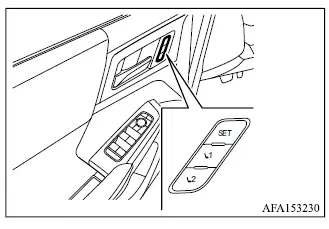
Memory storage function
Two separate driving positions for the driver's seat and, on applicable models, the door mirrors can be stored in the personal memory system.
Use the following procedure to save a preferred driving position in the Mitsubishi Outlander memory system.
Some models are not equipped with a memory function for the door mirrors.
1. Adjust the driver's seat and door mirrors to the desired positions using the individual adjustment switches.
2. Press the SET switch and, within 5 seconds, press memory switch 1 or 2.
3. The indicator light for the selected memory switch will illuminate and remain on for approximately 5 seconds.
4. A chime will sound to confirm that the driving position has been stored successfully.
NOTE
- If a new position is stored using a memory switch that already contains a saved setting, the previous position will be overwritten by the newly stored position.
Confirming memory storage
Press the SET switch to check whether a driving position has been stored. If no position is stored in memory switch 1 or 2, the indicator light for that switch will illuminate for approximately 0.5 seconds. If a position has already been stored, the corresponding indicator light will remain illuminated for approximately 5 seconds.
Recalling switch memory positions
To recall a manually stored driving position, press memory switch 1 or 2. The driver's seat and, on equipped Mitsubishi Outlander models, the door mirrors will automatically move to the positions stored under the selected memory switch.
Linking log-in function to a stored memory position (models with navigation system)
On models equipped with the navigation system, the user log-in function can be linked to a stored driving position using the following procedure.
1. While carrying the transmitter registered to the vehicle for the log-in function, place the ignition switch in the ON position.
NOTE
- Keep other registered transmitters sufficiently far away during this procedure. If multiple transmitters are nearby, the Mitsubishi Outlander may detect the wrong transmitter.
2. Adjust the driver's seat and door mirrors to the desired positions.
3. Place the ignition switch in the OFF position.
The next time you log in by selecting the corresponding user on the display after placing the ignition switch in the ON position while carrying the registered transmitter, the system will automatically adjust the driver's seat and door mirrors to the memorized driving position.
Linking a transmitter to a stored memory position (models without navigation system)
On models without the navigation system, each transmitter can be linked to a stored memory position assigned to memory switch 1 or 2 using the procedure below.
1. Complete steps 1 through 3 in the "Memory storage function" procedure to save the desired driving position.
2. After the indicator light for the selected memory switch illuminates, and while it remains on during the approximately 5-second period, press the
 button
and then the
button
and then the
 button on the transmitter in succession. The indicator light for the linked memory switch will blink. When the indicator light turns off, the transmitter has been linked to that memory setting.
Once the transmitter is linked, placing the ignition switch in the OFF position and pressing the
 button on the transmitter will cause the driver's seat and door mirrors to move to the position stored under the linked memory switch.
NOTE
- If a new driving position is stored in a memory switch that is already linked to a transmitter, the transmitter will automatically become associated with the new position and the previous stored position will be replaced.
Entry/Exit function
The entry/exit function is designed to make it easier for the driver to enter and leave the Mitsubishi Outlander. When the shift lever is in the P (Park) position, the driver's seat can automatically move according to the conditions described below.
The driver's seat will slide backward:
- When the driver's door is opened while the ignition switch is in the OFF position.
- When the ignition switch is changed from ON to OFF while the driver's door is open.
The driver's seat will return to its previous driving position:
- When the ignition switch is placed in the ON position while the shift lever is in the P (Park) position.
The entry/exit function can be disabled through "Vehicle Settings" in the multi-information display by changing the following setting:
- Switch "Exit Seat Slide" from ON to OFF.
System operation
The driver memory settings system will not operate, or operation will stop, under any of the following conditions:
- When the vehicle is moving. The driver's seat return function can operate if vehicle speed is below 2 MPH (3 km/h).
- When any memory switch is pressed while the driver memory settings system is operating.
- When a driver's seat adjustment switch is operated while the memory system is moving the seat.
- When the driver's seat has already reached the memorized position.
- When no seat position has been stored in the selected memory switch.
- When the shift lever is moved from P (Park) to any other position.
