
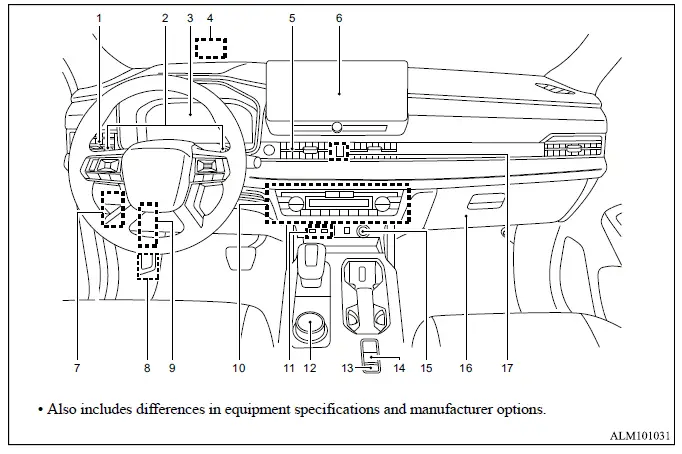
This illustrated overview identifies the principal controls, displays, storage areas and convenience features arranged across the Mitsubishi Outlander instrument panel. The numbered references make it easier to locate frequently used equipment and connect each component with the corresponding operating instructions.
- Side ventilator for directing airflow toward the driver or front passenger.
- Steering wheel paddle shifter for manual selection of simulated transmission ranges when the function is available.
- Meters, gauges and clock used to present essential driving and vehicle information.
- Head-Up Display [HUD], which presents selected information within the driver's forward field of view.
- Center ventilator for distributing conditioned air through the middle of the instrument panel.
- Audio system* or navigation system*:
- Rearview camera display for viewing the area behind the Mitsubishi Outlander.
- Multi Around Monitor for displaying available views around the vehicle.
- Bluetooth Hands-Free Phone System* for supported phone functions.
- Fuse box cover, providing access to the related interior electrical fuses.
- Hood release handle used to unlock the hood from inside the vehicle.
- Steering wheel lock lever for adjusting and securing the steering wheel position.
- Heater and air conditioner controls:
- Defogger switch for clearing moisture from the windows.
- Windshield deicer switch, where equipped.
- Heated seat switch for the applicable seating positions.
- Ventilated front seat switch, where equipped.
- Heated steering wheel switch, where equipped.
- USB (Universal Serial Bus) input terminal* for connecting compatible devices.
- Drive mode selector for choosing an available driving mode:
- Hill Descent Control switch for activating the related downhill assistance function.
- Brake Auto Hold switch for controlling the automatic brake-holding function.
- Parking brake switch for operating the electric parking brake.
- Power outlet for compatible electrical accessories.
- Glove box for storing documents and small personal items.
- Hazard warning flasher switch for activating all turn signal lights simultaneously.
*: Refer to the separate Smartphone-link Display Audio [SDA] Owner's Manual for detailed information about the audio, navigation, USB and Bluetooth-related functions.
