
Power windows
WARNING
- Make sure all passengers keep their hands, arms, and other body parts inside the vehicle while driving and before any window is closed.
Use the window lock switch when necessary to prevent passengers from operating the power windows unexpectedly.
- To reduce the risk of serious injury or death caused by unintended operation of the vehicle or its systems, including entrapment in a closing window or accidental door locking, never leave children, people who require assistance, or pets unattended inside the Mitsubishi Outlander. Interior temperatures in a closed vehicle can rise rapidly in warm weather and may become dangerous or life-threatening within a short period of time.
NOTE
- If a power window does not close completely while the vehicle is being driven, reduce vehicle speed, then open and close the window again.
- If noticeable wind buffeting, pulsing, or excessive noise occurs while only one window is open, slightly open the opposite-side window or the sunroof, if so equipped, to help reduce the pressure difference inside the cabin.
The power windows can be operated while the ignition switch is in the ON position. They also remain available for approximately 45 seconds after the ignition switch is placed in the OFF position. If either the driver's door or front passenger's door is opened during this approximately 45-second period, power window operation is canceled.
Main power window switch (driver's side)
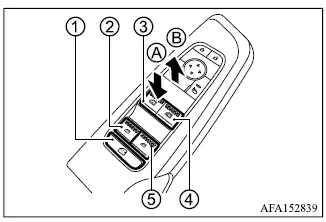
- Window lock button
- Rear left passenger side window
- Driver side window
- Front passenger side window
- Rear right passenger side window
To open a window, push the corresponding switch downward in direction A and hold it. To close the window, pull the switch upward in direction B and hold it. The main power window switch on the driver's door allows the driver to open or close all of the Mitsubishi Outlander power windows individually.
Locking passengers' windows
When window lock button 1 is pressed, operation of the passenger windows is disabled and only the driver's window can be opened or closed. Press the window lock button again to restore normal passenger window operation.
Passenger side power window switch
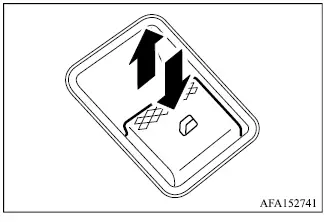
Each passenger-side power window switch operates only the window for the corresponding seating position. To open the window, press and hold the switch downward. To close it, pull and hold the switch upward until the desired position is reached.
Automatic operation (if so equipped)
Example
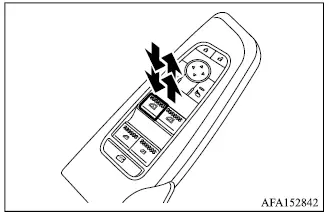
The automatic operation is available on any power window switch that has an
 mark on its surface.
To open or close the window fully using the automatic function, press the switch completely downward or pull it fully upward, then release it. The switch does not need to be held while the window travels to its fully open or fully closed position. To stop the window before it reaches the end of its travel, briefly operate the switch in the opposite direction.
For manual control, lightly press or pull the switch and hold it. The window will continue moving only while the switch remains operated and will stop when the switch is released.
Auto-reverse function (if so equipped)
WARNING
- There is a small area immediately before the window reaches the fully closed position where an obstruction may not be detected by the auto-reverse system. Before closing any window, make sure all passengers have their hands, fingers, and other body parts safely inside the Mitsubishi Outlander.
If the power window control unit detects an object caught in the window while it is closing, the window will immediately reverse direction and lower to help release the obstruction.
The auto-reverse function is available when a window is being closed using automatic operation while the ignition switch is in the ON position. It can also operate for approximately 45 seconds after the ignition switch has been placed in the OFF position, provided power window operation remains available.
Depending on road, weather, or other operating conditions, the auto-reverse function may occasionally activate even when nothing is trapped in the window. A sudden impact or load on the glass similar to the resistance caused by an obstruction can cause the system to reverse the window.
If the windows do not close automatically (if so equipped)
If the automatic closing function of a Mitsubishi Outlander power window does not operate correctly, initialize the power window system using the following procedure.
1. Start the engine.
2. Close the door.
3. With the engine running, operate the power window switch to open the affected window completely.
4. Pull the power window switch upward and hold it until the window closes completely. After the window reaches the fully closed position, continue holding the switch for more than 3 seconds.
5. Release the power window switch. Then operate the window using the automatic function to confirm that initialization has been completed successfully.
WARNING
- When the auto-reverse function has been canceled or is not operating, the window will not automatically reverse even if the control unit detects an obstruction. Before closing the windows, always make sure that all passengers have their hands, fingers, and other body parts safely clear of the window openings.
If the power window automatic function still does not operate correctly after completing the initialization procedure above, it is recommended that you have the Mitsubishi Outlander inspected by an authorized Mitsubishi Motors dealer.
