
On models equipped with the full-screen display, the meter layout can be changed to enlarge the multi-information display area and provide more space for selected driving information.

How to use the multi-information display
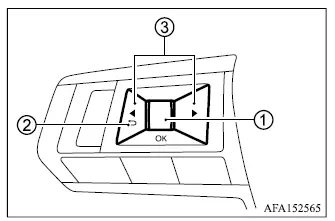
Mitsubishi Outlander steering wheel controls for the full-screen multi-information display

The multi-information display is operated using scroll dial 1 and the steering wheel buttons Mitsubishi Outlander multi-information display back button symbol 2, and Mitsubishi Outlander multi-information display screen change button symbol 3.

  1. Scroll dial - rotate the dial to move through menus and available items, then press it to confirm a selection or change the highlighted setting in the multi-information display.
  2. Mitsubishi Outlander previous menu button symbol - return to the previous menu or display level.
  3. Mitsubishi Outlander display screen selection button symbol - move from one main information screen to the next, such as trip data or fuel economy.

Startup display

When the ignition switch is placed in the ON position, the multi-information display may provide access to the following screens, depending on the equipment installed in the Mitsubishi Outlander:

  • Home
  • Drive Computer - Average Speed, Trip Distance and Time, and Fuel Economy
  • Compass or Navigation
  • Audio
  • MI-PILOT Assist
  • Driving Aids
  • Tire Pressures
  • S-AWC
  • Warning
  • Settings

Warning screens appear only when the vehicle has an active condition or message that requires the driver's attention.

    READ NEXT:

     Personal Display (model with full-screen display)

    Example The Personal Display area A can show several types of driving and vehicle information. To choose the item displayed in this area: 1. Press control switch 1 on the left side of the st

     Multi-information display warnings and indicators

    NOTE The warning messages and indicators shown in the multi-information display may vary depending on the Mitsubishi Outlander's specifications, installed equipment, and vehicle configur

     Trip computer

    The trip computer controls are located on the left side of the steering wheel, allowing the driver to move through the available information screens and adjust selected display functions witho

    SEE MORE:

     LDP system limitations

    WARNING The following limitations apply to the Lane Departure Prevention [LDP] system. Failure to understand these limitations or to follow the instructions for proper use of the system could result in serious injury or death. The LDP system may activate if the driver changes lanes without fir

     How to park with predictive course lines

    WARNING If tires of a different size are installed, the predictive course lines may no longer correspond accurately to the actual path of the vehicle. On snow-covered, icy, or otherwise slippery roads, the actual path of the Mitsubishi Outlander may differ from the predictive course lines show