
NOTE
- The warning messages and indicators shown in the multi-information display may vary depending on the Mitsubishi Outlander's specifications, installed equipment, and vehicle configuration.
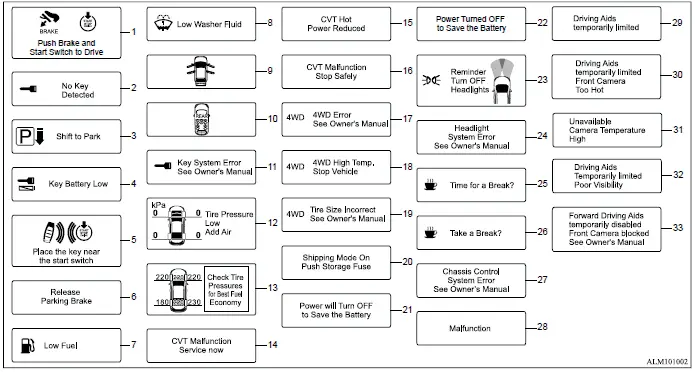
1. Engine start operation indicator
This indicator appears when the shift lever is in the P (Park) position and the vehicle is ready for the engine-start operation.
The indicator shows that the engine can be started by pushing the ignition switch while depressing the brake pedal. The engine can be started directly regardless of the current ignition switch position when the required starting conditions are met.
2. No Key Detected warning
This warning appears when the door is closed while the ignition switch is in the ON position and the transmitter is detected outside the vehicle.
If the "No Key Detected" warning appears in the Mitsubishi Outlander multi-information display, make sure the transmitter has been brought inside the vehicle before continuing.
3. Shift to Park warning
This warning appears when a door is opened while the shift lever is in a position other than P (Park). It alerts the driver that the vehicle has not been placed in the proper parking position.
If this warning appears, push the park button to shift the transmission into the P (Park) position, or place the ignition switch in the ON position as required.
An interior warning chime will also sound together with the displayed warning.
4. Key Battery Low warning
This warning appears when the battery inside the transmitter is becoming depleted and may no longer provide reliable operation.
If the warning is displayed, replace the transmitter battery with a new battery.
5. Place the key near the start switch indicator
This indicator may appear when the transmitter battery is low or when normal communication between the transmitter and the vehicle cannot be established.
If the indicator appears, depress the brake pedal and touch the ignition switch with the transmitter. This allows the Mitsubishi Outlander to recognize the transmitter when normal wireless communication is unavailable.
6. Release Parking Brake warning
This warning appears when the accelerator pedal is depressed but the electric parking brake automatic release function cannot operate. If the warning is displayed, release the electric parking brake manually before attempting to drive.
7. Low Fuel warning
This warning appears when the amount of fuel remaining in the fuel tank becomes low. Refuel the vehicle as soon as reasonably convenient and, whenever possible, before the fuel gauge reaches 0 (Empty). A small reserve of fuel remains in the tank when the gauge reaches the 0 (Empty) indication.
8. Low Washer Fluid warning
This warning appears when the window washer fluid level becomes low. Add an appropriate amount of washer fluid as necessary so the windshield washer system remains available for use.
9. Door/liftgate open warning
This warning appears when one or more doors and/or the liftgate are open or have not been closed securely. The vehicle graphic in the multi-information display identifies the corresponding open door or liftgate, allowing the driver to determine which opening requires attention.
10. Rear seat belt warning
The rear seat belt warning is displayed in the multi-information display for approximately 75 seconds when the ignition is switched ON while one or more rear seat belts are unfastened.
The driver can acknowledge the warning display by pushing the scroll dial located on the left side of the steering wheel.
The warning will also appear if any rear seat belt changes from the fastened condition to the unfastened condition during the journey. The display remains active until the number of fastened rear seat belts again matches the highest number of fastened rear seat belts detected during that journey, or until the driver acknowledges the message by pushing the scroll dial on the left side of the steering wheel.
The journey status used by the rear seat belt monitoring function is reset when either rear door is opened while the vehicle is stationary.
If the vehicle speed exceeds 9 MPH (15 km/h) while the number of fastened rear seat belts remains lower than the maximum number detected during the current journey, the rear seat belt warning will appear again in the Mitsubishi Outlander multi-information display.
The warning display cannot be acknowledged while the seat belt reminder chime is sounding.
A red seat symbol marked with an "X" indicates that the seat belt for the corresponding rear seating position is unfastened.
Green Seat with tick symbol: A green seat symbol with a check mark indicates that the seat belt for the corresponding rear seating position is properly fastened.
NOTE
The rear seat belt warning may be displayed even when no passenger is occupying the rear seats.
11. Key System Error: See Owner's Manual warning
This warning appears when the Mitsubishi Outlander detects a malfunction in the transmitter or the associated key system.
If this warning appears while the engine is stopped, the engine may not be able to start. If the warning appears while the engine is already running, the vehicle can still be driven. However, the key system should be inspected and repaired as soon as possible. It is recommended that you contact an authorized Mitsubishi Motors dealer for diagnosis and service.
12. Tire Pressure Low - Add Air warning
This warning appears when the low tire pressure warning light in the meter illuminates and the system detects insufficient tire pressure. As long as the low tire pressure warning light remains illuminated, the warning will appear each time the ignition switch is placed in the ON position.
If this warning appears, stop the vehicle in a safe location and check the tire pressures. Adjust the affected tire or tires to the recommended COLD tire pressure specified on the Tire and Loading Information placard.
13. Check Tire Pressures for Best Fuel Economy indicator
This message appears when tire pressure is relatively low or high and falls outside the range considered appropriate for optimum fuel economy. Check the pressure of the tires and adjust them to the designated cold tire pressure specified for the Mitsubishi Outlander.
14. CVT Malfunction Service now warning
This warning illuminates when the vehicle detects a problem with the CVT system. If the warning appears, the transmission system should be checked as soon as possible. It is recommended that you have the Mitsubishi Outlander inspected by an authorized Mitsubishi Motors dealer.
15. CVT Hot Power Reduced warning
The transmission incorporates a high fluid temperature protection mode. If the CVT fluid temperature becomes excessively high, such as when climbing steep grades in high ambient temperatures while carrying a heavy load or towing a trailer, engine power may be reduced automatically. Under some operating conditions, vehicle speed may also be limited to help reduce the possibility of transmission damage.
The driver can continue to control vehicle speed with the accelerator pedal, but available engine output and vehicle speed may be reduced while the protection function is active.
16. CVT Malfunction: Stop Safely warning
This warning appears when a malfunction is detected in the CVT system that requires the vehicle to be stopped. If the warning is displayed, move the vehicle off the road to a safe location and stop the engine immediately. It is recommended that you contact an authorized Mitsubishi Motors dealer for assistance and inspection.
17. 4WD Error: See Owner's Manual warning
This warning appears when the All-Wheel Control (AWC) system is not operating properly while the engine is running. If the warning appears, reduce vehicle speed and have the AWC system checked. It is recommended that the Mitsubishi Outlander be inspected by an authorized Mitsubishi Motors dealer.
18. 4WD High Temp. Stop Vehicle warning
This warning appears when the temperature of the oil in powertrain components increases because of a large difference in rotational speed between the front and rear wheels. This condition can occur when substantial wheel slip develops, such as while driving on rough surfaces, through sand or mud, or when attempting to free a stuck vehicle.
If this warning is displayed, stop the vehicle as soon as it is safe to do so and leave the engine idling. To protect the powertrain components, the AWC system may temporarily switch to FWD operation. When the warning disappears, AWC driving can be resumed.
The warning may also appear when there is a significant difference in the overall diameter of the front and rear wheels or tires. If this occurs, pull off the road in a safe location and leave the engine idling. Check that all tires are the same size and have matching brand, construction, and tread pattern. Also verify that tire pressures are correct and that none of the tires are excessively worn. If a problem is found, replace the affected tires as necessary or adjust them to the correct tire pressure.
While this warning is present, do not select the GRAVEL, SNOW, or MUD mode on AWC-equipped models using the drive mode selector, and avoid driving at high speed.
20. Shipping Mode On Push Storage Fuse warning
This warning may appear when the extended storage fuse switch has not been pushed in, meaning it remains switched off. If the warning is displayed, push the extended storage fuse switch in to switch it on. The warning should then turn off.
21. Power will Turn OFF to Save the Battery warning
This warning appears after the ignition switch has remained in the ON position for a certain period of time. It indicates that vehicle power will be turned off automatically to help reduce unnecessary battery discharge.
22. Power Turned OFF to Save the Battery warning
This warning appears after the ignition switch has been turned OFF automatically by the Mitsubishi Outlander battery-saving function. It confirms that vehicle power was shut down to help preserve the battery charge.
23. Reminder: Turn OFF Headlights warning
This warning appears when the driver's door is opened while the headlight switch remains in the ON position and the ignition switch is in the OFF or LOCK position. To clear the condition and avoid leaving the exterior lights on unnecessarily, place the headlight switch in the OFF or AUTO position, if the vehicle is equipped with the AUTO setting.
24. Headlight System Error: See Owner's Manual warning
This warning appears when a malfunction is detected in the LED headlight system. If the warning remains displayed, have the lighting system inspected. It is recommended that the Mitsubishi Outlander be checked by an authorized Mitsubishi Motors dealer for diagnosis and service.
25. Time for a Break? indicator
This indicator appears when the preset "Time for a Break?" reminder reaches the selected interval. The reminder time can be set for a period of up to 6 hours, allowing the driver to receive a scheduled prompt during longer journeys.
26. Take a Break? indicator
This indicator appears when the Driver Attention Alert [DAA] system determines that signs of driver fatigue may be present or that the driver's level of attention is decreasing. When displayed, it serves as a prompt to consider taking a break from driving.
27. Chassis Control System Error: See Owner's Manual warning
This warning appears when the chassis control module detects an error within the chassis control system. If the warning is displayed, the system should be inspected. It is recommended that you have the Mitsubishi Outlander checked by an authorized Mitsubishi Motors dealer.
28. Malfunction warning
This warning appears when a malfunction is detected in one or more of the following driver assistance systems, provided the Mitsubishi Outlander is equipped with the corresponding feature:
- Lane Departure Warning [LDW]
- Lane Departure Prevention [LDP]
- Active Blind Spot Assist [ABSA]
- Blind Spot Warning [BSW]
- Rear Cross Traffic Alert [RCTA]
- Traffic Sign Recognition [TSR]
- Forward Collision Mitigation System [FCM]
- Predictive Forward Collision Warning [PFCW]
- Driver Attention Alert [DAA]
- Rear Automatic Emergency Braking [Rear AEB]
29. Driving Aids temporarily limited warning
This warning may appear when operation of the Forward Collision Mitigation System [FCM] and Predictive Forward Collision Warning [PFCW] is temporarily limited under certain conditions.
For the Forward Collision Mitigation System [FCM] and Predictive Forward Collision Warning [PFCW], the warning may be displayed in the following situations:
- When the system check for the warning function does not complete normally
- When the vehicle is being towed
30. Driving Aids temporarily limited Front Camera Too Hot warning
This warning appears when the temperature inside the vehicle becomes high enough that the sensor used by the following systems, if equipped, can no longer operate reliably:
- Forward Collision Mitigation System [FCM]
- Predictive Forward Collision Warning [PFCW]
After the interior temperature returns to a normal operating range, the warning should disappear and normal system availability should be restored.
If the warning continues to appear after the vehicle interior has cooled, have the applicable system inspected. It is recommended that you visit an authorized Mitsubishi Motors dealer for service.
This warning is associated with the ON/OFF status and operation of the FCM function.
31. Unavailable Camera Temperature High warning
This warning appears when the temperature inside the vehicle becomes high enough that the camera sensor used by the Active Blind Spot Assist [ABSA], Lane Departure Warning [LDW], Lane Departure Prevention [LDP] (if so equipped), or Traffic Sign Recognition [TSR] (if so equipped) can no longer provide reliable operation. Once the interior temperature of the Mitsubishi Outlander returns to a normal range, the warning should disappear and the affected functions can resume normal operation.
If the warning remains displayed, have the affected system inspected. It is recommended that you visit an authorized Mitsubishi Motors dealer for diagnosis and service.
32. Driving Aids Temporarily limited Poor Visibility warning
This warning appears when the Forward Collision Mitigation System [FCM] and Predictive Forward Collision Warning [PFCW] are active but the front camera is affected by intense light. This can occur when strong sunlight or high beams from an oncoming vehicle enter the camera's field of view and temporarily reduce its ability to operate reliably.
This warning is linked to the ON/OFF function of the FCM and may disappear once normal camera visibility is restored.
33. Forward Driving Aids temporarily disabled Front Camera blocked: See Owner's Manual warning
This warning appears when the Forward Collision Mitigation System [FCM] and Predictive Forward Collision Warning [PFCW] are automatically turned off because the front camera cannot obtain a clear view through the windshield. This may occur under the following conditions:
- The windshield area in front of the camera is covered by moisture, snow, ice, dirt, or another object that obstructs the camera's view.
- The windshield area used by the camera remains continuously covered with dirt or other material that prevents normal camera operation.
If this warning appears, clean the windshield glass in the camera area. Use the windshield wipers and defroster as necessary to remove moisture, snow, ice, or other material that may be blocking the camera's view.
This warning is linked to the ON/OFF function of the FCM and reflects the temporary availability of the forward camera-based driver assistance functions.
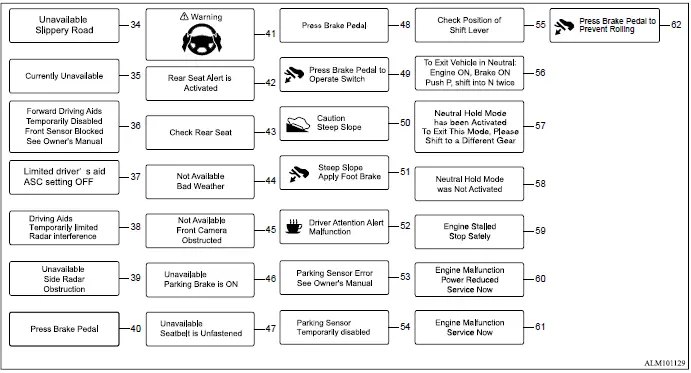
34. Unavailable Slippery Road
This message appears when the Active Blind Spot Assist [ABSA], Lane Departure Prevention [LDP], or Adaptive Cruise Control [ACC] system becomes temporarily unavailable because slippery road conditions have been detected. The affected driver assistance functions may remain unavailable until conditions allow normal system operation.
35. Currently Unavailable warning
This message appears when the Active Blind Spot Assist [ABSA], Lane Departure Prevention [LDP], or Adaptive Cruise Control [ACC] system becomes unavailable because the Active Stability Control [ASC] system has been turned off, or because SNOW mode, GRAVEL mode, or MUD mode has been selected on an AWC-equipped Mitsubishi Outlander.
36. Limited driver's aid ASC setting OFF warning
This warning appears when the Active Stability Control [ASC] system is switched off while the following driver assistance system is active. Turning ASC off may limit the availability or operation of the associated driver assistance function:
- Forward Collision Mitigation System [FCM]
37. Forward Driving Aids Temporarily Disabled Front Sensor Blocked: See Owner's Manual warning
If the front radar sensor area becomes covered with dirt or otherwise obstructed, the sensor may no longer be able to detect a vehicle ahead correctly. When this occurs, the Forward Collision Mitigation System [FCM], Predictive Forward Collision Warning [PFCW], Adaptive Cruise Control [ACC], or MI-PILOT Assist system, if equipped, may be turned off automatically. A corresponding warning message will then appear in the Mitsubishi Outlander multi-information display. If the warning appears, move the vehicle to a safe location and turn the engine off.
Inspect the front radar sensor area for dirt, snow, debris, or another obstruction. If anything is blocking the radar sensor area, carefully remove the material so the sensor has an unobstructed view.
Restart the engine after the sensor area has been checked and cleared. If the warning message continues to appear, have the Forward Collision Mitigation System [FCM], Predictive Forward Collision Warning [PFCW], Adaptive Cruise Control [ACC], or MI-PILOT Assist system inspected. It is recommended that you visit an authorized Mitsubishi Motors dealer for this service.
38. Driving Aids Temporarily limited Radar interference warning
This warning appears when the front radar sensor used by the Forward Collision Mitigation System [FCM] and Predictive Forward Collision Warning [PFCW] detects interference from another radar source. The interference can temporarily limit the ability of the affected systems to operate normally.
39. Unavailable Side Radar Obstruction warning
This warning appears when the Blind Spot Warning [BSW], Active Blind Spot Assist [ABSA], or Rear Cross Traffic Alert [RCTA] system becomes temporarily unavailable because an obstruction has been detected in the side radar sensing area. The affected function may remain unavailable while the radar blockage is present.
40. Press Brake Pedal warning
This indicator appears when operation of the electric parking brake requires the brake pedal to be depressed, or when additional driver input is needed to help prevent unintended vehicle movement. It may be displayed in the following situations:
- The driver attempts to release the electric parking brake manually without first depressing the brake pedal.
- The Mitsubishi Outlander is stopped on a steep incline and there is a possibility that the vehicle could move backward, even while the electric parking brake is applied.
41. Lane Keep Assist [LKA] alert
This message may appear while the Lane Keep Assist [LKA] system is engaged and the system determines that the driver is not providing sufficient steering input.
It is displayed under the following condition:
When the driver is not holding the steering wheel or when no steering wheel operation is detected.
Take hold of the steering wheel immediately and resume normal steering input.
Once steering operation is detected again, the warning disappears and the Lane Keep Assist [LKA] function is automatically restored.
42. Rear Seat Alert is Activated
When the Rear Seat Alert system is enabled, this message appears while the feature is active and can remind the driver to check the rear seating area of the Mitsubishi Outlander.
- Using the steering switch, the driver can select "Dismiss Message" to temporarily clear the message from the display. If no selection is made, the message will automatically disappear after a period of time.
- Using the steering switch, the driver can select "Disable Alert" to turn off the audible horn alert for the remainder of the current trip.
WARNING
- Selecting "Dismiss Message" while stopped during a trip only dismisses the message for that particular stop and does not deactivate the Rear Seat Alert system. The system can provide another alert at a later stop during the same trip. Selecting "Disable Alert" disables the Rear Seat Alert function for the remainder of the current trip, and no audible alert will be provided during that period.
NOTE
- The Rear Seat Alert system remains disabled until the driver enables it through the multi-information display.
43. Check Rear Seat
When the Rear Seat Alert system is enabled, this message appears after the Mitsubishi Outlander comes to a complete stop, the shift lever is moved from D (Drive) to P (Park), and the driver exits the vehicle. After the audible alert has been provided, the message reminds the driver to check the rear seating area for passengers or items that may have been left behind.
NOTE
- This system remains disabled until the driver activates it through the multi-information display.
44. Not Available Bad Weather
This message may appear while the Lane Keep Assist [LKA] system is engaged and weather or road conditions prevent the system from reliably detecting the lane boundaries.
Under the following conditions, the Lane Keep Assist [LKA] system is automatically canceled:
- When the windshield wipers are operating at the HI setting.
- When lane markers cannot be detected correctly for a period of time because of conditions such as snow ruts, reflections from a wet road surface, or multiple unclear or difficult-to-distinguish lane markings.
To use the Lane Keep Assist [LKA] system again, cancel the MI-PILOT Assist system and reactivate it after road and visibility conditions improve and the lane markers can be clearly detected.
45. Not Available Front Camera Obstructed
This message may appear while the Adaptive Cruise Control [ACC] system is engaged and the front camera cannot obtain a sufficiently clear view of the road ahead.
Under the following conditions, the ACC system is automatically canceled:
- The windshield area in front of the camera is fogged or covered with dirt, water droplets, ice, snow, or other material that interferes with camera visibility.
- Strong light, such as direct sunlight or high beams from an oncoming vehicle, enters the front camera and temporarily affects its ability to operate reliably.
46. Unavailable Parking Brake is ON
This message may appear while the Adaptive Cruise Control [ACC] system is engaged.
Under the following condition, the ACC system is automatically canceled:
- The electric parking brake is applied.
The Adaptive Cruise Control [ACC] system cannot be used while the electric parking brake is activated. Release the parking brake before attempting to use ACC again.
47. Unavailable Seatbelt is Unfastened
This message may appear while the Adaptive Cruise Control [ACC] system is engaged.
Under the following condition, the ACC system is automatically canceled:
- When the driver's seat belt is not fastened.
The Adaptive Cruise Control [ACC] system cannot be used while the driver's seat belt is unfastened. Fasten the driver's seat belt before attempting to reactivate ACC in the Mitsubishi Outlander.
48. Press Brake Pedal
This message may appear while the Adaptive Cruise Control [ACC] system is engaged and the vehicle is being held at a stop.
It will be displayed under the following condition:
- While the vehicle is stopped by the ACC system, the driver's door is opened and the electric parking brake has not been activated.
Depress the brake pedal immediately to keep the Mitsubishi Outlander securely stopped.
49. Press Brake Pedal to Operate Switch warning
This warning appears if the Brake Auto Hold switch is pushed without depressing the brake pedal while the Brake Auto Hold function is active. To deactivate Brake Auto Hold, depress the brake pedal first and then push the Brake Auto Hold switch.
50. Caution Steep Slope indicator
This indicator appears when the Brake Auto Hold function is active while the vehicle is stopped on a steep slope. It alerts the driver that the vehicle is positioned on a significant incline while the automatic brake-holding function is operating.
51. Steep Slope Apply Foot Brake warning
This warning appears on a steep slope before the electric parking brake is applied and before the braking force provided by the Brake Auto Hold function is released. Depress the brake pedal as instructed to help prevent the vehicle from rolling.
52. Driver Attention Alert Malfunction warning
This warning appears when a malfunction is detected in the Driver Attention Alert [DAA] system. When the warning is displayed, the system may not be able to provide its normal driver-attention monitoring function.
53. Parking Sensor Error: See Owner's Manual warning
This warning illuminates when the Mitsubishi Outlander detects a malfunction in the parking sensor system. The parking assistance function should be checked if the warning remains displayed.
54. Parking Sensor Temporarily disabled
This warning illuminates when the parking sensor system becomes temporarily unavailable because an abnormal sensor condition has been detected. Normal operation may remain unavailable while the condition affecting the sensor is present.
55. Check Position of Shift Lever
This warning appears when the system cannot correctly detect the selected shift position. Make sure the shift lever is placed properly in the intended position. If the warning remains displayed, have the system inspected. It is recommended that you contact an authorized Mitsubishi Motors dealer for service.
56. Neutral hold mode guidance indicator
This indicator appears when the ignition switch is placed in the "OFF" position while the shift lever remains in the "N" (Neutral) position and Neutral hold mode is available. It provides guidance that the Neutral hold function can be used under the current conditions.
57. Neutral hold mode activated indicator
This indicator appears when Neutral hold mode has been successfully activated. To exit Neutral hold mode, shift the vehicle from the "N" (Neutral) position to another available shift position.
58. Neutral Hold Mode was Not Activated indicator
This indicator appears when Neutral hold mode could not be activated. If this occurs, wait briefly without changing the shift position, then repeat the required operation to activate Neutral hold mode.
59. Engine Stalled Stop Safely warning
This warning appears when the engine stalls because a malfunction has been detected in the engine system. If the warning appears, move the Mitsubishi Outlander off the road and stop in a safe location as soon as possible. After the vehicle has been safely stopped, place the shift position in "P" and attempt to restart the engine. It is recommended that you have the vehicle inspected by an authorized Mitsubishi Motors dealer. If the engine cannot be restarted, contact an authorized Mitsubishi Motors dealer for assistance.
60. Engine Malfunction Power Reduced Service Now warning
This warning indicates that the engine has entered a fail-safe operating mode because a malfunction has been detected. Under certain conditions, engine output and vehicle speed may be reduced automatically. It is recommended that you have the Mitsubishi Outlander inspected by an authorized Mitsubishi Motors dealer as soon as possible.
61. Engine Malfunction Service Now warning
This warning illuminates when a problem is detected in the engine system. If the warning appears, have the engine system checked promptly. It is recommended that you visit an authorized Mitsubishi Motors dealer for diagnosis and service.
62. Press Brake Pedal to Prevent Rolling
This warning appears if the vehicle begins to move while the Brake Auto Hold function is active. Depress the brake pedal immediately to prevent the vehicle from rolling and to maintain control of the Mitsubishi Outlander.
