
Example
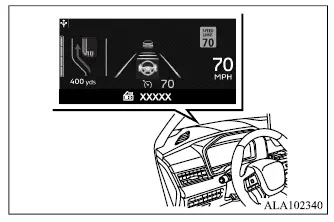
- XXXXX represents the name of the radio station currently selected by the audio system.
WARNING
- Failure to adjust the brightness and position of the projected image correctly may interfere with the driver's view through the windshield. Reduced forward visibility can contribute to an accident resulting in severe injury or death.
- Do not concentrate on the Head-Up Display [HUD] for extended periods while driving. Excessive attention to the display may prevent you from noticing other vehicles, pedestrians, or objects on the road and could lead to an accident resulting in severe injury or death.
- Do not place liquids on or near the HUD opening, and do not spray water or spill beverages into the opening or surrounding area.
If switches, wiring, or other electrical components become wet, they may malfunction or create a risk of vehicle fire.
If a beverage or other liquid is accidentally spilled near the HUD, wipe up as much of the liquid as possible and promptly consult an authorized Mitsubishi Motors dealer or a repair facility of your choice.
The Head-Up Display [HUD] projects selected vehicle information onto the windshield directly in front of the driver. Its position allows important driving information to be viewed without requiring the driver to look down at the instrument panel.
Depending on vehicle equipment and the functions currently in use, the Mitsubishi Outlander HUD can display one or more of the following types of information:
- Vehicle speed
- Navigation
- Driving Assist (if so equipped)
- Traffic Sign (if so equipped)
- Audio
- TEL/SMS
NOTE
- Do not touch any internal parts of the projector.
Touching internal projector components may cause the equipment to malfunction.
- To avoid scratching the projector glass, do not place sharp objects on or near the projector opening.
- Do not place objects on the instrument panel where they could obstruct or interfere with the projected HUD image.
- If polarized sunglasses are worn, the Head-Up Display image may become difficult to see.
- Visibility of the projected image may vary depending on weather and environmental conditions, including rain, snow, and strong sunlight.
How to use the HUD
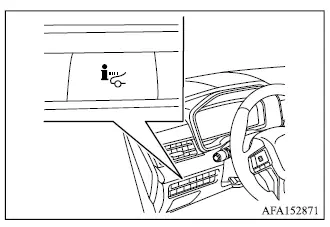
To turn the HUD system on, push the HUD switch located on the instrument panel to the left of the driver. Push the same switch again to turn the Head-Up Display off.
If the HUD system is switched off, it will remain off even after the vehicle is turned off and restarted.
The following Head-Up Display settings can be adjusted through the multi-information display:
- Brightness
- Height
- Rotation
- Displayed information
- Reset Settings
NOTE
Emergency information may still be displayed through the HUD even when the Head-Up Display system has been switched off.
This product incorporates the following categories of software:
(1) Software developed by Panasonic Corporation or developed for Panasonic Corporation
(2) Third-party software licensed to Panasonic Corporation
(3) Open source software
Regarding item (3), the product contains open source software (OSS), including various software components to which specific license information applies.
Refer to the applicable license information at: http://car.panasonic.jp/oss/j03llnna
Display brightness
The brightness of the Head-Up Display can be adjusted through the Mitsubishi Outlander multi-information display. In addition to the selected brightness setting, the HUD brightness is adjusted automatically in response to the level of exterior ambient light.
NOTE
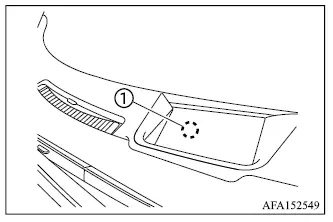
- The HUD incorporates a built-in sensor 1 that helps control the brightness of the projected image. If this sensor is covered by an object, the HUD may become darker and the displayed information may be difficult to see.
- Do not expose the HUD sensor to excessive light, as doing so could cause a failure or malfunction.
Driver assistance/Navigation/ Traffic Sign/Audio/TEL/SMS linking
The HUD can display linked driver assistance and navigation information when the Mitsubishi Outlander is equipped with the applicable systems. This allows selected warnings, route guidance, and other relevant information to appear directly in the driver's forward field of view.
The driver assistance linking display can show warning and operating information associated with the following systems when the vehicle is equipped with them:
- Forward Collision Mitigation System [FCM]
- Predictive Forward Collision Warning system
- Cruise control
- Adaptive Cruise Control [ACC]
- MI-PILOT Assist
- Lane Departure Warning [LDW] system
- Lane Departure Prevention
- Lane Keep Assist [LKA]
The Navigation System linking display can present the following route-guidance information:
- Intersection names
- Arrows indicating turning direction
- Distance to the next intersection
- Recommended lane indicator
For detailed information about operation of the navigation system and its available functions, refer to the separate Smartphone-link Display Audio [SDA] Owner's Manual.
The Traffic Signs Recognition System linking display can show the following information when the Mitsubishi Outlander is equipped with this feature:
- Speed limit sign
The Audio System linking display can show information about the currently selected audio source, including:
- Songs
- Radio stations
The TEL/SMS linking display can show information associated with incoming telephone communications, including:
- Caller's name or phone number
