
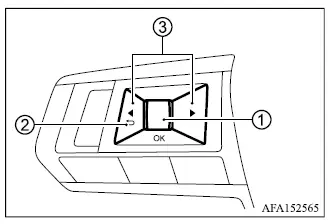
The trip computer controls are located on the left side of the steering wheel, allowing the driver to move through the available information screens and adjust selected display functions without taking attention away from the instrument panel.
- Scroll dial button - rotate or operate the control to navigate through the available items, then use it to change or select an item shown in the multi-information display.
-
 - returns to the previous menu or display level.
 -
 - switches from one information screen to the next, such as Home, Fuel economy, or S-AWC.
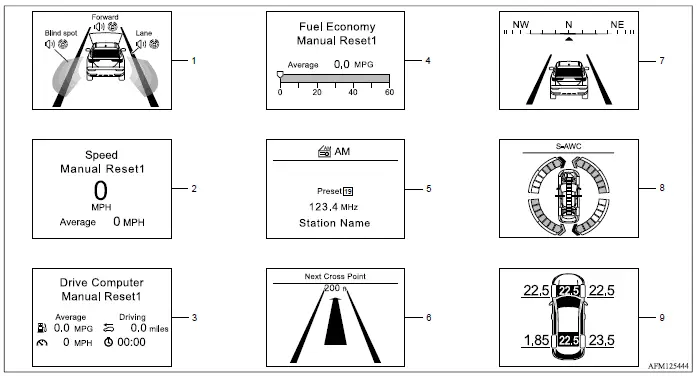
1. Driver assistance
The Driver Assistance mode shows the current operating status of supported driver assistance systems when the Mitsubishi Outlander is equipped with the corresponding features.
- Lane Departure Warning [LDW]
- Lane Departure Prevention [LDP]
- Blind Spot Warning [BSW]
- Active Blind Spot Assist [ABSA]
- Forward Collision Mitigation System [FCM]
- Predictive Forward Collision Warning [PFCW]
2. Speed and Average speed (model with type 1 display)
The Speed and Average Speed mode displays the current vehicle speed together with the average speed calculated since the most recent reset. This display provides three operating modes. Push the scroll dial to switch between Manual reset1, Manual reset2, and Auto Refuel.
Manual reset1 stores the calculated value until it is reset manually using the scroll dial.
Manual reset2 can be reset manually with the scroll dial and is also reset automatically each time the ignition is placed in the OFF position.
Auto Refuel is reset automatically whenever the vehicle is refueled.
3. Drive Computer
Average fuel consumption
The Average Fuel Consumption display shows the average amount of fuel consumed since the most recent reset, giving the driver a useful reference for overall fuel use during the selected measurement period.
Average speed
The Average Speed display shows the average vehicle speed calculated since the last reset.
Trip odometer
The Trip Odometer shows the total distance the Mitsubishi Outlander has traveled since the trip value was last reset.
Elapsed time
The Elapsed Time display shows the amount of time that has passed since the corresponding drive computer data was last reset.
The Drive Computer provides three reset modes. Push the scroll dial to switch between Manual reset1, Manual reset2, and Auto Refuel according to how you want the trip data to be tracked.
Manual reset1 retains its information until the driver manually resets it using the scroll dial.
Manual reset2 can be reset manually with the scroll dial and will also reset automatically whenever the ignition is placed in the OFF position.
Auto Refuel resets the corresponding drive computer information automatically each time the vehicle is refueled.
4. Fuel economy display
Current fuel consumption
The Fuel Economy display shows the vehicle's current fuel consumption, allowing the driver to observe changes in fuel use as driving conditions and vehicle operation vary.
Average fuel consumption
The Fuel Economy display also shows average fuel consumption calculated since the most recent reset.
The Fuel Economy display has three operating modes. Push the scroll dial to switch between Manual reset1, Manual reset2, and Auto Refuel.
Manual reset1 can only be reset manually using the scroll dial.
Manual reset2 can be reset manually using the scroll dial and is also reset automatically whenever the ignition is placed in the OFF position.
Auto Refuel resets the fuel economy data automatically whenever the Mitsubishi Outlander is refueled.
5. Audio
The Audio mode displays information about the current audio system status in the multi-information display.
6. Navigation (if so equipped)
When route guidance has been set in the navigation system, this display presents the relevant navigation route information in the multi-information display.
7. Compass (if so equipped)
The Compass display indicates the current heading direction of the vehicle.
8. S-AWC operation display (if so equipped)
When the S-AWC operation display is selected, the driver can view information showing the amount of yaw moment control and the strength of traction control being applied between the front and rear wheels. This provides a visual indication of S-AWC operation while driving.
9. Tire Pressures
The Tire Pressure mode displays the pressure of all four tires while the vehicle is being driven, allowing the driver to monitor the tire pressure information directly from the Mitsubishi Outlander multi-information display.
When the "Tire Pres ECO advice" function is turned ON and tire pressure becomes relatively low, the message "Check Tire Pressures for Best Fuel Economy" appears. If the "Tire Pressure Low - Add Air" warning is displayed, push the scroll dial 1 to switch directly to the Tire Pressure mode and view additional information related to the warning.
