
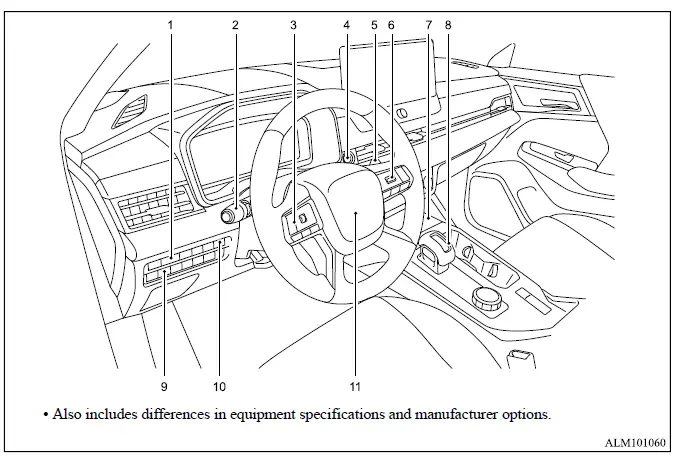
The Mitsubishi Outlander cockpit places the primary driving controls within easy reach of the driver. The illustration identifies the switches and systems used for lighting, visibility, infotainment, transmission operation, cruise functions and selected convenience features.
- Instrument brightness control for adjusting the illumination level of the meters and driver displays.
- Headlight and turn signal switch with integrated fog light switch functions.
- Steering wheel remote control switches on the left side:
- Audio controls for supported sound system functions.*
- Multi-information display controls for reviewing and selecting vehicle information.
- Push-button ignition switch used to start or stop the vehicle and select the applicable ignition mode.
- Wiper and washer switch for controlling the windshield and rear window wiping and washing functions.
- Steering wheel remote control switches on the right side:
- Cruise control functions.
- Adaptive Cruise Control [ACC].
- MI-PILOT Assist controls.
- Bluetooth Hands-Free Phone System controls.*
- Voice Recognition system switch.*
- Wireless charger for compatible mobile devices.
- Shift lever:
- Continuously Variable Transmission [CVT] selector operation.
- Head-Up Display [HUD] switch for controlling the available driver information display.
- Power remote liftgate switch for opening or closing the liftgate when the operating conditions are met.
- Steering wheel:
- Horn control.
*: Refer to the separate Smartphone-link Display Audio [SDA] Owner's Manual for detailed instructions covering the audio system, Bluetooth Hands-Free Phone System and Voice Recognition functions.
