
Model with Combination meter cluster / Multi-information display (Type 1)
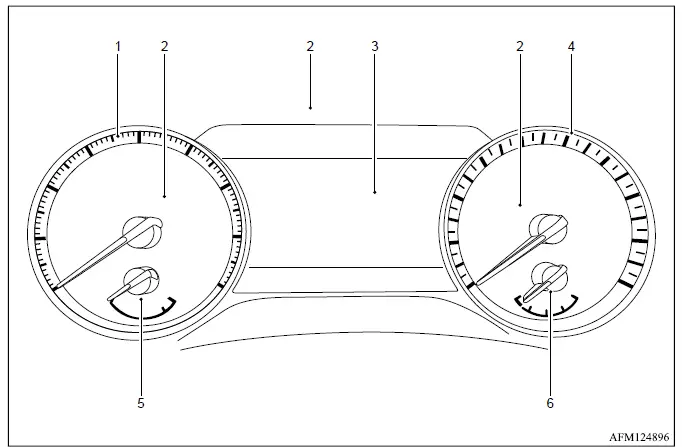
The Type 1 Mitsubishi Outlander instrument cluster combines conventional needle gauges with a central multi-information display, allowing the driver to monitor vehicle speed, engine operation, fuel level and essential status information at a glance.
- Tachometer showing the engine speed.
- Warning and indicator lights for monitored vehicle systems and operating conditions.
- Multi-information display
- Distance-to-empty estimate and odometer information.
- Speedometer displaying the current vehicle speed.
- Engine coolant temperature gauge.
- Fuel gauge showing the approximate amount of fuel remaining in the tank.
The needle indicators may move slightly after the ignition switch is placed in the OFF or LOCK position. This brief movement is a normal characteristic of the meter cluster and does not indicate a malfunction.
Model with full digital driver display (Type 2)
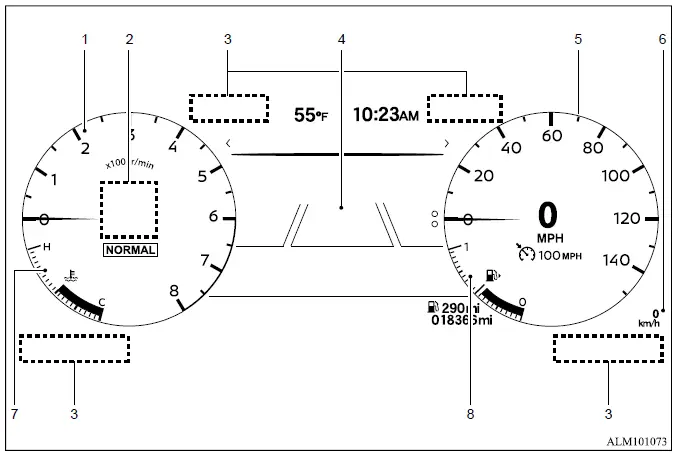
The Type 2 full digital driver display presents the primary driving information electronically and includes an additional personal display area that can be configured to show selected Mitsubishi Outlander data.
- Tachometer displaying engine speed.
- Personal display for selected vehicle and driving information.
- Warning and indicator lights.
- Multi-information display
- Distance-to-empty estimate and odometer information.
- Main speedometer.
- Secondary speedometer.
- Engine coolant temperature gauge.
- Fuel gauge.
CAUTION
- Clean the meter lens only with a soft cloth lightly dampened with water. Do not use a rough cloth, alcohol, benzine, paint thinner, solvents or paper towels containing chemical cleaning agents. These materials may scratch the lens, damage its surface or cause permanent discoloration.
- Do not spray water, cleaner or any other liquid directly onto the meter lens. Liquid entering the instrument cluster may damage electronic components and cause the display or related systems to malfunction.
Changing the meter screen view (model with type 2 display)
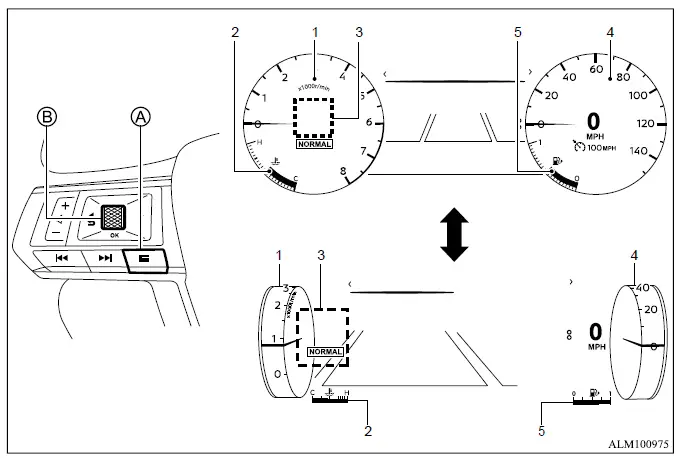
- Tachometer.
- Engine coolant temperature gauge.
- Personal Display.
- Speedometer.
- Fuel gauge.
On Mitsubishi Outlander models equipped with the full-screen Type 2 display, the meter layout can be changed to provide a larger multi-information display area. This allows more space for selected driving and vehicle-status information while retaining the essential gauges around the screen.
To change the meter screen view:
1. Press control switch A on the left side of the steering wheel.
2. The "Shortcut Menu" will appear in the multi-information display area.
3. Rotate scroll dial B to highlight "Change Meter View," and then press scroll dial B to confirm the selection.
Speedometer and odometer
Speedometer
Example
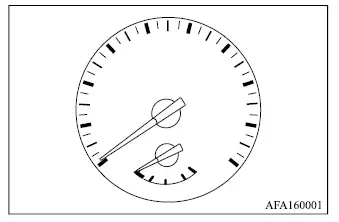
The speedometer indicates the current Mitsubishi Outlander vehicle speed in miles per hour (MPH), kilometers per hour (km/h), or both, depending on the meter configuration and selected display settings.
Secondary speedometer (models with type 2 meter)
The secondary speedometer provides an additional vehicle-speed reading in kilometers per hour (km/h) or miles per hour (MPH), allowing the alternate unit to remain visible when required.
Distance to empty (dte - km or mile)/Odometer
Example
Distance to empty (dte - km or mile)
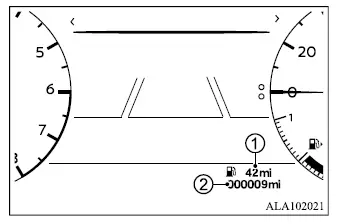
The distance-to-empty value (dte) 1 provides an estimated distance that the Mitsubishi Outlander can travel before refueling is required. The estimate is calculated continuously using the amount of fuel remaining in the tank together with the vehicle's actual recent fuel consumption.
The displayed estimate is updated approximately every 30 seconds to reflect changes in driving conditions and fuel use.
The dte mode includes a low-range warning function. When the remaining fuel level becomes low, a warning appears on the display to advise the driver that refueling will soon be necessary.
If the fuel level decreases further and the remaining driving range can no longer be calculated reliably, the dte display changes to "---".
- If only a small quantity of fuel is added, the display may continue to show the same value that appeared immediately before the ignition switch was placed in the OFF position. The estimate should update after the system detects a sufficient change in fuel level and driving conditions.
- When driving uphill, downhill or around curves, fuel may move inside the tank. This movement can temporarily affect the detected fuel level and cause the displayed distance-to-empty estimate to change momentarily.
Odometer
The odometer 2 appears in the multi-information display whenever the ignition switch is in the ON position.
It records and displays the total accumulated distance the Mitsubishi Outlander has travelled throughout its operating life.
Tachometer
Example
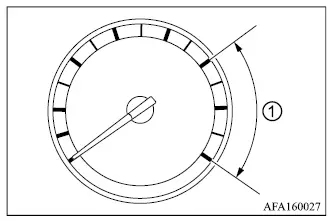
The tachometer shows engine speed in revolutions per minute (RPM), allowing the driver to monitor how quickly the engine is operating. Do not allow the indicator to enter the red zone 1, as this represents an excessively high engine speed.
CAUTION
- When the engine speed approaches the red zone, reduce accelerator input or shift to a higher gear where applicable.
Continuing to operate the Mitsubishi Outlander engine in the red zone can place excessive stress on internal components and may cause serious engine damage.
Engine coolant temperature gauge
Type 1
Type 2
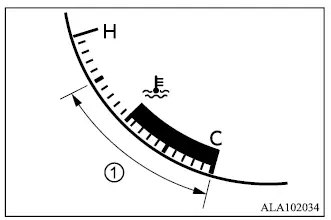
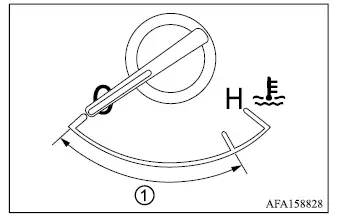
The engine coolant temperature gauge displays the current operating temperature of the engine coolant.
The coolant temperature is considered normal when the gauge remains within the operating zone shown in the illustration.
The indicated temperature may change according to outside air temperature, engine load, traffic conditions, vehicle speed and the way the Mitsubishi Outlander is being driven.
CAUTION
- If the gauge approaches the hot (H) end of the normal operating range, reduce vehicle speed and engine load to help lower the coolant temperature.
- If the gauge moves beyond the normal range, stop the vehicle in a safe location as soon as possible and allow the engine to idle while monitoring the condition.
- Do not continue driving with an overheated engine. Prolonged operation at an excessive coolant temperature can cause severe and costly engine damage.
Fuel gauge
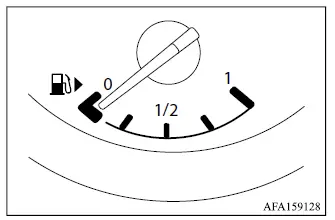
Type 1
Type 2
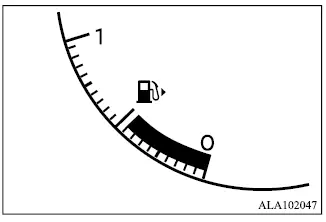
The fuel gauge shows the approximate amount of fuel remaining in the tank when the ignition switch is in the ON position.
The indicated level may fluctuate slightly during braking, cornering, acceleration or travel on steep grades because fuel moves inside the tank.
After refueling, the fuel-level display may require several seconds to stabilize and show the updated amount.
The low fuel warning
 appears on the multi-information display when the amount of fuel in the tank becomes low. Refuel the Mitsubishi Outlander as soon as practical, preferably before the gauge reaches 0 (empty).
The arrow,
 , identifies the side of the vehicle on which the fuel filler door is located.
Refuel before the gauge reaches the empty (0) position to reduce the risk of running out of fuel while driving.
If fuel is added while the ignition switch remains in the ON position, or if only a small quantity is added, the remaining-fuel display may not immediately indicate the correct level.
A small reserve quantity may remain in the tank when the fuel gauge reaches the empty (0) position. This reserve should not be relied upon for continued driving.
CAUTION
- If the vehicle runs out of fuel, the
 malfunction indicator light (MIL) may illuminate.
Refuel immediately. After several driving trips, the
 light should turn off once the system recognizes normal operation. If it remains illuminated after several trips, have the vehicle inspected. Mitsubishi Motors recommends visiting an authorized Mitsubishi Motors dealer for this service.
Instrument brightness control
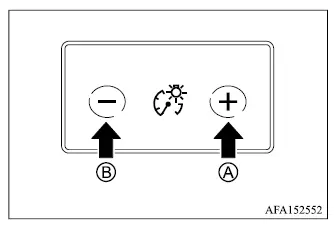
The instrument brightness control switch can be used while the ignition switch is in the ON position.
Press the + side of switch A to increase the brightness of the meter cluster and instrument panel illumination.
Press the - side of switch B to reduce the brightness of the meter cluster and instrument panel lights.
Continuously Variable Transmission (CVT) position indicator
The Continuously Variable Transmission (CVT) position indicator shows the current shift lever position whenever the ignition switch is in the ON position, allowing the driver to confirm the selected transmission range before moving the Mitsubishi Outlander.
