
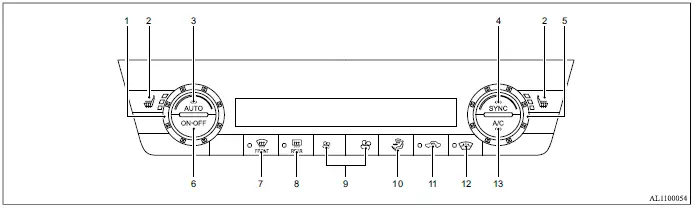
- Temperature control dial (driver's side)
-
 (heated seats) buttons (if so equipped)
 - AUTO (automatic) button
- SYNC (synchronize) button
- Temperature control dial (passenger's side)
- ONꞏOFF button
-
 (front defroster) button
 -
 (electric rear window defogger) button
 -
 (fan speed control) buttons
 -
 (air flow control) button
 -
 (air recirculation) button
 -
 (wiper deicer switch) button (if so equipped)
 - A/C (air conditioner) button
Automatic operation
Cooling and/or dehumidified heating (AUTO)
This automatic climate control mode can be used throughout the year. The system automatically regulates the passenger compartment temperature and also controls airflow distribution and fan speed to maintain the selected setting inside the Mitsubishi Outlander.
1. Push the AUTO button to activate automatic operation. The indicator on the button will illuminate.
2. Turn the temperature control dial on the appropriate side to select the desired temperature.
- When the indicator light on the SYNC button is not illuminated, the driver's side and front passenger's side temperatures can be adjusted independently.
In hot and humid conditions, a visible mist may briefly come from the ventilators as the incoming air is cooled rapidly. This is a normal operating characteristic and does not indicate a malfunction.
Heating (A/C OFF)
In this mode, the air conditioner compressor is not activated. Use this setting when heating is required without air-conditioning operation.
1. Push the AUTO button to turn automatic operation on. The indicator on the button will illuminate. 2. Push the A/C button. The A/C indicator light will turn off. 3. Turn the temperature control dial on the corresponding side to select the desired temperature.
- When the SYNC indicator light is off, the driver's side and front passenger's side temperatures can be set independently.
- The Mitsubishi Outlander climate control system will automatically maintain the selected passenger compartment temperature.
Airflow distribution and fan speed are also adjusted automatically according to the selected temperature.
NOTE
- Do not set the selected temperature lower than the outside air temperature when using heating with the A/C off, as the system may not operate as intended.
- This mode is not recommended when the windows are fogged or are likely to fog.
Dehumidified defrosting or defogging
1. Push the
 button. The indicator light on the button will illuminate.
2. Turn the temperature control dial on the corresponding side to set the desired temperature.
button. The indicator light on the button will illuminate.
2. Turn the temperature control dial on the corresponding side to set the desired temperature.
- After the windshield has been cleared, push the AUTO button as soon as practical to return the Mitsubishi Outlander climate control system to automatic operation.
- When the
 button is pushed, the air conditioner automatically turns on when the outside temperature is above 35ºF (2ºC). Air recirculation is also switched off automatically so that outside air can enter the passenger compartment, helping improve windshield defogging performance.
Manual operation
Fan speed control
Push the
 buttons to manually increase or decrease the blower fan speed according to the desired airflow level.
Air intake control
The air intake mode changes each time the
 button is pushed.
- When the indicator light is illuminated, air inside the Mitsubishi Outlander passenger compartment is recirculated.
- When the indicator light is off, outside air is drawn into the passenger compartment.
- To return the air intake function to automatic control, push and hold the
 button for approximately 2 seconds. The indicator light will flash twice, after which the climate control system will automatically manage the air intake mode.
Air flow control
Push the
 button to manually change the airflow distribution and select the desired air outlets:
 - Air flows mainly from the center and side ventilators.
 - Air flows mainly from the center and side ventilators, with additional airflow directed to the foot outlets.
 - Air flows mainly from the foot outlets, with part of the airflow directed toward the defroster.
 - Air flows mainly from the defroster and foot outlets.
 - Air flows mainly from the defroster outlets to help clear the windshield.
Synchronize temperature settings
Push the SYNC button to synchronize the temperature settings for the driver's side and front passenger's side of the Mitsubishi Outlander.
The SYNC indicator light will illuminate when synchronized temperature control is active.
While SYNC mode is active, turning the driver's side temperature control dial adjusts the selected temperature for both the driver and front passenger zones at the same time.
To cancel SYNC mode and return to independent temperature adjustment, push the SYNC button again or turn the front passenger's side temperature control dial.
To turn the system off
Push the ONꞏOFF button to switch off the heater and air conditioning system.
