
Lighting
Type A
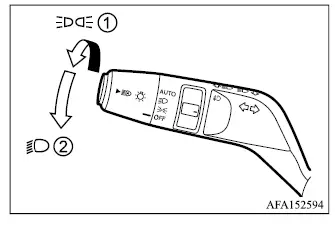
Type B
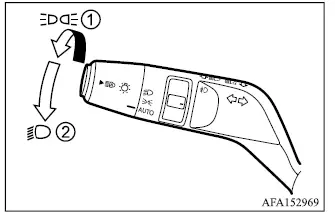
- Rotate the switch to the
 position, and the front parking lights, tail lights, license plate lights, and instrument panel illumination will turn on.
 - Rotate the switch to the
 position, and the headlights will turn on while the front parking, tail, license plate, and instrument panel lights remain illuminated.
Auto Headlight system
Type A
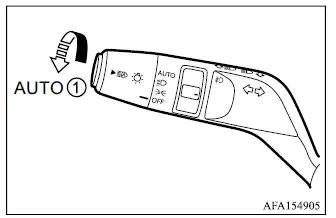
Type B
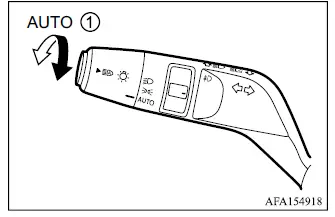
The Auto Headlight system allows the Mitsubishi Outlander headlights to switch on and off automatically according to the surrounding light conditions.
To activate the Auto Headlight system:
1. Make sure the headlight switch is placed in the AUTO position 1.
2. Start the engine.
3. With the switch in AUTO, the system automatically controls headlight operation according to ambient light conditions.
To turn the Auto Headlight system off, rotate the switch to the OFF position, if so equipped,
 or
or
 position.
When AUTO mode is selected, the system can automatically illuminate the headlights as outside conditions become dark and switch them off again when sufficient ambient light is detected.
If the ignition switch is placed in the OFF position and one of the doors is opened while this condition continues, the headlights can remain illuminated for approximately 5 minutes.
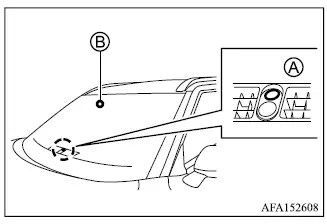
Do not place objects over light sensor A (if so equipped), located on top of the instrument panel, or rain/light sensor B (if so equipped), located above the inside rearview mirror. These sensors are used to control the Auto Headlight system. If a sensor is covered, it may interpret the condition as darkness and cause the headlights to illuminate unnecessarily.
Models not equipped with rainsensing auto wiper system
Do not place objects on the photo sensor located on top of the instrument panel, and do not spray glass cleaner directly onto the sensor. Obstructing or contaminating the photo sensor may prevent it from detecting ambient light correctly and can interfere with automatic headlight operation.
Models equipped with rain-sensing auto wiper system
If windshield replacement is required, or if repairs must be performed on the windshield near the rain sensor, it is recommended that you contact an authorized Mitsubishi Motors dealer so the sensor-related systems can continue to operate correctly.
Headlights off delay
After the ignition is switched off, pull the lever toward its rearmost position to turn the headlights on for approximately 30 seconds. This function can provide temporary illumination around the Mitsubishi Outlander after leaving the vehicle.
The lever can be pulled up to 4 times, extending the headlight illumination period to a maximum of approximately 2 minutes.
Headlight beam select
Example
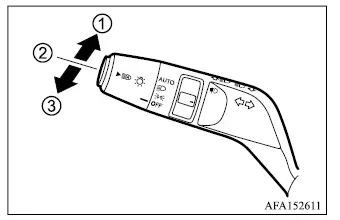
- To select the high beams, push the lever forward. The high-beam headlights will illuminate and the
 indicator will illuminate in the instrument display.
 - Push the lever again to return the headlights to the low-beam setting.
- Pull and release the lever to flash the high-beam headlights. The high beams remain illuminated only while the flash function is being operated.
Automatic High Beam [AHB]
The Automatic High Beam [AHB] system operates when the vehicle is traveling at approximately 34 MPH (55 km/h) or above. When the high beams are illuminated and the system detects an oncoming vehicle or a vehicle traveling ahead of the Mitsubishi Outlander, it automatically switches the headlights from high beam to low beam to reduce glare for other road users.
Precautions on Automatic High Beam [AHB]
WARNING
- The Automatic High Beam [AHB] system is a driver convenience feature and must not be treated as a substitute for attentive, responsible driving. The driver must remain alert at all times, use safe driving practices, and manually switch between high and low beams whenever road, traffic, or visibility conditions require it.
- The Automatic High Beam [AHB] system may not switch correctly between high and low beams under certain conditions. When necessary, operate the headlights manually.
- During adverse weather conditions such as rain, fog, snow, strong wind, or similar situations that reduce visibility.
- When a light source resembling a vehicle headlight or tail light is present near the Mitsubishi Outlander.
- When the headlights of an oncoming vehicle or the tail lights of a vehicle ahead are turned off, when dirt or other foreign material changes the apparent color of the lights, or when the light beam is incorrectly aimed.
- When the surrounding brightness changes suddenly or repeatedly over a short period of time.
- When driving on roads with rolling hills, sharp rises and dips, or significant changes in road elevation.
- When traveling on a road with frequent or sharp curves.
- When a road sign, reflective surface, mirror-like object, or similar item reflects intense light toward the front of the vehicle.
- When a container, trailer, cargo surface, or other object being towed by a vehicle ahead reflects strong light toward the Mitsubishi Outlander.
- When one of the vehicle's headlights is dirty, damaged, or otherwise unable to provide its normal light output.
- When the vehicle is tilted or leaning because of a punctured tire, towing condition, uneven loading, or another similar situation.
- The timing at which the Automatic High Beam [AHB] system changes between low and high beams may vary depending on the following conditions.
- The brightness and intensity of the headlights on an oncoming vehicle or the lights of a vehicle traveling ahead.
- The movement, position, and direction of the oncoming vehicle or the vehicle ahead.
- When only one headlight or tail light is illuminated on an oncoming vehicle or a vehicle traveling ahead.
- When the oncoming vehicle or the vehicle ahead is a motorcycle or another two-wheeled vehicle.
- Road conditions, including inclines, curves, changes in road surface, and similar features.
- The number of occupants in the vehicle and the amount or distribution of cargo being carried.
Automatic High Beam [AHB] operations
Example
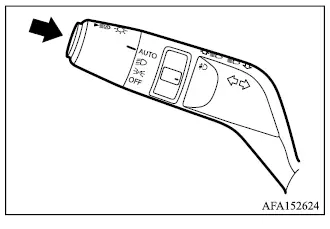
To activate the Automatic High Beam [AHB] system, push the AHB switch as illustrated while the headlight control is in the AUTO position. When the system is active and the headlights are illuminated, the Automatic High Beam [AHB] indicator in the meter will also illuminate.
If the Automatic High Beam [AHB] indicator does not illuminate under these conditions, the system may not be operating correctly. It is recommended that the AHB system be inspected by an authorized Mitsubishi Motors dealer.
When vehicle speed decreases below approximately 28 MPH (45 km/h), the Mitsubishi Outlander headlights remain on low beam rather than automatically changing to high beam.
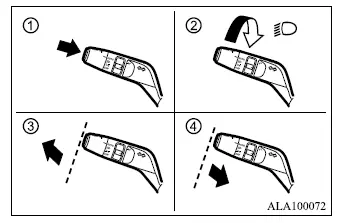
The Automatic High Beam [AHB] system can be turned off using any of the following methods.
- While the headlights are being controlled by the Automatic High Beam [AHB] system:
- Push the AHB switch. 1
- Rotate the headlight switch to the
 position. 2
 - Push the headlight lever forward to select the high beams manually. 3
- Pull the lever toward you to select the low beams manually. 4
- When the headlights are not currently being controlled by the Automatic High Beam [AHB] system:
- Push the AHB switch. 1
- Rotate the headlight switch to the
 position. 2
 - Push the headlight lever forward to select the high beams manually. 3
Ambient image sensor maintenance
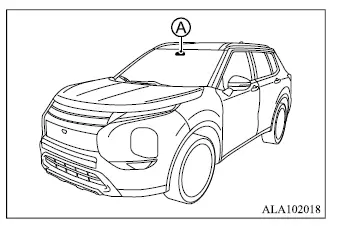
The ambient image sensor A used by the Automatic High Beam [AHB] system is positioned in front of the inside rearview mirror. To help maintain reliable Automatic High Beam operation and reduce the risk of system malfunction, observe the following precautions:
- Keep the windshield clean, especially in the area in front of the ambient image sensor.
- Do not attach stickers, including transparent materials, or install accessories near the ambient image sensor where they could obstruct its view.
- Do not strike, damage, or apply excessive force to the area surrounding the ambient image sensor. Do not touch the sensor lens located on the ambient image sensor.
If the ambient image sensor or the surrounding area is damaged in an accident, it is recommended that you have the Mitsubishi Outlander inspected by an authorized Mitsubishi Motors dealer.
Battery saver system
- When the headlight switch is in the
 or
or
 position while the ignition switch is in the ON position, the exterior lights will automatically turn off after a certain period once the ignition switch has been placed in the OFF position.
 - If the headlight switch remains in the
 or
or
 position after the lights have been turned off automatically, the lights will illuminate again when the ignition switch is returned to the ON position.
CAUTION
- If you manually turn the headlight switch on again after the battery saver system has automatically switched the lights off, the lights will not shut off automatically a second time. When leaving the vehicle unattended for an extended period, make sure the light switch is placed in the OFF position to avoid discharging the battery.
- Do not leave the light switch turned on for an extended period while the engine is not running, even if the headlights are capable of switching off automatically. Prolonged electrical use can discharge the vehicle battery.
Daytime running light system
The LED parking lights automatically illuminate at 100% intensity when the engine is started and the parking brake is released. The LED daytime running lights operate when the headlight switch is in the OFF position or in the
 position. When the headlight switch is turned to the
 position for full headlight illumination, the daytime running lights change to parking light operation.
If the parking brake is applied before the engine is started, the daytime running lights will not illuminate. They will turn on after the parking brake is released.
The daytime running lights remain illuminated until the ignition switch is placed in the OFF position.
At dusk or whenever additional exterior lighting is required, turn the headlight switch ON. The interior controls and switches are not illuminated while the headlight switch remains in the OFF position, so manual headlight operation is necessary as ambient light decreases.
WARNING
- When the daytime running light system is operating, the vehicle's tail lights are not illuminated. At dusk or in other low-light conditions, turn on the headlights manually. Failure to illuminate the headlights and tail lights when required can make the Mitsubishi Outlander less visible to other road users and could contribute to an accident resulting in injury.
Headlight cleaner (if so equipped)
The headlight cleaner can operate when the headlights are illuminated and the ignition switch is in the ON position.
The headlight cleaner operates under the following conditions:
- During the first windshield washer operation after the ignition switch is turned on.
- During every tenth windshield washer operation after the ignition switch is turned on.
- When the windshield washer switch is pulled and held.
CAUTION
- Do not operate the headlight cleaner when the window washer fluid reservoir is empty, as this may damage the washer system.
