
Example
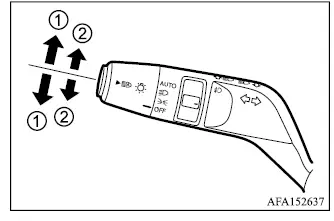
- Turn signal
Move the lever upward or downward to indicate the intended turning direction. After the turn is completed, the Mitsubishi Outlander turn signals normally cancel automatically as the steering wheel returns toward the straight-ahead position.
- Lane change signal
For a lane change, move the lever slightly toward position 2 without moving it fully into the turn-signal position. The exterior turn signal lamps and the corresponding indicator in the instrument cluster will flash only while the lever is being held.
If the lever is moved slightly toward position 2 and then released, the turn signal lamps and the indicator in the instrument cluster will flash three times to provide a brief lane-change indication.
NOTE
- The three-flash lane change signal function can be disabled. For additional information about this setting, consult an authorized Mitsubishi Motors dealer.
- If the turn signal lamps and the turn signal/hazard indicator in the meter panel begin flashing unusually quickly, there may be a malfunction in the turn signal system. Contact an authorized Mitsubishi Motors dealer and have the vehicle inspected.
Fog light switch (if so equipped)
Example
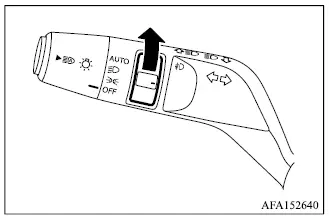
To turn the fog lights on, rotate the headlight switch to the
 position, then turn the fog light switch to the
 position.
When the headlight switch is in the AUTO position, if so equipped, the headlights must already be illuminated before the fog lights can be turned on. Once the headlights are on, rotate the fog light switch to the fog light position.
To switch the fog lights off, return the fog light switch to the OFF position.
The headlights must be illuminated for the fog lights to operate. If the high-beam headlights are selected, the fog lights will turn off automatically.
