
HomeLink and the HomeLink house icon are registered trademarks of Gentex Corporation.
HomeLink provides a convenient integrated alternative to carrying multiple hand-held radio-frequency (RF) transmitters. The system can replace up to 3 compatible transmitters used to operate devices such as garage door openers, gate operators, entry door locks, security systems, and certain home lighting controls. Additional information about HomeLink operation and compatibility is available at www.homelink.com, www.youtube.com/HomeLinkGentex, or through the toll-free HomeLink Hotline at 1-800-355-3515.
WARNING
- Do not use HomeLink with a garage door opener that does not include the safety stop and automatic reverse functions required by U.S. Federal Regulations. A garage door opener that cannot detect an object in the path of a closing door and automatically stop and reverse does not meet current U.S. Federal requirements. Operating a garage door system without these safety features increases the risk of serious injury or death.
- During HomeLink programming, the garage door, gate, or other controlled device may open or close unexpectedly. Before beginning the programming procedure, make sure all people, vehicles, and objects are safely clear of the door or gate being programmed.
NOTE
- After HomeLink has been programmed, keep the original hand-held transmitter in a safe place for future programming or setup procedures, such as when transferring the device settings to another vehicle.
If the Mitsubishi Outlander is sold, erase all programmed HomeLink button settings before transferring the vehicle to the new owner for security purposes.
- A maximum of 3 devices can be programmed into the HomeLink system.
If you want to change or replace one of the previously programmed devices, the existing programming for that button must first be cleared or replaced according to the applicable programming procedure.
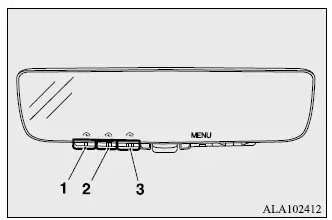
- HomeLink button 1
- HomeLink button 2
- HomeLink button 3
Before programming HomeLink
- Some garage door openers manufactured after 1995 use "rolling code protection" to improve security.
To program a garage door opener equipped with rolling code protection, you will need access to the garage door opener motor so that its "Learn" or "Smart" button can be pressed during the setup procedure. For easier and safer access, using a ladder and having another person assist with the programming process is recommended.
- For faster training and more reliable transmission of the radio-frequency signal, it is recommended that the hand-held transmitter being programmed to the Mitsubishi Outlander HomeLink system have a fresh battery installed.
Programming a new HomeLink
To program HomeLink to operate a garage door, gate, entry door opener, or compatible home or office lighting system, the Mitsubishi Outlander must be at the same location as the device being programmed.
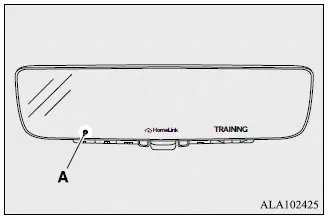
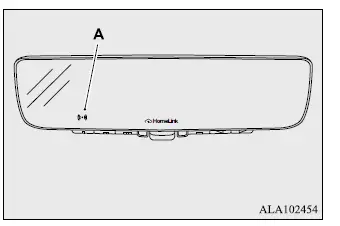
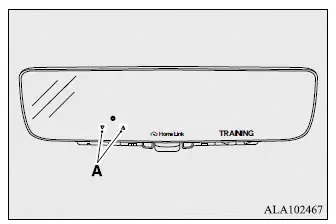
1. Press the HomeLink button you want to program. Indicator light (A) above the selected HomeLink button will begin flashing orange slowly. The HomeLink house icon and the word TRAINING will also appear, indicating that the system is ready to learn the transmitter signal.
NOTE
- You do not need to continue holding the HomeLink button after the programming mode has been activated.
- If the indicator light does not begin flashing as described, refer to the "Clearing the programmed information" procedure before attempting to program the button again.
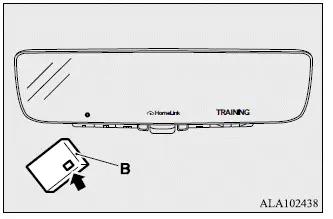
2. Position the end of your hand-held transmitter (B) approximately 1 to 3 inches (2 to 8 cm) from the HomeLink button you are programming, while keeping the HomeLink indicator light clearly visible.
NOTE
- Some hand-held transmitters may program more effectively when held 6 to 12 inches (15 to 30 cm) away from the HomeLink controls. If the Mitsubishi Outlander HomeLink system does not respond as expected, try increasing the distance between the transmitter and the HomeLink button.
3. Press and hold the appropriate button on the hand-held transmitter while watching indicator light (A). Continue holding the transmitter button until indicator light (A) changes from a slow orange flash to either a rapidly flashing green light for a rolling-code device or a continuously illuminated green light for a fixed-code device. The HomeLink house icon and the word TRAINED will also be displayed when the signal has been learned successfully.
Once the indicator changes as described and the TRAINED message appears, release the button on the hand-held transmitter.
NOTE
- Certain devices may require the procedure described in the "Gate operator / Canadian programming" section instead of step 3 of "Programming a new HomeLink." If the indicator light does not change to rapidly flashing green or continuously illuminated green after following these instructions, refer to additional HomeLink support information at www.homelink.com.
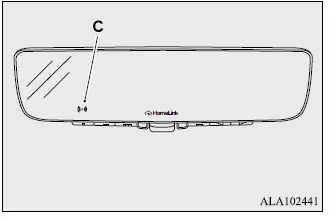
4. Press the HomeLink button that was just programmed and observe indicator light (C) to determine whether additional programming is required.
- If indicator light (C) remains continuously illuminated green, programming is complete. The programmed device should operate when the HomeLink button is pressed and released.
- If indicator light (C) flashes rapidly green, firmly press and hold the programmed HomeLink button for 2 seconds, then release it. Repeat this "press/hold/release" sequence a second time. Depending on the manufacturer of the garage door opener or other rolling-code device, a third repetition may be required. If the device operates after this sequence, HomeLink programming is complete.
- If the programmed device still does not operate, continue with steps 5 through 7 of "Programming a new HomeLink" to complete setup for a rolling-code device.
5. At the garage door opener receiver, also known as the motor-head unit, locate the "Learn" or "Smart" button. This button is commonly positioned near the point where the hanging antenna wire connects to the motor-head unit.
6. Firmly press and release the "Learn" or "Smart" button. The exact name and color of this button vary by manufacturer. After pressing it, you will typically have approximately 30 seconds to begin step 7.
7. Return to the Mitsubishi Outlander and firmly press and hold the programmed HomeLink button for 2 seconds, then release it. Repeat the same "press/hold/release" sequence a second time. Depending on the brand and design of the garage door opener or other rolling-code device, repeat the procedure a third time if necessary to complete synchronization.
After this procedure is completed successfully, HomeLink should operate the programmed rolling-code device whenever the corresponding HomeLink button is pressed.
NOTE
- If you continue to experience programming difficulties or have questions about HomeLink operation, additional instructions and programming videos are available at www.homelink.com and www.youtube.com/HomeLinkGentex, or through the HomeLink Hotline.
Gate operator/Canadian programming
Canadian radio-frequency regulations require certain transmitters to stop transmitting, or "time out," after several seconds. In some cases, this transmission period may be too short for the Mitsubishi Outlander HomeLink system to learn the signal during the standard programming procedure. Some gate operators sold in the United States are designed with a similar automatic time-out function.
When a hand-held transmitter reaches its time limit, the transmitter's indicator LED will turn off, showing that the device has stopped sending its radio-frequency signal.
If you are programming HomeLink in Canada, or if you are having difficulty programming a gate operator or garage door opener using the standard "Programming" procedure, replace step 3 in the "Programming a new HomeLink" instructions with the procedure below:
NOTE
- When programming a garage door opener or gate operator using the repeated transmitter "cycling" procedure, it is recommended that the device be unplugged to help prevent possible overheating caused by repeated activation attempts.
3. Press and release the hand-held transmitter button approximately every 2 seconds to repeatedly "cycle" the signal. Continue this process until the HomeLink indicator changes from slowly flashing orange to either rapidly flashing green for a rolling-code device or continuously illuminated green for a fixed-code device. The HomeLink house icon and the word TRAINED will also appear when the signal has been successfully learned. Once this occurs, stop cycling the transmitter button.
Continue with step 4 under "Programming a new HomeLink" to complete the programming procedure.
Operating HomeLink
To operate a programmed device, simply press and release the corresponding HomeLink button. The trained device, such as a garage door opener, gate operator, security system, entry door lock, or compatible home or office lighting system, should then activate. Indicator light (A) will either flash rapidly green when operating a rolling-code device or remain continuously illuminated green for a fixed-code device. The original hand-held transmitter can still be used independently at any time.
Garage door feedback
The HomeLink system can receive garage door position and movement information from compatible garage door opener systems, allowing the Mitsubishi Outlander to provide feedback about the current status of the door.
Garage door status information is shown using indicators (A).
The indicators illuminate or blink according to the operating condition reported by the compatible garage door opener:
 : Blinking
 : Illuminates
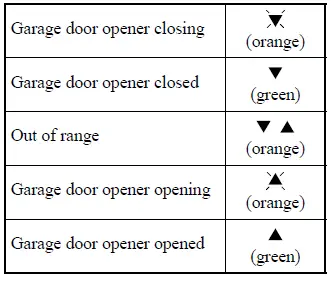
The HomeLink system can receive these garage door status messages from a distance of up to approximately 820.2 feet (250 m) when there is a clear, unobstructed line of sight. Actual reception range can be reduced by obstacles such as houses, trees, and other structures. In some situations, you may need to reduce vehicle speed so the Mitsubishi Outlander HomeLink system has enough time to receive the CLOSED or OPENED status message from the garage door opener. If the vehicle moves out of range before HomeLink receives either the UP or DOWN status message, both the UP and DOWN indicators will remain continuously illuminated orange.
The most recently received garage door status can be recalled after the initial feedback by pressing HomeLink buttons 1 and 2 together, or buttons 2 and 3 together, for approximately 2 seconds. The last recorded garage door status message will then be shown for about 3 seconds using the same indication pattern illustrated above.
Clearing the programmed information
To erase the programming stored in all 3 HomeLink buttons, follow the procedure below. Individual buttons cannot be erased separately, but any single button can be reprogrammed with a new device as described in the following section.
1. Press and hold the 2 outer HomeLink buttons for at least 10 seconds. The HomeLink house icon and the word CLEARING will appear, while the indicator changes from continuously illuminated orange to rapidly flashing green.
2. When the displayed word CLEARING changes to CLEARED, release both HomeLink buttons. The previously stored programming for all 3 buttons will be erased.
NOTE
- Do not continue holding the HomeLink buttons for longer than 20 seconds.
3. The Mitsubishi Outlander HomeLink system is now returned to training, or learning, mode and can be programmed again at any time beginning with step 1 under "Programming a new HomeLink".
Reprogramming a single HomeLink button
To replace the programming stored in one HomeLink button without clearing the other programmed buttons, complete the following procedure.
1. Press and hold the HomeLink button you want to reprogram. Do not release the button during this initial step.
2. After approximately 20 seconds, the indicator light will begin flashing orange slowly. At this point, release the HomeLink button.
Continue with step 2 under "Programming a new HomeLink" to train the selected button with the new device.
NOTE
- If programming of the new device is not completed, the HomeLink button will retain and return to its previously stored programming.
For additional questions, operating information, or programming assistance, refer to www.homelink.com, www.youtube.com/HomeLinkGentex, or contact the HomeLink Hotline.
General information
The HomeLink system installed in the Mitsubishi Outlander operates using radio frequencies regulated by the Federal Communications Commission (FCC) for vehicles sold in the U.S.A. and by Industry Canada for vehicles sold in Canada. The device complies with Part 15 of the FCC Rules and RSS-210 of the Industry Canada Rules.
Operation is subject to the following two conditions.
- This device may not cause harmful interference.
- This device must accept any interference received, including interference that may cause undesired operation of the system.
CAUTION
- The HomeLink transmitter has been tested and found to comply with applicable FCC and IC requirements.
Changes or modifications that are not expressly approved by the party responsible for regulatory compliance could void the user's authority to operate this equipment.
This equipment complies with FCC radiation exposure limits established for an uncontrolled environment. Users must follow the specified operating instructions to maintain compliance with RF exposure requirements. The transmitter must remain at least 8 inches (20 cm) from the user and must not be co-located or operated in conjunction with any other antenna or transmitter.
The designation "IC:" appearing before the certification or registration number indicates only that the applicable Industry Canada technical specifications have been satisfied.
