
Example
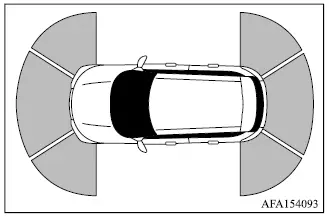
The parking sensor system helps alert the driver to obstacles detected around the Mitsubishi Outlander by using ultrasonic sensors installed in the front and rear bumpers. When an object is detected within the sensing area, the system provides audible warnings and corresponding visual information.
When the "Auto Show Sensor" setting is switched on, the parking sensor view automatically appears in the multi-information display when the system detects an applicable obstacle.
WARNING
- The parking sensor system is designed as a convenience aid and must not be used as a substitute for proper parking techniques or direct observation of the surrounding area.
- The driver is always responsible for safety while parking, reversing, or performing other low-speed maneuvers.
Always look around the Mitsubishi Outlander and confirm that the intended path is clear before and during any parking maneuver.
- Read and understand the operating limitations of the parking sensor system described in this section. The different colors of the parking sensor indicators represent different approximate distances between the vehicle and a detected object.
- Adverse weather or nearby ultrasonic noise sources, including automatic car washes, compressed-air brakes on trucks, or pneumatic tools, may interfere with system operation. This can result in reduced detection performance or false warnings.
- The parking sensor system is intended to help the driver detect relatively large stationary objects and reduce the possibility of vehicle damage during low-speed maneuvering.
- The system is not designed to prevent contact with every small or moving object. Always maneuver slowly and cautiously. Objects positioned below the bumper sensing area, very close to the bumper, or directly on the ground may not be detected.
- The parking sensor system may have difficulty detecting soft or sound-absorbing objects such as snow, cloth, cotton, glass wool, and similar materials; thin objects such as rope, wire, or chain; and objects with wedge-shaped profiles.
- Maintain the tires at the specified inflation pressure. Incorrect tire pressure may affect vehicle height or position and could interfere with normal parking sensor operation. Differences in tire size may also prevent the system from functioning as intended.
- If components other than MITSUBISHI MOTORS Genuine Parts are installed near the sensor areas, the parking sensor system may not operate normally.
If the Mitsubishi Outlander sustains damage to the bumper fascia that causes it to become bent, displaced, or misaligned, the parking sensor detection zones may also change. This can lead to inaccurate distance measurements, missed objects, or false warnings.
CAUTION
- Excessive interior or exterior noise, such as high audio-system volume or wind noise from an open window, may make the parking sensor warning tone difficult or impossible to hear.
- Keep the parking sensors installed in the bumper fascia free from snow, ice, mud, and heavy accumulations of dirt. Do not clean the sensors with sharp or abrasive objects. If the sensing surfaces are covered or damaged, parking sensor accuracy may be reduced.
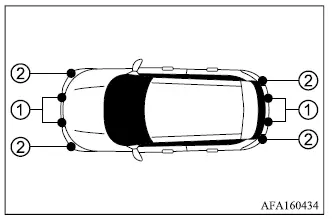
- Center parking sensors
- Corner parking sensors
System operation
The parking sensor system provides visual and audible alerts for the following types of detected obstacles:
- obstacles in front of the Mitsubishi Outlander when the shift lever is in the D (Drive) position
- obstacles at both the front and rear of the vehicle when the shift lever is in the R (Reverse) position
The system is automatically deactivated when vehicle speed exceeds 6 MPH (10 km/h). Parking sensor operation becomes available again when the Mitsubishi Outlander slows below that speed.
When an object is first detected, a green indicator appears and flashes while an intermittent warning tone sounds. As the vehicle moves closer to the object, the indicator changes to yellow and flashes more rapidly, while the warning tone also increases in frequency. When the Mitsubishi Outlander is very close to the detected obstacle, the indicator changes to red and remains illuminated continuously, and the warning tone becomes continuous.
Example
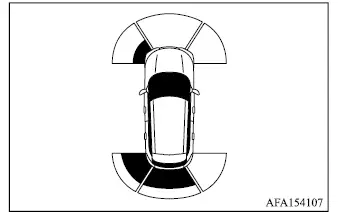
As the Mitsubishi Outlander moves closer to a detected obstacle, the parking sensor indicator corresponding to the affected detection area appears in the multi-information display.
Example
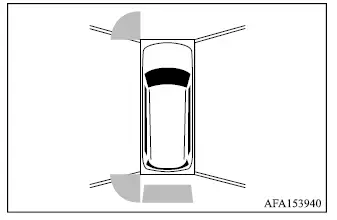
The parking sensor indicator is also shown in the Multi Around Monitor view on the Smartphone-link Display Audio [SDA] screen, providing an additional visual reference for the location of detected obstacles around the vehicle.
How to enable/disable the parking sensor system
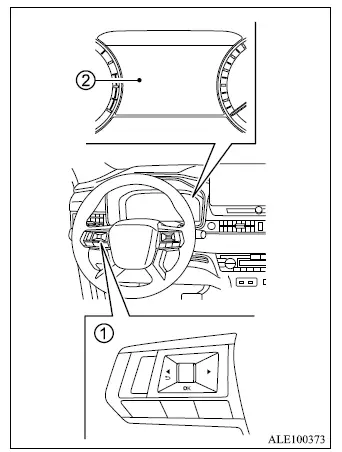
- Steering wheel remote control switches (left side)
- Multi-information display
The parking sensor system is automatically activated when the ignition switch is in the ON position and the shift lever is placed in D (Drive) or R (Reverse).
Use the following procedure to configure the parking sensor functions and related settings.
1. Press the
 button until
"Settings"
appears in the multi-information display
2 and then push the scroll dial. Use the
scroll dial to select "Driver Assistance."
Then push the scroll dial.
button until
"Settings"
appears in the multi-information display
2 and then push the scroll dial. Use the
scroll dial to select "Driver Assistance."
Then push the scroll dial.
2. Select "Parking sensors" and push the scroll dial to open the parking sensor settings menu.
3. Use the scroll dial to move through the menu and select or adjust the desired item:
- Moving Object
- Turns Moving Object Detection (MOD) ON or OFF - Auto Show Sensor
- Automatically displays the parking sensor view in the multi-information display when the parking sensor system activates - Front
- Turns the front parking sensors ON or OFF - Rear
- Turns the rear parking sensors ON or OFF - Distance
- Adjusts the parking sensor detection setting to "Long", "Medium" or "Short" - Volume
- Adjusts the parking sensor warning tone volume to "High", "Medium" or "Low"
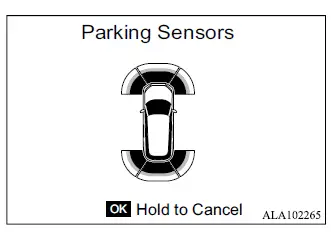
When the transmission is in R (Reverse) and the "Parking Sensors" screen is displayed in the multi-information display, the parking sensor system can be temporarily disabled by pressing and holding the OK switch on the steering wheel for more than 3 seconds.
The parking sensor system automatically resumes operation under any of the following conditions:
- When the transmission is shifted to P (Park) or N (Neutral).
- When vehicle speed increases above approximately 6 MPH (10 km/h).
- When the Mitsubishi Outlander engine is restarted.
Parking sensor system limitations
WARNING
- The following limitations apply to the parking sensor system. Failure to operate the Mitsubishi Outlander with these limitations in mind could result in serious injury or death.
- Read and understand the parking sensor limitations described in this section. Adverse weather can affect ultrasonic sensor performance and may cause reduced detection capability or false warnings.
- The parking sensor system is automatically deactivated at speeds above 6 MPH (10 km/h) and becomes available again when vehicle speed decreases below that level.
- Adverse weather or nearby ultrasonic noise sources, such as an automatic car wash, compressed-air brakes on a truck, or a pneumatic drill, may interfere with the parking sensors and cause reduced performance or unintended activation.
- The parking sensor system is not designed to prevent contact with every small or moving object. Always maneuver the vehicle slowly and carefully. Small objects located below bumper level or directly on the ground may not be detected.
- The parking sensor system may not reliably detect soft or sound-absorbing objects such as snow, cloth, cotton, or glass wool; thin objects such as rope, wire, or chain; wedge-shaped objects; objects with complex shapes; or several objects positioned very close together.
- The parking sensor system may not detect objects reliably when vehicle speed exceeds approximately 3 MPH (5 km/h), and certain angled or moving objects may also remain undetected.
- The parking sensor system may not detect the following:
- Pedestrians approaching the Mitsubishi Outlander from the side
- Objects positioned immediately beside the vehicle
- The parking sensor system may not operate correctly under the following conditions:
- When rain, snow, ice, dirt, or other material adheres to a parking sensor
- When loud sounds or ultrasonic interference are present around the vehicle
- When the surface of an obstacle is angled diagonally relative to the front or rear of the vehicle
- When a parking sensor or the surrounding area becomes extremely hot or extremely cold
- The parking sensor system may activate unexpectedly under the following conditions:
- When tall or overgrown grass is present around the Mitsubishi Outlander
- When structures such as walls, toll-gate equipment, narrow tunnels, or parking-garage gates are located close to the side of the vehicle
- When bumps, protrusions, manhole covers, or similar features are present on the road surface
- When the vehicle passes through a hanging flag, curtain, or similar flexible object
- When snow or ice has accumulated behind the vehicle
- When driving on a steep hill
System temporarily unavailable
If the parking sensor system detects that one or more sensors are blocked, the system is automatically deactivated and a warning message appears in the multi-information display.
The parking sensor system remains unavailable until the condition interfering with sensor operation has been cleared.
The parking sensors may become temporarily blocked by environmental conditions such as splashing water, mist, or fog. Sensor operation can also be affected by ice, water droplets, frost, dirt, or other material covering the sensing surfaces.
Action to take: When the obstruction or temporary environmental condition is no longer present, the parking sensor system on the Mitsubishi Outlander will automatically resume normal operation.
System maintenance
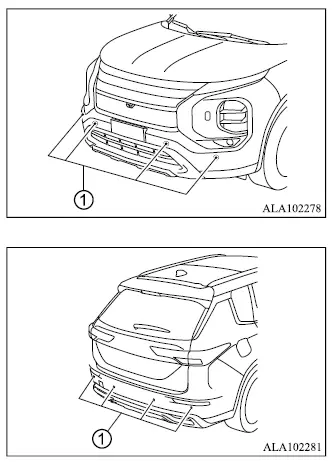
Parking sensors 1 are installed in the front and rear bumpers of the Mitsubishi Outlander. Keep the sensor surfaces and the surrounding areas clean to help maintain accurate obstacle detection.
If the parking sensors become dirty, carefully wipe them with a soft cloth. Avoid scratching, striking, or otherwise damaging the sensor surfaces while cleaning them.
The parking sensors may be temporarily affected by environmental conditions such as splashing water, mist, or fog.
Sensor blockage may also be caused by ice, water droplets, frost, dirt, or other debris covering the parking sensors.
Inspect the areas around the parking sensors regularly and remove any material or object that could interfere with their operation.
Do not attach stickers, including transparent materials, install accessories, or apply additional paint to the parking sensors or the surrounding bumper areas. These modifications may interfere with ultrasonic detection and could cause a malfunction or improper parking sensor operation.
Do not subject the areas around the parking sensors to strong impacts, and do not remove, disassemble, or modify the sensors. If the parking sensors or surrounding bumper areas become deformed or damaged as a result of an accident or other impact, have the system inspected. It is recommended that you visit an authorized Mitsubishi Motors dealer for this service.
When washing the Mitsubishi Outlander with a high-pressure washer, do not direct the high-pressure water jet at the parking sensors. Excessive water pressure may damage the sensors or cause the parking sensor system to malfunction.
