
Instrument Panel
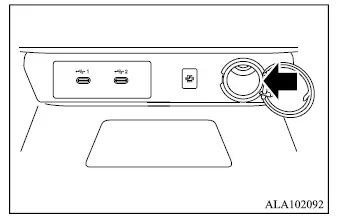
Cargo area
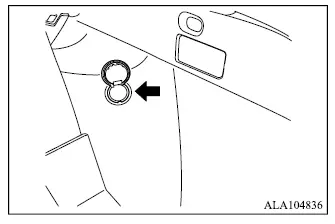
The Mitsubishi Outlander is equipped with power outlets located in the instrument panel and cargo area, providing convenient electrical power for compatible accessories.
CAUTION
- The power outlet and accessory plug may become hot during use and can remain hot for a short time after the accessory has been disconnected.
- Do not connect accessories that exceed a 12-volt, 120W (10A) electrical load. Do not use double adapters or connect more than one electrical accessory to the outlet at the same time.
- Use the power outlet while the engine is running whenever possible to reduce the risk of discharging the vehicle battery.
- Avoid using the power outlet while high electrical loads such as the air conditioner, headlights, or electric rear window defogger are operating.
- Insert the accessory plug fully into the outlet. If proper electrical contact is not made, the plug may overheat or the internal temperature fuse may open.
- Before inserting or removing a plug, make sure the connected electrical accessory is switched OFF.
- When the power outlet is not being used, close its protective cap. Do not allow water or other liquids to enter or contact the outlet.
USB (Universal Serial Bus) charging outlet (if so equipped)
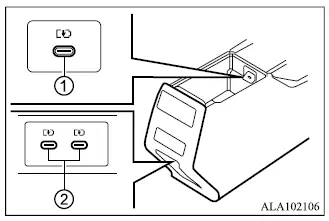
- A USB charging outlet is located inside the console box.
- Two USB charging connectors are located on the back of the center console box, if so equipped.
The USB charging outlets are intended only for charging compatible external devices.
Connect the USB device to the appropriate charging connector.
Charging begins automatically after a compatible device is connected, with a maximum output of up to 5 volts, 15W, and 3A.
The connected external device can continue charging while the ignition switch is in the ACC or ON position.
Do not attempt to charge several devices from a single USB connector by using a multi-plug adapter.
Do not allow water or any other liquid to enter the USB charging outlet. If liquid is splashed into the charging port or the port becomes clogged or obstructed, it is recommended that you contact an authorized Mitsubishi Motors dealer for inspection.
Some mobile devices may not support charging through the Mitsubishi Outlander USB outlets because charging compatibility depends on the specifications of the connected device.
CAUTION
- Using the USB charging connectors for an extended period while the engine is not running may discharge the vehicle battery.
- Before connecting a device, inspect the USB charging port and make sure it is free of dirt, debris, or other obstructions. A clogged charging port may cause a short circuit and could damage both the connected device and the charging connector.
- Do not force a USB device into the connector.
Inserting a USB plug at an angle, upside-down, or in an incorrect orientation may damage the connector. Make sure the USB device is correctly aligned before inserting it into the charging port.
Wireless charger (if so equipped)
The wireless charger is located in the lower section of the instrument panel. To use it, place a compatible smartphone flat on the wireless charging pad in the designated charging area.
Charging begins automatically when the smartphone is correctly positioned on the pad. The device can continue charging while the Mitsubishi Outlander ignition switch remains in the ON position.
WARNING
- Never place metallic objects or materials between the wireless charger and the smartphone, as they may interfere with charging or create an unsafe condition.
- If you use a pacemaker or other implanted or external medical equipment, consult the manufacturer of the medical device before using the wireless charger to determine whether electromagnetic fields from the charger could affect its operation.
- Do not cover the smartphone with cloth, fabric, or similar material while it is being charged wirelessly, as this may trap heat around the device.
- Never place a wet smartphone on the wireless charging pad or attempt to charge a device that has moisture on it.
- Do not place the vehicle transmitter near the wireless charger while charging is in progress.
CAUTION
- Do not place an RFID or NFC card between the wireless charger and the smartphone. Wireless charging may damage or corrupt data stored on the card.
- Do not use the wireless charger when dust, dirt, or debris has accumulated on the charging pad. Keep the surface clean so the smartphone can rest properly in the charging area.
- Do not strike, impact, or apply excessive force to the surface of the wireless charger, as this could damage the charging system.
Wireless charger Indicator
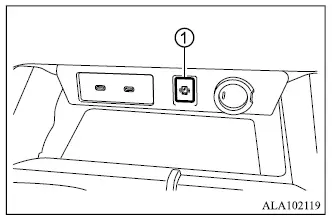
Indicator 1 illuminates in orange when the wireless charging process begins and the smartphone is being charged.
When charging is completed, the indicator changes to green.
If the charging process stops unexpectedly or a malfunction is detected, the indicator flashes in orange to indicate that normal wireless charging is not taking place.
Operation of the wireless charger
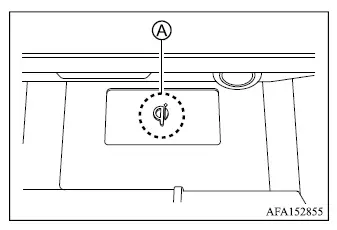
For wireless charging to operate correctly, the charging coil in the smartphone must be aligned with the coil built into the charging pad. The most effective charging area is centered around the "Qi" logo A. Place the smartphone on the pad so its internal charging coil is positioned as closely as possible over the "Qi" logo.
Because the location of the charging coil differs between smartphone models, the ideal position on the Mitsubishi Outlander wireless charging pad may vary. If charging does not begin immediately, move the smartphone slightly until the charging indicator confirms that a suitable position has been found.
Some smartphone cases and accessories can interfere with wireless charging or prevent the charging coils from aligning correctly. If charging is unreliable, remove the case or accessory before placing the smartphone on the charging pad.
Turn off the smartphone's vibration function before wireless charging. Vibration may cause the device to move away from the optimum charging position and interrupt the charging process.
NOTE
- Only smartphones that support the Qi wireless charging standard can be charged using this system.
- The smartphone may become warm during wireless charging. If its temperature becomes too high, the protection function of the wireless charger may temporarily stop charging. This does not indicate a malfunction. Allow the smartphone to cool, then place it back on the charging pad to restart charging.
- Wireless charging may stop depending on the operating condition of the smartphone, including factors such as battery temperature.
- If radio interference or noise occurs while charging, reposition the smartphone so its charging coil is centered more precisely over the "Qi" logo on the wireless charger.
- The wireless charging process will temporarily stop while the vehicle is searching for the transmitter.
- Wireless charging will not begin while a USB (Universal Serial Bus) cable is connected to the smartphone. If a smartphone connected by USB is placed on the Mitsubishi Outlander wireless charging pad, the indicator may illuminate or flash orange, but wireless charging will not be performed.
- Depending on the smartphone model and its charging-control characteristics, the wireless charger indicator may remain illuminated in orange even after the smartphone battery has finished charging.
FCC: 2A6WXWC500MNM
IC:28559-WC500MNM
This device complies with Part 15 of the FCC Rules and RSS-Gen of the IC Rules.
Operation is subject to the following two conditions:
(1) This device may not cause harmful interference, and
(2) This device must accept any interference received, including interference that may cause undesired operation.
CAUTION
- Any changes or modifications not expressly approved by the party responsible for regulatory compliance could void the user's authority to operate this equipment.
FCC RF Radiation Exposure Statement: This equipment complies with FCC RF radiation exposure limits established for an uncontrolled environment. This device and its antenna must not be co-located or operated in conjunction with any other antenna or transmitter.
This equipment should be installed and operated so that a minimum distance of 15 cm is maintained between the radiator and your body.
ISED Compliance Statement
This device contains licence-exempt transmitter(s)/receiver(s) that comply with the licence-exempt RSS standards of ISED (Innovation, Science and Economic Development Canada). Operation is subject to the following two conditions:
(1) This device may not cause interference.
(2) This device must accept any interference, including interference that may cause undesired operation of the device.
This equipment complies with ISED RF radiation exposure limits established for an uncontrolled environment. This device and its antenna must not be co-located or operated in conjunction with any other antenna or transmitter. This equipment should be installed and operated with a minimum distance of 15 cm between the radiator and your body.
IDéclaration d'avertissement ISED
L'émetteur/récepteur exempt de licence contenu dans le présent appareil est conforme aux CNR d'Innovation, Sciences et Développement économique Canada applicables aux appareils radio exempts de licence. L'exploitation est autorisée aux deux conditions suivantes:
(1) L'appareil ne doit pas produire de brouillage.
(2) L'appareil doit accepter tout brouillage radioélectrique subi, même si le brouillage est susceptible d'en compromettre le fonctionnement.
Cet équipement est conforme aux limites d'exposition aux RF d'ISDE applicables à un environnement non contrôlé. Cet appareil et son antenne ne doivent pas être placés à proximité d'autres antennes ou émetteurs ni fonctionner conjointement avec ceux-ci.
Cet équipement doit être installé et utilisé de manière à maintenir une distance minimale de 15 cm entre le radiateur et le corps humain.
