
The Brake Auto Hold function keeps the Mitsubishi Outlander stationary without requiring the driver to continue pressing the brake pedal after the vehicle has stopped, such as at a traffic light or intersection. When the driver presses the accelerator pedal again, Brake Auto Hold is released automatically and the vehicle can begin moving.
The current operating status of the Brake Auto Hold system can be confirmed on the multi-information display.
WARNING
- The Brake Auto Hold function is not designed to keep the vehicle stationary on a steep slope or slippery road. Do not rely on Brake Auto Hold when the Mitsubishi Outlander is stopped under these conditions, as the vehicle could move unexpectedly.
- If Brake Auto Hold is active but does not keep the vehicle completely stationary, immediately depress the brake pedal and hold the vehicle with the service brakes. If the vehicle begins moving unexpectedly because of surrounding or road conditions, a warning chime may sound and a Brake Auto Hold warning may appear in the multi-information display.
- Always deactivate Brake Auto Hold before using an automatic car wash or before the vehicle is towed.
- When parking the vehicle, entering or leaving the vehicle, or loading or unloading luggage, always push the park button to select P (Park) and apply the parking brake.
Failure to secure the Mitsubishi Outlander correctly could allow it to move or roll away unexpectedly, potentially causing serious personal injury or property damage.
- If any of the following conditions occurs, the Brake Auto Hold system may not operate correctly. Have the system inspected promptly. It is recommended that you contact an authorized Mitsubishi Motors dealer. Continuing to operate the vehicle without addressing these conditions could allow the vehicle to move unexpectedly and may result in serious injury or property damage.
- A Brake Auto Hold-related warning message appears in the multi-information display.
- The indicator light on the Brake Auto Hold switch does not illuminate when the switch is pushed.
- The Brake Auto Hold function will not activate if the Active Stability Control [ASC] warning light, electric parking brake warning light, or master warning light is illuminated and the "Chassis Control System Error" message appears in the multi-information display.
- An operating sound may be heard while the system maintains braking force to keep the vehicle stationary. This is a normal characteristic of Brake Auto Hold and does not indicate a malfunction.
How to activate/deactivate the Brake Auto Hold function
How to activate the Brake Auto Hold function
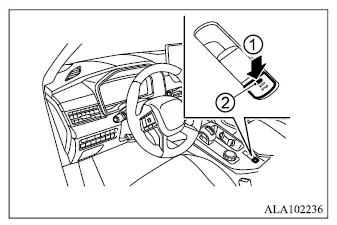
1. With the ignition switch in the ON position, push Brake Auto Hold switch 1.
Indicator light 2 on the Brake Auto Hold switch will illuminate.
2. When the Brake Auto Hold system enters standby mode, the Brake Auto Hold indicator light (white) in the meter will illuminate.
For the Brake Auto Hold function to become available, all of the following conditions must be satisfied.
- The driver's seat belt is fastened.
- The electric parking brake is released.
- The transmission is not in the P (Park) position.
- The Mitsubishi Outlander is not stopped on a steep hill.
NOTE
- The Brake Auto Hold function automatically resets to OFF whenever the ignition switch is changed from the OFF position to the ON position.
How to deactivate the Brake Auto Hold function
While Brake Auto Hold is activated, push the Brake Auto Hold switch again. The Brake Auto Hold indicator light will turn off and the function will be deactivated.
If Brake Auto Hold is currently maintaining braking force, firmly depress and hold the brake pedal before pushing the Brake Auto Hold switch to deactivate the function.
WARNING
- When deactivating Brake Auto Hold while the system is actively maintaining braking force, firmly depress and continue holding the brake pedal. Once Brake Auto Hold is switched off, its braking force is released and the vehicle may begin to move or roll.
Failure to prevent unintended vehicle movement could result in serious personal injury or property damage.
How to use the Brake Auto Hold function
The following procedures describe how Brake Auto Hold operates during normal stopping, starting, and parking situations in the Mitsubishi Outlander.
To maintain braking force automatically
With Brake Auto Hold activated and the Brake Auto Hold indicator light (white) illuminated in the meter, depress the brake pedal and bring the vehicle to a complete stop. The system will maintain the braking force that was applied by the driver. While the vehicle is being held by Brake Auto Hold, the Brake Auto Hold indicator light (green) will illuminate in the meter.
To start the vehicle from a standstill
When the vehicle is not in P (Park) and the shift lever is not in N (Neutral), depress the accelerator pedal while Brake Auto Hold is maintaining braking force. The system will automatically release the brakes so the Mitsubishi Outlander can begin moving.
The Brake Auto Hold indicator light will change back to white, indicating that the system has returned to standby mode.
Parking
If the park button is pushed to select P (Park) while Brake Auto Hold is maintaining braking force, the electric parking brake will automatically apply and the braking force provided by Brake Auto Hold will be released. The Brake Auto Hold indicator light will then turn off. Similarly, if the electric parking brake is applied while Brake Auto Hold is holding the vehicle stationary, Brake Auto Hold will release its braking force and its indicator light will turn off.
NOTE
- Under the following conditions, the electric parking brake will automatically apply and Brake Auto Hold will release its braking force:
- Brake Auto Hold has maintained braking force continuously for 3 minutes or longer.
- The driver's seat belt is unfastened.
- The ignition switch is placed in the OFF position.
- A malfunction occurs in the Brake Auto Hold system.
- If the Mitsubishi Outlander comes to a stop but Brake Auto Hold does not maintain braking force, depress the brake pedal more firmly until the Brake Auto Hold indicator light (green) illuminates.
