
Drive Mode Selector (Example)
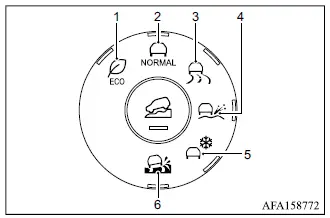
- ECO mode
- NORMAL mode
- TARMAC mode
- GRAVEL mode
- SNOW mode
- MUD mode (AWC model)
Display (Example)
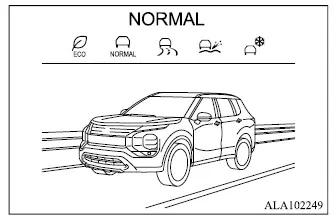
The Drive Mode Selector allows the driver to choose operating characteristics for the Mitsubishi Outlander's integrated vehicle dynamics control system. Depending on the selected mode, the system coordinates control of the engine, transmission, EPS, AWC if equipped, AYC (Active Yaw Control), ABS, and ASC to help optimize driving performance and vehicle stability for different driving styles and road conditions.
Select the drive mode that best matches the current driving conditions or desired vehicle response. Available modes are NORMAL, GRAVEL, ECO, SNOW, TARMAC, and MUD on AWC-equipped models.
The currently selected drive mode is shown in the multi-information display.
To change the drive mode, turn the Drive Mode Selector to the right or left. The available mode list will appear in the multi-information display, allowing the desired mode to be selected.
NOTE
- The drive mode selection list disappears approximately 5 seconds after a mode has been selected.
- When the ignition switch is turned off and then switched on again, the Mitsubishi Outlander automatically returns to NORMAL mode.
If the drive mode cannot be changed using the Drive Mode Selector while the ignition switch is in the ON position, have the system inspected. It is recommended that you contact an authorized Mitsubishi Motors dealer for this service.
WARNING
- Do not stare at the Drive Mode Selector or multi-information display while driving. Keep your attention focused on safely operating the vehicle.
NORMAL mode
NORMAL mode provides a balanced combination of driving performance, stability, and efficiency for the Mitsubishi Outlander across a wide range of ordinary road and driving conditions.
ECO mode
ECO mode is designed to support economical and environmentally conscious driving by optimizing powertrain characteristics for smoother and more efficient vehicle operation.
NOTE
- Selecting ECO mode does not guarantee improved fuel economy. Actual fuel consumption is influenced by many factors, including driving style, traffic, road conditions, vehicle load, and environmental conditions.
Operation
Select ECO mode using the Drive Mode Selector. The ECO drive indicator light in the instrument panel will illuminate.
When the accelerator pedal is operated within the economical driving range, the ECO drive indicator light illuminates green.
If the accelerator pedal is depressed beyond the economical driving range, the ECO drive indicator light turns off.
The ECO drive indicator light will not illuminate under the following conditions:
- When the shift lever is in R (Reverse), P (Park), or N (Neutral).
- When vehicle speed is below 6 MPH (10 km/h) or above 75 MPH (120 km/h).
- When cruise control, if equipped, or the Adaptive Cruise Control [ACC] system, if equipped, is operating.
Tire Pres ECO advice
The "Tire Pres ECO advice" function displays fuel-economy-related tire pressure information in the multi-information display when low tire pressure is detected.
When this setting is enabled, the ECO Drive Report display shows the message "See Tire Pressures".
You can switch directly to the Tire Pressures display by pushing the
 button on the steering wheel.
ECO Pedal Guide function
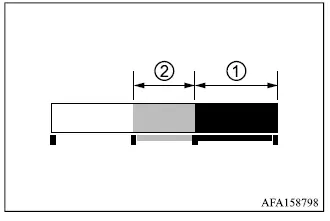
When ECO mode is selected, the ECO Pedal Guide can be displayed in the multi-information display. This feature provides a visual indication of accelerator use and can help the driver operate the Mitsubishi Outlander more efficiently.
When the ECO Pedal Guide bar remains within green range 1, the vehicle is being driven within the super economy driving range.
When the ECO Pedal Guide bar is within light-green range 2, the vehicle is being driven within the economy driving range.
If the ECO Pedal Guide bar moves outside green ranges 1 and 2, the accelerator pedal is being depressed beyond the economy driving range.
The ECO Pedal Guide bar is not displayed under the following conditions:
- When vehicle speed is less than approximately 2 MPH (4 km/h).
- When the shift lever is in P (Park), N (Neutral), or R (Reverse).
TARMAC mode
TARMAC mode is intended for dry paved roads and emphasizes more agile vehicle response. It provides responsive and powerful acceleration, a more direct and linear steering feel, and enhanced stability and traceability while cornering.
GRAVEL mode
GRAVEL mode is intended for rough surfaces such as relatively flat unpaved roads or wet paved roads. The mode is designed to improve straight-line stability on uneven surfaces while providing stronger traction and acceleration when starting.
NOTE
- When GRAVEL mode is selected, operation of Adaptive Cruise Control [ACC], MI-PILOT Assist, Lane Departure Prevention [LDP], and Active Blind Spot Assist [ABSA] is affected.
SNOW mode
SNOW mode is intended for slippery road surfaces such as snow-covered roads. It is designed to provide predictable initial steering response and improved cornering stability when traction is limited.
NOTE
- When SNOW mode is selected, operation of Adaptive Cruise Control [ACC], MI-PILOT Assist, Lane Departure Prevention [LDP], and Active Blind Spot Assist [ABSA] is affected.
MUD mode (AWC model)
MUD mode is available on AWC-equipped Mitsubishi Outlander models and is intended for slippery conditions where maximum available traction is required, including muddy roads and roads covered by deep snow. The mode adjusts vehicle control characteristics to improve traction performance under these demanding conditions.
NOTE
- When MUD mode is selected, operation of Adaptive Cruise Control [ACC], MI-PILOT Assist, Lane Departure Prevention [LDP], and Active Blind Spot Assist [ABSA] is affected.
