
WARNING
- Failure to follow the warnings and instructions for proper use of the LDW system could result in serious injury or death.
- The Lane Departure Warning system is designed only to alert the driver to a possible unintended departure from the current lane. It does not steer the Mitsubishi Outlander and cannot prevent a loss of vehicle control. The driver remains responsible for staying attentive, driving safely, keeping the vehicle within the travel lane, and maintaining control at all times.
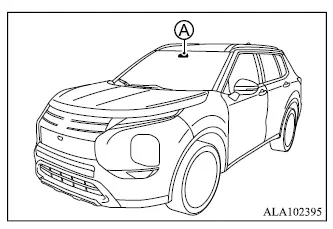
The LDW system operates when the Mitsubishi Outlander is traveling at approximately 37 MPH (60 km/h) or faster and the lane markings on the road are clearly visible.
The system monitors the lane markings ahead using camera unit A, which is located above the inside rearview mirror.
If the LDW system detects that the vehicle is beginning to leave the current driving lane unintentionally, it alerts the driver through a visual indicator and vibration of the steering wheel.
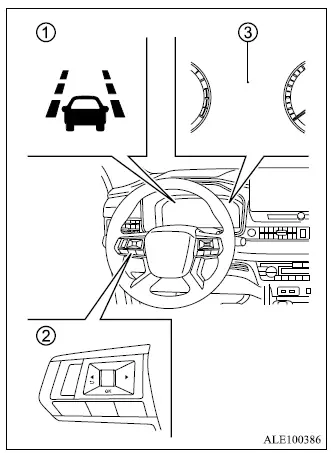
- LDW indicator (on the multi-information display)
- Steering wheel remote control switches (left side)
- Multi-information display
LDW system operation
The Lane Departure Warning system becomes available when vehicle speed is approximately 37 MPH (60 km/h) or higher and the lane markings are sufficiently clear for the camera to detect. If the Mitsubishi Outlander begins approaching either the left or right boundary of its travel lane, the steering wheel will vibrate and LDW indicator 1 in multi-information display 3 will blink to warn the driver.
The warning stops once the vehicle returns to a position within the detected lane markings.
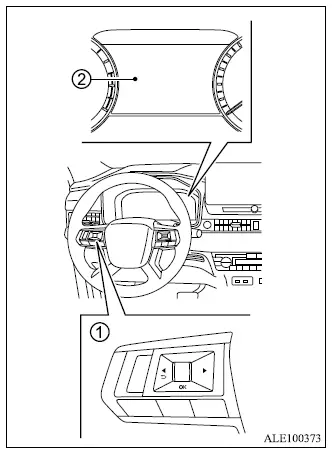
How to enable/disable the LDW system
- Steering wheel remote control switches (left side)
- Multi-information display
Use the following procedure to enable or disable the Lane Departure Warning system.
1. Push the
 button repeatedly until "Settings" appears in multi-information display 2, then push the scroll dial. Use the scroll dial to select "Driver Assistance".
Push the scroll dial to open the selected menu.
2. Select "Lane" and push the scroll dial.
3. Select "Warning (LDW)" and push the scroll dial to change the LDW setting.
NOTE
- If the LDW system is disabled, that setting will be retained the next time the Mitsubishi Outlander engine is started.
Setting lane sensitivity (if so equipped)
If equipped, the lane sensitivity setting can be adjusted through the "Settings" menu in the multi-information display, allowing the LDW system response to be configured using the available vehicle settings.
1. Push the
 button repeatedly until "Settings" appears in the multi-information display, then push the scroll dial.
Use the scroll dial to select "Driver Assistance".
Then push the scroll dial to open the selected menu.
2. Select "Lane Assist" and push the scroll dial.
3. Select "Lane Sensitivity", then choose one of the available sensitivity levels:
- Strong
- Normal
- Mild
NOTE
- The selected lane sensitivity setting is retained even after the Mitsubishi Outlander engine is restarted. The same sensitivity setting is also applied to the Lane Departure Prevention [LDP] system.
LDW system limitations
WARNING
- The following are important operating limitations of the Lane Departure Warning system. Failure to follow these warnings and instructions when using LDW could result in serious injury or death.
- The system does not operate at vehicle speeds below approximately 37 MPH (60 km/h), and it cannot provide a lane departure warning when lane markings cannot be detected reliably.
- Do not rely on the LDW system under the following conditions because its ability to detect lane markings and provide an accurate warning may be reduced:
- During adverse weather conditions such as rain, fog, or snow.
- When driving on slippery surfaces, including roads covered with ice or snow.
- When driving on winding, rough, or uneven roads.
- When normal lanes are closed or altered because of road construction or repair work.
- When driving through temporary or makeshift traffic lanes.
- When the travel lane is unusually narrow.
- When the Mitsubishi Outlander is being driven with abnormal tire conditions, including excessive tire wear, low tire pressure, use of a spare tire, installation of tire chains, or use of non-standard wheels.
- When the vehicle is equipped with non-original brake, steering, or suspension components.
- When towing a trailer or another vehicle.
- The LDW system may also operate incorrectly or may be unable to identify the actual lane boundaries under the following conditions:
- On roads with several parallel lane markings, faded or poorly painted lines, yellow lane markings, non-standard markings, or lane lines obscured by water, dirt, snow, or other material.
- On roads where old or discontinued lane markings remain visible and can still be detected by the camera.
- On roads with sharp curves.
- On roads containing strong visual contrasts such as shadows, snow, standing water, wheel ruts, pavement seams, or lines left after road repairs. The LDW system may incorrectly interpret these features as lane markings.
- Where the travel lane merges with another lane or separates into multiple lanes.
- When the direction of travel of the Mitsubishi Outlander does not correspond closely with the direction of the detected lane markings.
- When driving too close to the vehicle ahead, preventing the lane camera unit from obtaining a clear view of the road markings.
- When rain, snow, dirt, or another object is attached to or covering the windshield in front of the lane camera unit.
- When headlight illumination is reduced because the lenses are dirty or the headlight aim is not adjusted correctly.
- When strong light enters the lane camera unit, such as direct sunlight shining toward the front of the vehicle at sunrise or sunset.
- When ambient brightness changes suddenly, such as when the vehicle enters or exits a tunnel or passes beneath a bridge.
System temporarily unavailable
Condition A:
If the Mitsubishi Outlander has been parked in direct sunlight under high-temperature conditions above approximately 104ºF (40ºC) and is then started, the LDW system may be temporarily deactivated automatically. In this situation, the LDW indicator will flash and the following message will appear in the multi-information display: "Unavailable Camera Temperature High".
When the interior temperature decreases sufficiently, the Lane Departure Warning system will resume operation automatically and the LDW indicator will stop flashing.
Condition B:
The warning function of the LDW system is not designed to operate under the following conditions:
- When the turn signal is operated and the Mitsubishi Outlander changes lanes in the direction indicated by the signal. The LDW system will become available again approximately 2 seconds after the turn signal is switched off.
- When vehicle speed decreases below approximately 37 MPH (60 km/h).
Action to take:
Once the conditions described above are no longer present and all required operating conditions are satisfied, the LDW system will automatically resume normal operation.
System malfunction
If a malfunction occurs in the LDW system, the function will be canceled automatically and the message "Not Available System Malfunction" will appear in the multi-information display. If a "Malfunction" message is displayed, move the Mitsubishi Outlander safely off the road and stop in a suitable location.
Place the ignition switch in the OFF position, then restart the engine. If the "Malfunction" message continues to appear in the multi-information display after restarting, have the LDW system inspected. It is recommended that you visit an authorized Mitsubishi Motors dealer for this service.
System maintenance
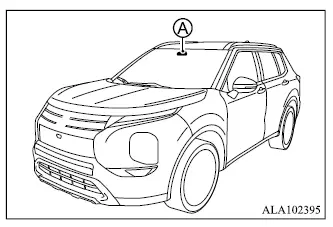
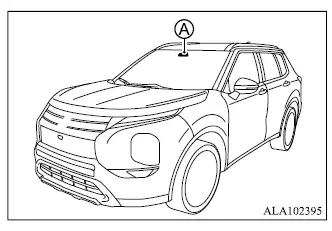
Lane camera unit A used by the LDW system is located above the inside rearview mirror.
To maintain proper operation of the Mitsubishi Outlander Lane Departure Warning system and reduce the possibility of a system malfunction, observe the following precautions:
- Keep the windshield clean, particularly the area in front of the lane camera unit.
- Do not attach stickers, including transparent materials, or install accessories near the camera unit, as they may interfere with its field of view.
- Do not place reflective objects such as white paper or mirrors on the instrument panel. Reflected sunlight may interfere with the camera unit's ability to detect lane markings correctly.
- Do not strike, damage, or apply unnecessary force to the area around the camera unit. Do not touch the camera lens or remove the screw located on the camera unit. If the camera unit or the surrounding area is damaged in an accident, it is recommended that the Mitsubishi Outlander be inspected by an authorized Mitsubishi Motors dealer.
