
The LDP system operates at vehicle speeds of approximately 37 MPH (60 km/h) and above when the lane markings are sufficiently clear for the camera to detect. If the Mitsubishi Outlander approaches either the left or right edge of the travel lane, the steering wheel will vibrate and LDP indicator (orange) 2 in the multi-information display will blink to warn the driver. The system will then automatically provide steering assistance for a short period to help move the vehicle back toward the center of the lane.
To turn on the LDP system, push MI-PILOT Assist switch 4 on the steering wheel after starting the engine. LDP ON indicator 1 in multi-information display 3 will illuminate. Push the MI-PILOT Assist switch again to turn off the LDP system. The LDP ON indicator will then turn off.
How to enable/disable the LDP system
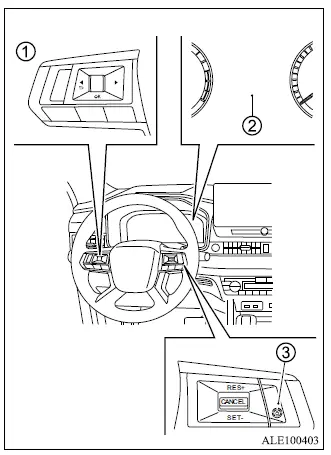
- Steering wheel remote control switches (left side)
- Multi-information display
- MI-PILOT Assist switch
Use the following procedure to enable or disable the Lane Departure Prevention system.
1. Push the
 button repeatedly until "Settings" appears in multi-information display 2, then push the scroll dial. Use the scroll dial to select "Driver Assistance." Then push the scroll dial to open the selected menu.
2. Select "Lane" and push the scroll dial.
3. Select "Prevention (LDP)" and push the scroll dial.
4. Push MI-PILOT Assist switch 3 to turn the LDP system on or off.
NOTE
- Turning on the MI-PILOT Assist system, if equipped, activates the LDP and ABSA systems at the same time. If LDP has been disabled through the settings menu, the Lane Departure Prevention system will nevertheless be turned on automatically whenever the Lane Keep Assist [LKA] system is active.
