
The Mitsubishi Outlander may be equipped with a range of Driver Assistance systems designed to support the driver in different traffic, parking, and highway driving situations. Each system has a specific purpose and operates under its own conditions and limitations.
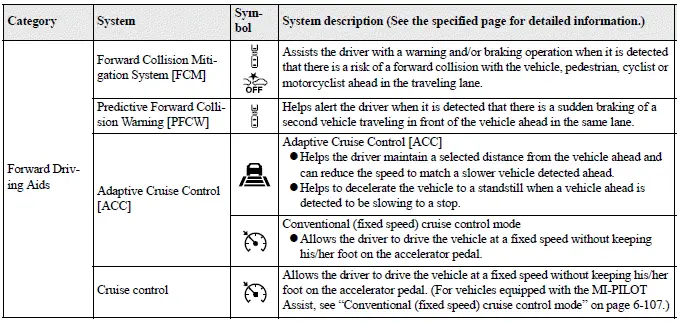
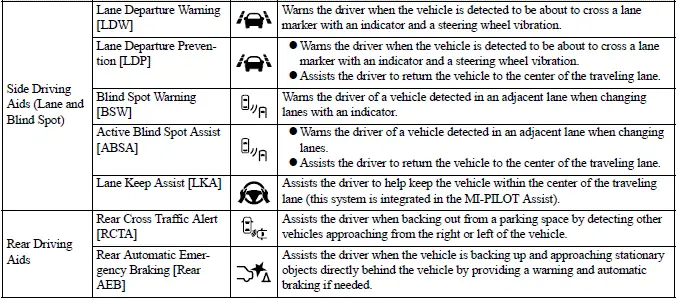
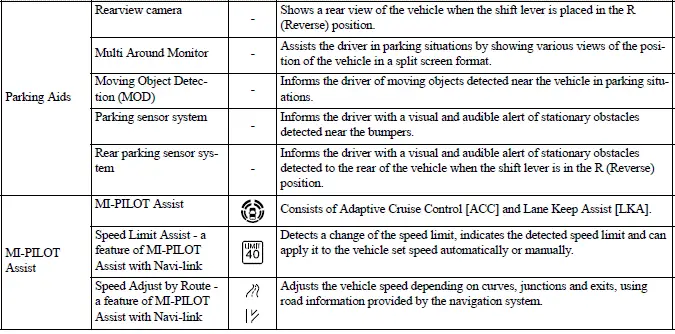
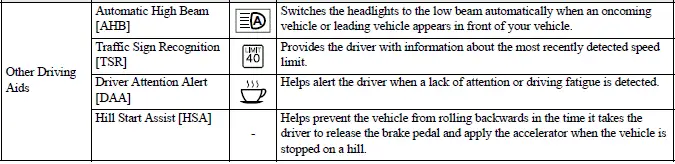
How to enable/disable the systems
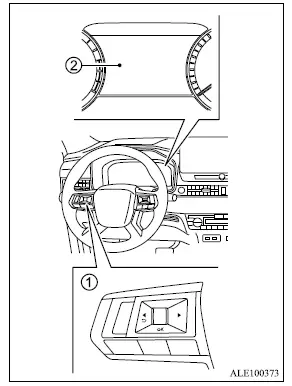
- Steering wheel remote control switches (left side)
- Multi-information display
The following Driver Assistance systems, if equipped, can be enabled or disabled through the settings menu in the multi-information display. Use the scroll dial on the left-side steering wheel remote control switches to navigate through the available settings and select the required system.
- Forward Collision Mitigation System [FCM]
- Predictive Forward Collision Warning [PFCW]
- Lane Departure Warning [LDW]
- Lane Departure Prevention [LDP]*
- Blind Spot Warning [BSW]
- Active Blind Spot Assist [ABSA]*
- Lane Keep Assist [LKA]
- Rear Cross Traffic Alert [RCTA]
- Rear Automatic Emergency Braking [Rear AEB]
- Moving Object Detection (MOD)
- Parking sensor system
- Rear parking sensor system
- Speed Limit Assist - a feature of MI-PILOT Assist with Navi-link
- Speed Adjust by Route - a feature of MI-PILOT Assist with Navi-link
- Traffic Sign Recognition [TSR]
- Driver Attention Alert [DAA]
*: To operate the LDP and ABSA systems, each function must first be enabled in the settings menu. After that, push the MI-PILOT Assist switch to activate the applicable system.
Driver Assistance display
The Driver Assistance display can be selected in the Mitsubishi Outlander multi-information display using the scroll dial. It may also appear temporarily when the MI-PILOT Assist switch is pushed.
The operating status of the applicable Driver Assistance systems is shown in different zones of the display, allowing the driver to see which warning or intervention functions are currently enabled.
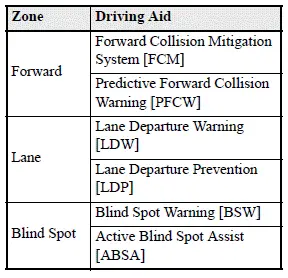
- When one or more "Warning" systems are enabled, the "
 " mark is displayed in the corresponding zone.
 - When one or more "Intervention" systems are enabled, the "
 " mark is displayed in the corresponding zone.
The Driver Assistance display can change according to which systems are active, as shown in the following examples:
All: outline
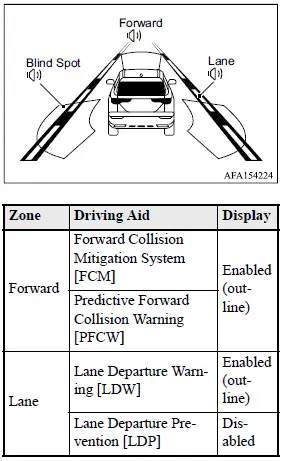
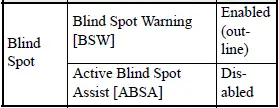
Forward: outline, Other: shaded
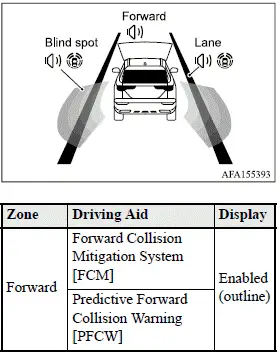
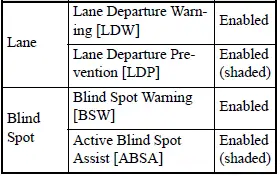
Common troubleshooting guide
Several Driver Assistance systems share common components such as cameras, radar sensors, and other detection sensors. If a pop-up warning message appears in the multi-information display, or if a related warning light flashes or remains illuminated, check the indicated system condition. For system-specific information, refer to the "System temporarily unavailable" and "System malfunction" sections in this Owner's Manual for the applicable Mitsubishi Outlander Driver Assistance system.
For camera and radar temporary blockage
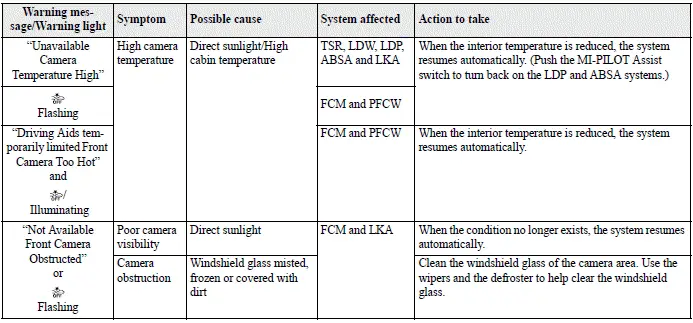
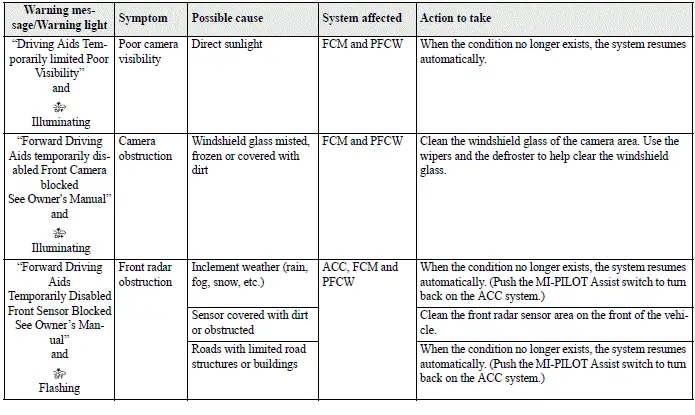
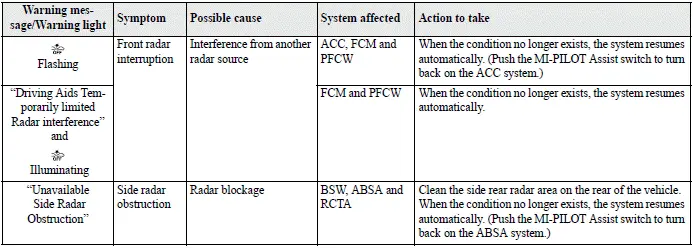
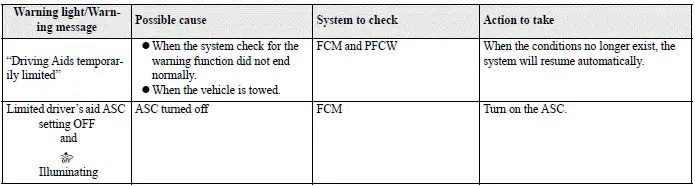
For system temporarily unavailable

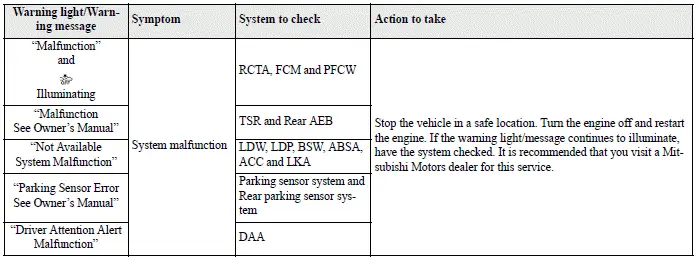
For system malfunction
Camera, radar and sensor locations
The cameras, radar sensors, and other sensors used by the Mitsubishi Outlander Driver Assistance systems are installed at different locations around the front and rear of the vehicle. For cleaning, inspection, and maintenance requirements for each component, refer to the "System maintenance" section for the applicable system in this Owner's Manual.
Vehicle front
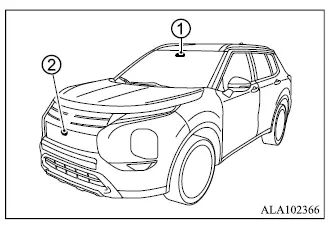
1. Front camera unit
- Forward Collision Mitigation System [FCM]
- Lane Departure Warning [LDW]
- Lane Departure Prevention [LDP]
- Active Blind Spot Assist [ABSA]
- Lane Keep Assist [LKA]
- Automatic High Beam [AHB]
- Traffic Sign Recognition [TSR]
- Adaptive Cruise Control [ACC]
2. Front radar sensor
- Forward Collision Mitigation System [FCM]
- Predictive Forward Collision Warning [PFCW]
- Adaptive Cruise Control [ACC]
2. Front radar sensor
- Forward Collision Mitigation System [FCM]
- Predictive Forward Collision Warning [PFCW]
- Adaptive Cruise Control [ACC]
Vehicle rear
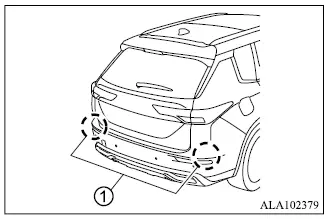
1. Side radar sensor
- Blind Spot Warning [BSW]
- Active Blind Spot Assist [ABSA]
- Rear Cross Traffic Alert [RCTA]
Sensors
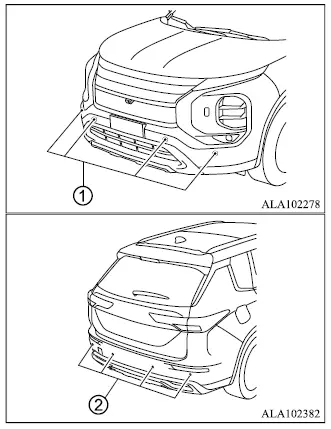
1. Front sensors
- Parking sensor system
2. Rear sensors
- Rear Automatic Emergency Braking [Rear AEB]
- Parking sensor system
- Rear parking sensor system
