
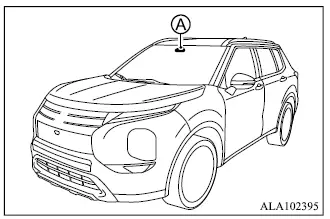
The Traffic Sign Recognition [TSR] system helps provide the driver with information about the most recently detected speed limit and certain other road signs. The system uses front camera unit A, mounted on the windshield in front of the inside rearview mirror, to recognize applicable traffic signs and display the detected information in the multi-information display. On Mitsubishi Outlander models equipped with a Navigation System, the displayed speed limit is determined using a combination of navigation map data and live recognition from the front camera.
TSR information can be shown in the multi-information display and, if equipped, in the Head-Up Display.
WARNING
The TSR system is designed only to assist the driver by providing traffic sign information. It does not replace careful observation of road conditions, posted signs, or the driver's responsibility to operate the Mitsubishi Outlander safely. The system cannot prevent accidents caused by inattention or improper driving.
Depending on road, weather, lighting, or traffic conditions, the system may fail to recognize a traffic sign or may display information that differs from the actual sign. The driver must remain alert, observe the road directly, and follow all applicable traffic regulations at all times.
System operation
The Traffic Sign Recognition [TSR] system can display the following types of road signs, as shown in the example below:
Example
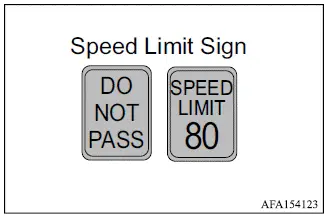
- "DO NOT PASS"
- Indicates that the vehicle is traveling in a no-overtaking zone.
- "SPEED LIMIT"
- Indicates the most recently detected speed limit.
CAUTION
- The TSR system is intended only as an aid to attentive driving. The driver remains responsible for staying alert, driving safely, following all applicable road regulations, and visually checking traffic signs along the route.
- The TSR system may not operate correctly under the following conditions:
- When a road sign is difficult to see clearly because it is damaged, obscured, faded, or affected by weather conditions.
- When rain, snow, dirt, or other material is attached to the windshield in front of the front camera unit.
- When headlight output is reduced because the lenses are dirty or the headlight aim is not adjusted correctly.
- When strong light enters the front camera unit.
For example, this may occur when direct sunlight shines toward the front of the Mitsubishi Outlander at sunrise or sunset.
- When there is a sudden change in ambient brightness, such as when entering or leaving a tunnel or passing beneath a bridge.
- When the vehicle is traveling in an area not covered by the navigation system.
- When navigation information differs from the actual road layout, for example after a change in road routing.
- When passing buses, trucks, or other vehicles displaying speed-related stickers or markings.
- When Navigation System data is unavailable or is not up to date.
- The TSR system may occasionally display a traffic sign even when no corresponding sign is directly ahead of the vehicle. It may also display a speed limit that does not apply to passenger vehicles. For example, the system may recognize a truck-specific speed limit, an advisory speed sign, a daytime or nighttime speed restriction, or a sign using different measurement units near a national border. As a result, the displayed maximum speed may be higher or lower than the actual limit that applies to the Mitsubishi Outlander.
- Depending on operating conditions and available data, TSR information may differ from traffic sign information shown in the Navigation turn-by-turn display, the multi-information display, or the Navigation System display.
How to enable/disable the TSR system
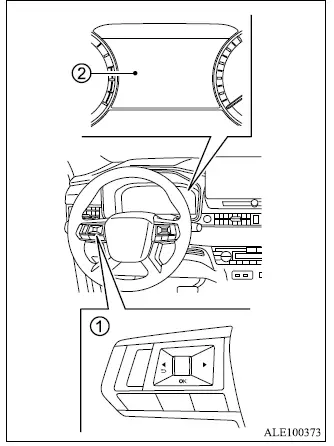
- Steering wheel remote control switches (left side)
- Multi-information display
Use the following procedure to enable or disable the Traffic Sign Recognition [TSR] system in the Mitsubishi Outlander:
1. Press the
 button repeatedly until "Settings" appears in the multi-information display, then press the scroll dial. Rotate the scroll dial to highlight "Driver Assistance".
Press the scroll dial to open the selected menu.
2. Select "Traffic Sign", then press the scroll dial to switch the TSR system on or off.
System temporarily unavailable
If the Mitsubishi Outlander has been parked in direct sunlight in high-temperature conditions above approximately 104ºF (40ºC), the TSR system may be temporarily deactivated when the vehicle is started. In this situation, the "Unavailable Camera Temperature High" warning message will appear in the multi-information display.
Action to take:
Once the temperature inside the vehicle decreases sufficiently, the Traffic Sign Recognition system will automatically resume normal operation.
System malfunction
If a malfunction is detected in the TSR system, the function will automatically switch off and the TSR "Malfunction" warning message will appear in the multi-information display.
Action to take
If the TSR "Malfunction" warning message appears, move the Mitsubishi Outlander safely off the road and stop in a suitable location. Turn the engine off, then restart it. If the TSR "Malfunction" message remains displayed after restarting the engine, have the system inspected by an authorized Mitsubishi Motors dealer.
System maintenance
The Traffic Sign Recognition [TSR] system uses the same front camera unit as the Lane Departure Warning [LDW] system. This camera is installed on the windshield in front of the inside rearview mirror and provides the visual information required for TSR operation.
