
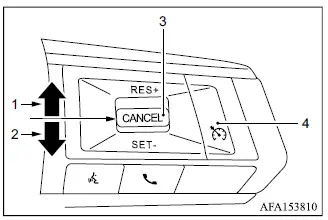
- RES+ switch
- SET- switch
- CANCEL switch
- Cruise ON/OFF switch
WARNING
- Always obey posted speed limits and never set the cruise control speed above the legal limit for the road you are driving on.
- Do not use cruise control under any of the following driving conditions. Using the system when a constant speed cannot be maintained safely may result in loss of vehicle control and could cause an accident.
- When road or traffic conditions make it difficult to maintain a constant vehicle speed.
- When driving in heavy or congested traffic.
- When surrounding traffic is frequently changing speed.
- When driving in areas with strong or gusty winds.
- When traveling on winding roads or roads with steep hills.
- When driving on slippery roads caused by rain, snow, ice, or similar conditions.
Precautions on cruise control
- If the cruise control system detects a malfunction, it will cancel operation automatically. The CRUISE indicator in the multi-information display will then blink to alert the driver that the system is not operating normally.
- If the CRUISE indicator continues to blink, switch the cruise control off using the Cruise ON/OFF switch and have the system inspected. It is recommended that the Mitsubishi Outlander be checked by an authorized Mitsubishi Motors dealer.
- The CRUISE indicator may also blink if the Cruise ON/OFF switch is turned on while the RES+, SET-, or CANCEL switch is being operated. To set the cruise control correctly, release the other switches and follow the normal operating procedure described below.
Cruise control operations
The cruise control system allows the Mitsubishi Outlander to maintain a selected driving speed above 20 MPH (30 km/h) without the driver having to keep continuous pressure on the accelerator pedal.
Cruise control will automatically cancel if vehicle speed falls more than approximately 8 MPH (13 km/h) below the preset cruising speed.
Moving the shift lever to the N (Neutral) position will also cancel cruise control operation.
Turning on cruise control
Push the Cruise ON/OFF switch. The CRUISE indicator will appear in the multi-information display, indicating that the system is ready to be set.
Setting cruising speed
1. Accelerate the Mitsubishi Outlander to the desired cruising speed.
2. Push the SET- switch down and release it.
3. Remove your foot from the accelerator pedal.
The vehicle will then maintain the selected speed as long as operating conditions allow.
NOTE
- If the RES+ switch is pushed and released when no cruising speed has previously been set, the system will use the vehicle's current speed as the new set speed.
Passing another vehicle
Depress the accelerator pedal when additional acceleration is required to pass another vehicle.
After the accelerator pedal is released, the Mitsubishi Outlander will gradually return to the previously selected cruising speed.
The cruise control system may not be able to maintain the preset speed when traveling up or down steep hills. In these situations, control vehicle speed manually instead of relying on cruise control.
Resetting to slower speed
Use any one of the following methods to reduce the preset cruising speed.
- Lightly depress the brake pedal. When the vehicle slows to the desired speed, push down and release the SET- switch to store the new cruising speed.
- Push down and hold the SET- switch.
When the vehicle reaches the desired lower speed, release the SET- switch to set that speed.
- Quickly push down and release the SET- switch.
Each operation reduces the preset vehicle speed by approximately 1 MPH (1.6 km/h).
Resetting to faster speed
Use any one of the following methods to increase the preset cruising speed.
- Push up and hold the RES+ switch. When the Mitsubishi Outlander reaches the desired higher speed, release the RES+ switch.
- Quickly push up and release the RES+ switch. Each operation increases the preset vehicle speed by approximately 1 MPH (1.6 km/h).
Resuming at preset speed
Push up and release the RES+ switch.
The vehicle will return to the most recently stored cruising speed when vehicle speed is above 20 MPH (30 km/h).
Cancelling cruising speed
Use any one of the following methods to cancel the current cruise control setting.
- Push the CANCEL switch.
- Lightly depress the brake pedal.
- Push the Cruise ON/OFF switch. The CRUISE indicator will turn off, confirming that cruise control has been switched off.
