
Example
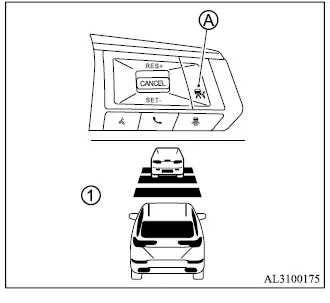
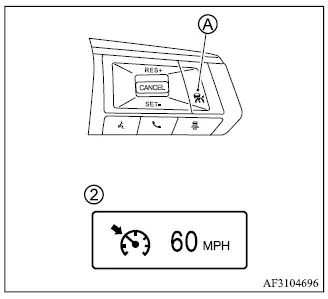
Selecting vehicle-to-vehicle distance control mode
To select the vehicle-to-vehicle distance control mode 1, quickly push and release the MAIN switch A. The system will then operate using Adaptive Cruise Control with following-distance adjustment when the required operating conditions are met.
Selecting the conventional (fixed speed) cruise control mode
To select the conventional (fixed speed) cruise control mode 2, push and hold the MAIN switch A for longer than approximately 1.5 seconds. In this mode, the Mitsubishi Outlander maintains a preset cruising speed without using vehicle-to-vehicle distance control.
Vehicle-to-vehicle distance control mode
In vehicle-to-vehicle distance control mode, the ACC system automatically assists in maintaining a selected following distance from a vehicle traveling ahead. The system adjusts the Mitsubishi Outlander speed according to the speed of the preceding vehicle, up to the selected set speed. When the road ahead is clear, the vehicle travels at the preset cruising speed.
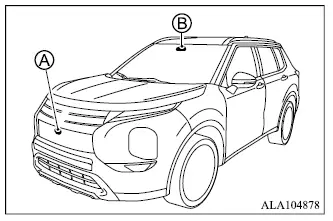
The ACC vehicle-to-vehicle distance control mode is intended to assist the driver when following another vehicle traveling in the same lane and in the same direction.
The system uses a multisensing front camera B installed behind the windshield together with radar sensor A located at the front of the vehicle to determine the distance to a vehicle traveling ahead in the same lane. If the system detects a slower-moving vehicle ahead, it reduces the speed of the Mitsubishi Outlander as necessary to help maintain the following distance selected by the driver.
NOTE
- Always make sure that the areas around the front camera and radar sensor remain clear. Dirt, snow, ice, or other obstructions may interfere with the sensors' ability to monitor the road ahead correctly.
Vehicle-to-vehicle distance control mode operation
The vehicle-to-vehicle distance control mode is designed to help maintain the selected following distance by reducing vehicle speed when necessary to match a slower vehicle ahead. If the preceding vehicle is detected slowing to a stop, the ACC system can decelerate the Mitsubishi Outlander to a standstill within the operating limits of the system. However, ACC can apply only up to approximately 40% of the vehicle's total braking capability. For this reason, the system should be used only when traffic conditions allow speeds to remain relatively steady or to change gradually.
If another vehicle suddenly enters the lane ahead or if the vehicle being followed decelerates rapidly, the distance between the vehicles may decrease quickly because the ACC system may not be able to slow the Mitsubishi Outlander fast enough on its own. If this occurs, a warning chime sounds and the ACC system display flashes to alert the driver. The driver must then take the necessary action to maintain a safe following distance and control the vehicle.
The ACC system will cancel operation and sound a warning chime if vehicle speed falls below approximately 15 MPH (25 km/h) while no vehicle is detected ahead.
The following functions are controlled while vehicle-to-vehicle distance control mode is active:
- When no vehicle is detected ahead, the vehicle-to-vehicle distance control mode maintains the speed selected by the driver. The available set-speed range is approximately 20 to 90 MPH (30 to 144 km/h).
- When a vehicle is traveling ahead in the same lane, the vehicle-to-vehicle distance control mode adjusts the Mitsubishi Outlander speed as necessary to help maintain the following distance selected by the driver. Speed adjustment is available up to the preset cruising speed. If the vehicle ahead comes to a stop, the system can decelerate the vehicle to a standstill within its operating limitations. Once the system determines that the vehicle has stopped, ACC operation is canceled and a warning chime sounds.
- When the vehicle ahead leaves the lane of travel and the road in front becomes clear, the vehicle-to-vehicle distance control mode accelerates the Mitsubishi Outlander as necessary and then maintains vehicle speed up to the selected set speed.
The ACC system does not control vehicle speed or provide a warning when the Mitsubishi Outlander approaches stationary or very slow-moving vehicles. The driver must remain attentive and be prepared to control speed and following distance manually, particularly when approaching toll gates, traffic congestion, or other situations where traffic ahead may be stopped or moving slowly.
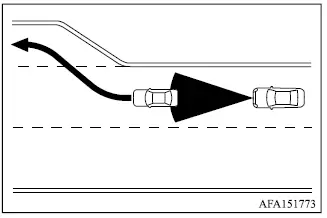
When driving on a highway at the selected cruising speed and approaching a slower-moving vehicle ahead, the ACC system adjusts vehicle speed to help maintain the following distance selected by the driver. If the vehicle ahead changes lanes or leaves the freeway, the ACC system can accelerate the Mitsubishi Outlander back toward the preset speed. The driver must continue to monitor surrounding traffic and remain prepared to intervene while the vehicle accelerates.
The system may not be able to maintain the selected cruising speed on winding roads, steep inclines, or downhill sections. If this occurs, the driver must manually control vehicle speed as necessary.
During normal vehicle-to-vehicle distance control, the ACC system automatically accelerates or decelerates the Mitsubishi Outlander according to the speed of the vehicle detected ahead. Press the accelerator pedal when additional acceleration is needed, such as when changing lanes. Apply the brake pedal whenever stronger deceleration is required to maintain a safe following distance, including when the vehicle ahead brakes suddenly or another vehicle cuts into the lane.
Always remain alert and ready to take control of the vehicle while using the ACC system.
Vehicle-to-vehicle distance control mode switches
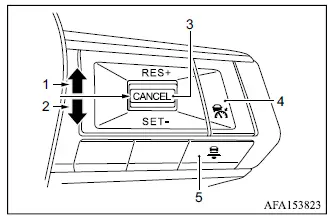
The vehicle-to-vehicle distance control mode is operated using the MAIN switch and four additional control switches located on the steering wheel.
1. RES+ switch:
Resumes the previously set cruising speed or increases the selected speed in increments.
2. SET- switch: Sets the desired cruising speed or reduces the selected speed in increments.
3. CANCEL switch: Temporarily deactivates ACC operation without deleting the stored set speed.
4. MAIN switch: Serves as the master control for activating the ACC system.
5. DISTANCE switch: Changes the selected following distance between the Mitsubishi Outlander and the vehicle ahead:
- Long
- Middle
- Short
Vehicle-to-vehicle distance control mode display and indicators
Example
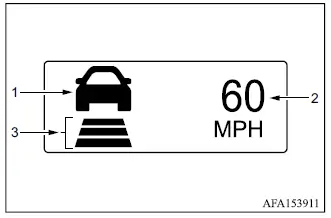
1. Vehicle ahead detection indicator: Shows whether the ACC system has detected a vehicle traveling ahead in the same lane.
2. Set vehicle speed indicator: Displays the cruising speed currently selected by the driver.
The speed unit shown on the display may differ depending on the country or vehicle configuration.
3. Set distance indicator: Shows the following-distance setting selected with the DISTANCE switch.
Operating vehicle-to-vehicle distance control mode
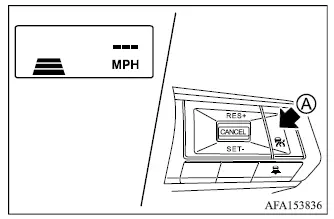
To turn on cruise control, quickly push and release the MAIN switch A. The set distance indicator and set vehicle speed indicator illuminate, indicating that the ACC system is active and waiting for a cruising speed to be set.
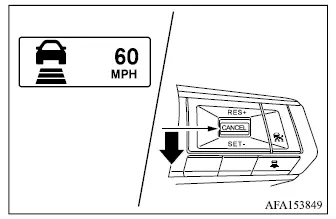
To set the cruising speed, accelerate the Mitsubishi Outlander to the desired speed, push the SET- switch, and then release it. The vehicle ahead detection indicator, set distance indicator, and set vehicle speed indicator illuminate. Remove your foot from the accelerator pedal and the vehicle will maintain the selected speed within the operating limits of the system.
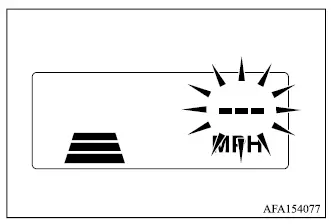
If the SET- switch is pushed under any of the following conditions, the ACC system cannot be set and the set vehicle speed indicator flashes for approximately 2 seconds.
- When the vehicle is traveling below 20 MPH (30 km/h) and no vehicle is detected ahead.
- When the shift lever is not in the D (Drive) position or manual shift mode.
- When the parking brake is applied.
- When the driver is operating the brakes.
- When the ASC system is switched off.
- When the ASC system, including the traction control system, is actively operating.
- When SNOW mode, MUD mode on AWC models, or GRAVEL mode is selected.
- When one or more wheels are slipping.
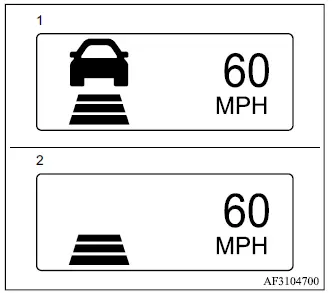
- System set display with vehicle ahead*
- System set display without vehicle ahead*
The driver selects the desired vehicle speed according to current road, traffic, and driving conditions. As long as no vehicle is detected in the lane ahead, the ACC system maintains the selected speed in a manner similar to conventional cruise control.
The currently selected cruising speed is shown on the ACC system display so the driver can confirm the active setting.
Vehicle detected ahead
When a vehicle is detected in the same lane ahead, the ACC system can reduce the speed of the Mitsubishi Outlander by controlling the throttle and applying the brakes as necessary to match a slower-moving vehicle. The system then continues to regulate vehicle speed according to the speed of the detected vehicle ahead, helping maintain the following distance selected by the driver.
NOTE
- The vehicle's stop lights illuminate whenever braking is automatically applied by the ACC system.
- When the brakes are operated by the ACC system, the driver may hear operating noise and/or feel some vibration. This is a normal characteristic of system operation and does not indicate a malfunction.
When a vehicle ahead is detected, the vehicle ahead detection indicator illuminates. The ACC display also continues to show the selected vehicle speed and the currently selected following-distance setting.
*: The appearance and design of the system set display may vary depending on the Mitsubishi Outlander model.
Vehicle ahead not detected
When the vehicle previously detected ahead is no longer present, the ACC system gradually accelerates the Mitsubishi Outlander toward the previously selected cruising speed. Once that speed is reached, the system maintains it as long as operating conditions remain suitable.
When no vehicle is detected ahead, the vehicle ahead detection indicator and the speed control status indicator for maintain-speed control mode turn off.
The ACC system normally accelerates gradually toward the selected vehicle speed. If quicker acceleration is required, the driver may depress the accelerator pedal. If no vehicle is detected ahead while the Mitsubishi Outlander is traveling below approximately 15 MPH (25 km/h), the ACC system cancels automatically.
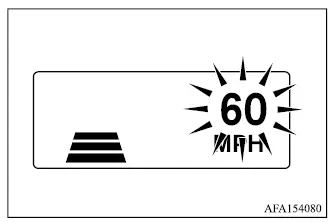
When passing another vehicle, the set speed indicator flashes if actual vehicle speed exceeds the preset ACC speed. The vehicle ahead detection indicator turns off once the area in front of the Mitsubishi Outlander becomes clear. After the accelerator pedal is released, the vehicle returns toward the previously selected cruising speed.
Even while a vehicle speed is stored in the ACC system, the accelerator pedal can be used whenever more rapid acceleration is necessary. The driver remains responsible for controlling the vehicle and monitoring surrounding traffic during the maneuver.
How to change set vehicle speed
The selected ACC vehicle speed can be increased or decreased while the system is operating.
To change to a faster cruising speed:
- Push up and hold the RES+ switch. The selected vehicle speed increases in increments of 5 MPH (5 km/h).
- Push up and quickly release the RES+ switch. Each operation increases the selected vehicle speed by 1 MPH (1 km/h).
To change to a slower cruising speed:
- Push down and hold the SET- switch. The selected vehicle speed decreases in increments of 5 MPH (5 km/h).
- Push down and quickly release the SET- switch.
Each operation decreases the selected vehicle speed by 1 MPH (1 km/h).
How to change set distance to vehicle ahead
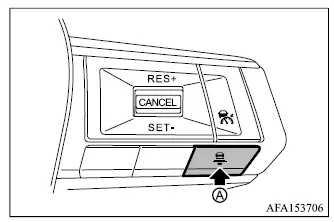
The following distance between the Mitsubishi Outlander and a detected vehicle ahead can be changed at any time to suit current traffic conditions.
Each time the DISTANCE switch A is pushed, the selected following distance changes in sequence from long to middle, then short, and back to long again.
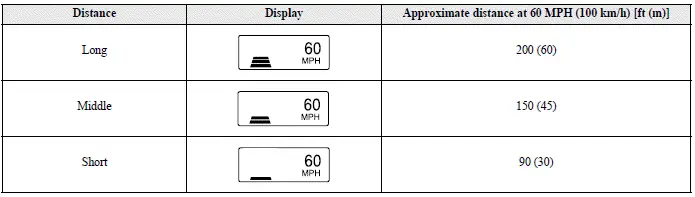
- The actual distance maintained from the vehicle ahead changes according to the speed of the Mitsubishi Outlander.
As vehicle speed increases, the ACC system uses a longer following distance for the selected distance setting.
- The selected following-distance setting is retained even after the engine is switched off and restarted.
Cut-in detection
If another vehicle moves into your lane close to the Mitsubishi Outlander, the ACC system may alert the driver by flashing the vehicle ahead detection indicator. The driver should continue monitoring the surrounding traffic and be prepared to adjust speed or following distance manually if necessary.
Approach warning
If your vehicle rapidly closes the distance to a vehicle ahead because that vehicle decelerates suddenly, or because another vehicle cuts into your lane, the ACC system may warn the driver with a chime and a flashing system display. Apply the brake pedal as necessary to reduce speed and maintain a safe following distance if:
- The warning chime sounds.
- The vehicle ahead detection indicator and the set distance indicator begin to blink.
- You determine that braking is necessary to maintain a safe distance from the vehicle ahead.
The approach warning chime may not sound in certain situations even when the distance between vehicles is relatively short. Examples include:
- When both vehicles are traveling at approximately the same speed and the distance between them remains nearly constant.
- When the vehicle ahead is traveling faster than the Mitsubishi Outlander and the following distance is increasing.
- When another vehicle cuts into the lane very close to your vehicle.
The warning chime will not sound under the following conditions:
- When your vehicle approaches vehicles that are stationary or moving slowly.
- When the accelerator pedal is depressed and the driver is overriding ACC operation.
NOTE
- The approach warning chime may sound and the ACC system display may flash if the radar sensor detects objects located beside the vehicle or along the edge of the road. Such detections may also cause the ACC system to decelerate or accelerate the Mitsubishi Outlander. This can occur while driving on winding, narrow, or hilly roads, or when entering or leaving a curve. In these situations, the driver must manually control vehicle speed and maintain an appropriate distance from traffic ahead.
Radar sensor sensitivity and detection performance can also be influenced by vehicle operation, including steering input and the vehicle's position within the lane, as well as by surrounding traffic or the condition of the vehicle. For example, sensor performance may be affected if the vehicle is being driven with certain types of damage.
Acceleration when passing
When the ACC system is operating above 44 MPH (70 km/h) while following a slower vehicle traveling below the preset speed, activating the left turn signal can cause the system to begin accelerating the Mitsubishi Outlander to assist with initiating a pass on the left. During this operation, the system may temporarily reduce the distance to the vehicle directly ahead. This feature operates only when the left turn signal is activated.
As the driver steers into the passing lane, the ACC system will continue accelerating toward the preset vehicle speed if no vehicle is detected ahead. If another vehicle is detected in the passing lane, the system instead adjusts speed according to that vehicle. If the driver does not move into the left lane, the temporary acceleration ends after a short period and the ACC system returns to maintaining the selected following distance. The driver can stop this acceleration at any time by depressing the brake pedal or pressing the CANCEL switch on the steering wheel.
WARNING
- To reduce the risk of a collision that could result in serious injury or death, observe the following precautions when using the passing-assistance function:
- This function is activated only by the left turn signal and may briefly accelerate the vehicle even if the driver does not actually begin changing lanes. This may also occur in situations that are not intended for passing, such as when signaling for a left-side exit.
- Before attempting to pass another vehicle, always confirm that the adjacent lane is clear and that the maneuver can be completed safely. Traffic conditions may change suddenly while passing. The driver must steer, accelerate, or brake manually whenever necessary and must never rely solely on the ACC system to complete the maneuver.
Vehicle-to-vehicle distance control mode limitations
WARNING
- The ACC system has the limitations described below. Failure to operate the Mitsubishi Outlander with these limitations in mind could result in serious injury or death.
- The system is intended primarily for use on straight, dry, open roads where traffic is relatively light and flows steadily. Use of ACC in city traffic or heavily congested areas is not recommended.
- The ACC system does not automatically compensate for every road or environmental condition. It should be used only when traffic is moving smoothly and predictably. Do not use the system on roads with sharp curves, on icy or otherwise slippery surfaces, during heavy rain, or in fog.
- The vehicle-to-vehicle distance control function has performance limitations, so never rely exclusively on the ACC system. It cannot compensate for careless, distracted, inattentive, or absent-minded driving, nor can it overcome poor visibility caused by rain, fog, or other adverse weather conditions.
Apply the brake pedal whenever necessary to reduce vehicle speed, taking into account the distance to the vehicle ahead and surrounding traffic conditions, so that a safe following distance is maintained at all times.
- If the vehicle ahead comes to a complete stop, the Mitsubishi Outlander can decelerate to a standstill within the operating limits of the ACC system. Once the system determines that the vehicle has stopped, ACC operation will be canceled and a warning chime will sound. The driver must depress the brake pedal to prevent the vehicle from moving.
- Always monitor vehicle operation and remain prepared to manually control the Mitsubishi Outlander and maintain an appropriate following distance.
Under certain road, traffic, weather, or driving conditions, the vehicle-to-vehicle distance control mode may not be able to maintain either the selected following distance or the preset vehicle speed.
- The ACC system is not designed to reliably detect the following types of vehicles, road users, or objects:
- Stationary or slow-moving vehicles when your vehicle is approaching them.
- Pedestrians or objects located in the roadway.
- Oncoming vehicles traveling toward your vehicle in the same lane.
- Motorcycles traveling offset from the center of the travel lane.
- The ACC system may be unable to detect a vehicle ahead correctly under certain road, weather, traffic, or driving conditions. To reduce the risk of an accident, do not use ACC under the following conditions:
- On roads with heavy or high-speed traffic, or on roads containing sharp curves.
- On slippery road surfaces, including roads covered with ice, snow, or similar material.
- On rough or uneven road surfaces, such as unpaved or uneven dirt roads.
- On steep downhill roads, where the vehicle may exceed the selected ACC speed and repeated braking could cause the brakes to overheat.
- On roads with repeated uphill and downhill sections.
- During adverse weather conditions such as rain, fog, or snow.
- When sensor detection performance is reduced by conditions such as rain, snow, fog, dust storms, sandstorms, or road spray from other vehicles.
- When dirt, ice, snow, or other material adheres to or covers the radar sensor area.
- When traffic requires frequent acceleration and deceleration, making it difficult to maintain a stable and appropriate following distance.
- When a vehicle with an unusual or complex shape, such as a car-carrier trailer or flatbed truck or trailer, is positioned near the vehicle ahead.
- When interference from other radar sources affects sensor operation.
- When excessively heavy baggage or cargo is loaded in the rear seat or cargo area of the Mitsubishi Outlander.
- When towing a trailer or another vehicle.
- Do not use the ACC system while towing a trailer. Under these conditions, the system may not reliably detect a vehicle traveling ahead.
- Do not use the ACC system if the vehicle is being driven with tires that are not in normal operating condition. This includes excessive tire wear, low tire pressure, the use of tire chains, or the installation of non-standard wheels.
- Under some road or traffic conditions, a vehicle or object may unexpectedly enter the sensor detection area and cause the ACC system to apply the brakes automatically. In other situations, the driver may need to use the accelerator pedal to control the distance from surrounding vehicles. Always remain alert and avoid using the ACC system whenever the conditions described in this section make its operation unsuitable.
- The ACC system also uses a front camera.
- Poor visibility caused by conditions such as rain, snow, fog, dust storms, sandstorms, or road spray from other vehicles.
- When the windshield area in front of the camera is fogged or covered by dirt, water droplets, ice, snow, or other material that interferes with the camera's view.
- When strong light, such as direct sunlight or high beams from an oncoming vehicle, shines into the front camera and affects its ability to recognize traffic ahead.
- When there is a sudden change in brightness, such as when the Mitsubishi Outlander enters or exits a tunnel or shaded area, or when a lightning flash abruptly changes surrounding light conditions.
The following are examples of conditions in which the front camera may not properly detect a vehicle ahead, or detection may be delayed:
The ACC system is designed to automatically monitor and check radar sensor operation within the functional limitations of the system. This self-checking capability does not eliminate the need for the driver to remain attentive to surrounding traffic and road conditions.
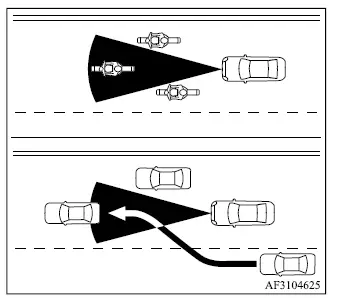
The detection area covered by the ACC sensor is limited and does not include every position around the front of the Mitsubishi Outlander.
A vehicle traveling ahead must remain within the sensor's detection zone for vehicle-to-vehicle distance control mode to recognize it correctly and help maintain the following distance selected by the driver.
A vehicle ahead may temporarily move outside the detection zone because of its position within the same traffic lane. Motorcycles can be particularly difficult to detect when they travel offset from the center of the lane. Similarly, a vehicle entering your lane from another lane may not be recognized until it has moved sufficiently into the ACC sensor's detection area. If this happens, the ACC system may flash the system indicator and sound a warning chime. The driver must be prepared to manually adjust vehicle speed and maintain a safe distance from the vehicle ahead.
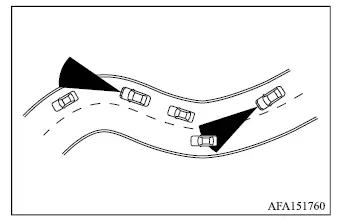
When driving on certain roads, including winding, hilly, curved, or narrow roads, or through road-construction areas, the ACC sensor may detect a vehicle traveling in another lane or may temporarily lose detection of the vehicle directly ahead. As a result, the ACC system may unexpectedly decelerate or accelerate the Mitsubishi Outlander.
Vehicle detection may also be influenced by the way the vehicle is being driven, including steering movements and its position within the traffic lane, as well as by the condition of the vehicle itself. Under these circumstances, the ACC system may unexpectedly flash the system indicator and sound the warning chime. The driver must then manually control the Mitsubishi Outlander as necessary to maintain an appropriate and safe following distance from the vehicle ahead.
