
WARNING
- ACC does not provide approach warnings or automatic braking while operating in conventional (fixed speed) cruise control mode.
This mode allows the Mitsubishi Outlander to maintain a selected speed between 20 and 90 MPH (30 to 144 km/h) without requiring the driver to keep continuous pressure on the accelerator pedal.
WARNING
- In conventional (fixed speed) cruise control mode, no warning chime is provided if the Mitsubishi Outlander becomes too close to a vehicle ahead because the system does not detect either the presence of the preceding vehicle or the distance between the two vehicles.
- Always monitor the distance between your vehicle and traffic ahead carefully. Failure to maintain a safe following distance could result in a collision.
- Always check the ACC system display to confirm which cruise control mode is currently selected before relying on system operation.
- Do not use conventional (fixed speed) cruise control mode under any of the following driving conditions:
- When road or traffic conditions make it difficult to maintain a constant preset speed.
- In heavy traffic or when surrounding traffic frequently changes speed.
- On winding, curved, or hilly roads.
- On slippery roads caused by rain, snow, ice, or similar conditions.
- In areas exposed to strong or gusty winds.
- Using conventional cruise control under unsuitable conditions may lead to loss of vehicle control and could result in an accident.
Conventional (fixed speed) cruise control switch
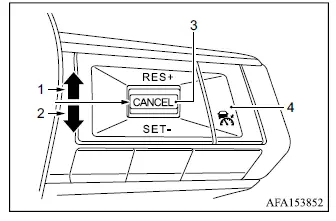
- RES+ switch:
Resumes the previously set speed or increases the selected cruising speed incrementally. - SET- switch:
Sets the desired cruising speed or reduces the selected speed incrementally. - CANCEL switch:
Temporarily deactivates cruise control without deleting the stored set speed. - MAIN switch:
Serves as the master switch for activating or switching off the cruise control system.
Conventional (fixed speed) cruise control mode display and indicators
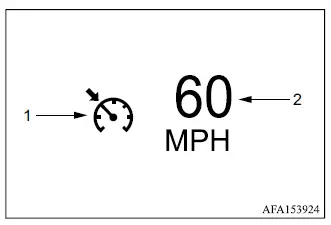
The conventional cruise control information is shown in the multi-information display.
1. Cruise indicator:
This indicator shows the current operating condition of the ACC system by changing color.
- Cruise control ON indicator (gray): Indicates that the ACC system has been switched on but no cruising speed has yet been set.
- Cruise control SET indicator (green): Indicates that a cruising speed has been selected and is currently set.
- Cruise control warning (orange): Indicates that a malfunction has been detected in the ACC system.
2. Set vehicle speed indicator:
This indicator displays the cruising speed currently selected by the driver.
For Canadian models, the selected speed is displayed in km/h.
Operating conventional (fixed speed) cruise control mode
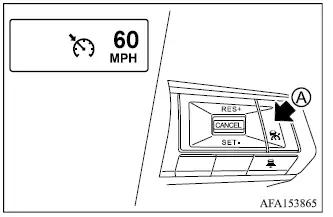
To activate conventional (fixed speed) cruise control mode, push and hold the MAIN switch A for longer than approximately 1.5 seconds.
When the MAIN switch is initially pushed, the ACC system display and its indicators appear in the multi-information display. Continue holding the MAIN switch for longer than approximately 1.5 seconds. The ACC vehicle-to-vehicle distance control display then turns off and the conventional cruise indicator appears, confirming that fixed-speed cruise control mode is ready for a cruising speed to be set.
Pushing the MAIN switch again turns the cruise control system completely off. The system is also switched off automatically when the ignition switch is placed in the OFF position.
To use cruise control again, quickly push and release the MAIN switch to select vehicle-to-vehicle distance control mode, or push and hold the MAIN switch again to activate conventional (fixed speed) cruise control mode.
WARNING
- To prevent accidental activation of cruise control, switch the MAIN switch off whenever the ACC system is not being used.
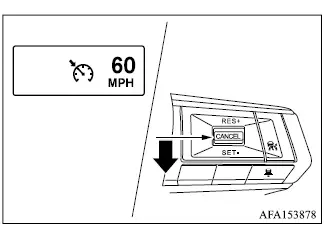
To set a cruising speed, accelerate the Mitsubishi Outlander to the desired speed, push down the SET- switch, and release it. The cruise indicator changes to green and the set vehicle speed indicator illuminates. Remove your foot from the accelerator pedal and the vehicle will maintain the selected speed as long as operating conditions allow.
- To pass another vehicle, press the accelerator pedal as necessary. After the pedal is released, the Mitsubishi Outlander returns toward the previously selected cruising speed.
- The vehicle may not be able to maintain the preset speed while traveling up or down steep hills.
If this occurs, manually control vehicle speed using the accelerator or brake pedal as necessary.
To cancel the preset vehicle speed, use any of the following methods:
1. Push the CANCEL switch. The set vehicle speed indicator will turn off.
2. Lightly depress the brake pedal. The set vehicle speed indicator will turn off.
3. Switch the MAIN switch off. Both the cruise indicator and the set vehicle speed indicator will turn off.
NOTE
- Conventional (fixed speed) cruise control mode is automatically canceled and a warning chime sounds under any of the following conditions.
- When the Mitsubishi Outlander is traveling below 15 MPH (25 km/h).
- When ASC, including the traction control system, is operating.
- When one or more wheels are slipping.
- When the shift lever is not in the D (Drive) position or manual shift mode.
- When the electric parking brake is applied.
- When ASC is switched off.
- When the FCM system applies braking.
- When the cruise control or ACC system detects a malfunction.
- When SNOW mode, MUD mode on AWC models, or GRAVEL mode is selected.
To reset the system to a faster cruising speed, use any one of the following three methods:
1. Press the accelerator pedal. When the Mitsubishi Outlander reaches the desired speed, push down and release the SET- switch to store the new speed.
2. Push up and hold the RES+ switch. When the vehicle reaches the desired higher speed, release the switch.
3. Push up and quickly release the RES+ switch. Each operation increases the selected vehicle speed by approximately 1 MPH (1 km/h).
To reset the system to a slower cruising speed, use any one of the following three methods:
1. Lightly depress the brake pedal. When the vehicle slows to the desired speed, push down and release the SET- switch.
2. Push down and hold the SET- switch.
Release the switch when the Mitsubishi Outlander has slowed to the desired cruising speed.
3. Push down and quickly release the SET- switch. Each operation decreases the selected vehicle speed by approximately 1 MPH (1 km/h).
To resume the previously stored vehicle speed, push up and release the RES+ switch. The Mitsubishi Outlander will return to the last selected cruising speed when vehicle speed is above 20 MPH (30 km/h).
