
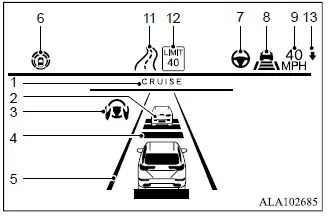
Models with type 1 display
Models with type 2 display
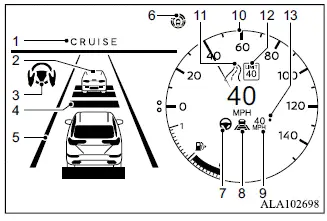
- MI-PILOT Assist activation
Appears when the MI-PILOT Assist system is activated and confirms that the driver-assistance system has been switched on. - Vehicle ahead detection indicator
Shows whether the system currently detects a vehicle traveling ahead of the Mitsubishi Outlander. - Lane Keep Assist [LKA] indicator
Shows the operating status of the Lane Keep Assist [LKA] function according to the color of the indicator- Lane Keep Assist [LKA] indicator (gray): Lane Keep Assist [LKA] is in standby mode
- Lane Keep Assist [LKA] indicator (green): Lane Keep Assist [LKA] is actively providing assistance
- Set distance indicator
Displays the following-distance setting currently selected by the driver. - Lane marker indicator
Shows whether the system detects the lane markings and indicates the current LKA operating condition- No lane markers displayed: Lane Keep Assist [LKA] is turned off
- Lane marker indicator (gray): Lane markers are not currently detected
- Lane marker indicator (green): Lane markers are detected and Lane Keep Assist [LKA] is active
- Lane marker indicator (orange): The system has detected a lane departure
- MI-PILOT Assist status indicator (
 )
)
Indicates the current operating status of the MI-PILOT Assist system according to the color of the indicator- MI-PILOT Assist status indicator (white): MI-PILOT Assist is switched on but remains in standby
- MI-PILOT Assist status indicator (green): MI-PILOT Assist is actively operating
- Lane Keep Assist [LKA] status indicator/
warning (
 )
)
Shows the operating condition or warning status of Lane Keep Assist [LKA] according to the indicator color- No Lane Keep Assist [LKA] status indicator displayed: Lane Keep Assist [LKA] is turned off
- Lane Keep Assist [LKA] status indicator (gray): Lane Keep Assist [LKA] is in standby
- Lane Keep Assist [LKA] status indicator (green): Lane Keep Assist [LKA] is actively operating
- Lane Keep Assist [LKA] status indicator (orange): A Lane Keep Assist [LKA] malfunction has been detected
- Speed control status indicator/set distance
indicator/lane marker indicator
(
 )
)
Shows the current speed-control status by indicator color and represents the selected following distance using the number of horizontal bars displayed- Speed control status indicator (white): ACC is switched on and in standby
- Speed control status indicator (green):
ACC vehicle-to-vehicle distance control mode is active
- Green vehicle icon displayed: A vehicle is detected ahead
- No vehicle icon shown: No vehicle is detected ahead, and the Mitsubishi Outlander maintains the cruising speed selected by the driver
- Speed control status indicator (orange): Indicates that an ACC malfunction has been detected
- Vehicle set speed indicator
Displays the vehicle speed currently selected for cruise control operation. - Vehicle set speed indicator (if so
equipped)
Displays the selected vehicle speed on models equipped with this indicator configuration. - Road information indicator (if so
equipped) (
 )
)
Displays road information detected or provided for the MI-PILOT Assist system. - Detected speed limit sign indicator (if
so equipped) (
 )
)
Displays the speed limit sign currently detected by the system. - Speed Limit Assist indicator (if so
equipped) (A,
 )
)
Indicates the selected Speed Limit Assist activation mode or current system operation.
NOTE
- When the MI-PILOT Assist system is activated, the multi-information display automatically changes to the dedicated MI-PILOT Assist system display.
To disable this automatic display transition, turn "Transition (Cruise)" off under "Customize Display" in the settings menu.
The MI-PILOT Assist information can also be shown in the Head-Up Display [HUD] on Mitsubishi Outlander models equipped with this feature.
Turning the conventional (fixed speed) cruise control mode ON
NOTE
- When conventional (fixed speed) cruise control mode is selected, MI-PILOT Assist does not provide approach warnings, automatic braking, or Lane Keep Assist [LKA].
To select conventional (fixed speed) cruise control mode, push and hold the MI-PILOT Assist switch for longer than approximately 1.5 seconds. Confirm the selected operating mode in the Mitsubishi Outlander system display before using cruise control.
