
To cancel MI-PILOT Assist operation, use any one of the following methods:
- Push the CANCEL switch.
- Lightly depress the brake pedal, except when the vehicle is already at a standstill.
- Push the MI-PILOT Assist switch to turn the system off completely. The MI-PILOT Assist status indicator will then turn off.
If the MI-PILOT Assist system is canceled while the Mitsubishi Outlander is stopped, the electric parking brake is applied automatically to help keep the vehicle stationary.
WARNING
- To prevent the vehicle from moving or rolling unexpectedly, which could result in serious injury or property damage, always switch MI-PILOT Assist off before leaving the vehicle. Push the park button to select P (Park), make sure the vehicle is securely stopped, and turn off the engine before exiting.
Adaptive Cruise Control [ACC] with Stop & Go
- Adaptive Cruise Control [ACC] is one of the functions included in the MI-PILOT Assist system. To use ACC without Lane Keep Assist [LKA], first activate MI-PILOT Assist and then switch Lane Keep Assist [LKA] off.
- To select conventional (fixed speed) cruise control mode instead, push and hold the MI-PILOT Assist switch for longer than approximately 1.5 seconds.
WARNING
- Failure to follow the warnings and instructions for proper use of the ACC system could result in serious injury or death.
- The ACC system is designed only to assist the driver. It is not a collision warning or collision avoidance system. ACC is recommended primarily for highway driving and is not intended for normal city use. The driver remains responsible for staying alert, driving safely, monitoring traffic, and maintaining full control of the Mitsubishi Outlander at all times.
- The ACC system has operating limitations and cannot function correctly under every combination of driving, traffic, weather, and road conditions. The driver must remain attentive, keep the vehicle properly positioned in its travel lane, and be prepared to take control whenever necessary.
- Always obey posted speed limits and never set the ACC speed above the applicable legal limit.
- The ACC system does not respond to stationary vehicles or vehicles moving at very low speeds.
- Always drive carefully and remain attentive while using ACC. Read and understand the Owner's Manual before operating the system. To reduce the risk of serious injury or death, never rely on ACC to prevent an accident or control vehicle speed in an emergency. Use the system only when road, traffic, and driving conditions are appropriate for safe operation.
ACC system operation
The ACC system is designed to help maintain a following distance selected by the driver from a vehicle traveling ahead. When a slower vehicle is detected, the system can reduce the speed of the Mitsubishi Outlander to match that vehicle. If the vehicle ahead slows to a stop, ACC can decelerate the Mitsubishi Outlander to a standstill within its operating limits. However, the ACC system can apply only up to approximately 40% of the vehicle's total braking capability.
ACC should be used only when traffic conditions allow vehicle speeds to remain relatively steady or change gradually. If another vehicle suddenly enters the lane ahead, or if the vehicle being followed decelerates rapidly, the distance between vehicles may decrease quickly because ACC may not be able to slow the Mitsubishi Outlander fast enough on its own. If this occurs, the system sounds a warning chime and flashes the ACC display to alert the driver to take immediate action.
The ACC system automatically cancels and a warning chime sounds if vehicle speed falls below approximately 15 MPH (25 km/h) while no vehicle is detected ahead.
For Mitsubishi Outlander models equipped with MI-PILOT Assist with Navi-link, when driving on a limited-access freeway identified by the navigation map data, the ACC system will cancel and a warning chime will sound if the vehicle remains at a standstill for more than approximately 3 seconds and no vehicle is detected ahead.
The ACC system operates as follows:
- When no vehicle is detected ahead, ACC maintains the cruising speed selected by the driver. The available vehicle set-speed range is approximately 20 to 90 MPH (30 to 144 km/h).
- When a vehicle is detected ahead in the same lane, ACC adjusts the Mitsubishi Outlander speed as necessary to help maintain the following distance selected by the driver. If the preceding vehicle slows to a stop, the system can decelerate the Mitsubishi Outlander to a standstill. After the vehicle stops, ACC continues applying braking force to help keep it stationary.
- When the vehicle ahead moves into another travel lane and the road in front becomes clear, the ACC system accelerates the Mitsubishi Outlander as necessary and then maintains speed up to the preset cruising speed.
The ACC system does not control vehicle speed or provide a warning when the Mitsubishi Outlander approaches stationary or very slow-moving vehicles. The driver must remain attentive and manually maintain a safe following distance, especially when approaching toll gates, congested traffic, or other situations where vehicles ahead may be stopped or moving slowly.
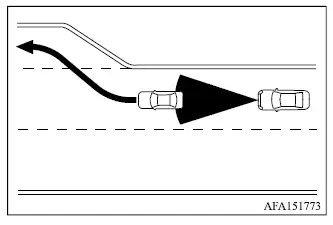
When driving on the highway at the selected vehicle speed and approaching a slower-moving vehicle ahead, the ACC system adjusts the Mitsubishi Outlander speed to help maintain the following distance chosen by the driver. If the vehicle ahead changes lanes or exits the highway, the ACC system can accelerate the vehicle back toward the preset speed and then maintain that speed. The driver must continue monitoring traffic and remain prepared to control the vehicle while it accelerates.
The ACC system may not be able to maintain the selected speed on winding roads, steep inclines, or downhill sections. If this occurs, the driver must manually control vehicle speed as necessary.
During normal vehicle-to-vehicle distance control, the system automatically accelerates or decelerates the Mitsubishi Outlander according to the detected speed of the vehicle traveling ahead.
Depress the accelerator pedal when additional acceleration is required, such as when changing lanes. Apply the brake pedal whenever stronger deceleration is necessary to maintain a safe distance from the vehicle ahead, including when the preceding vehicle brakes suddenly or another vehicle cuts into the lane. Always remain alert and ready to intervene while using the ACC system.
System set display - no vehicle detected ahead*
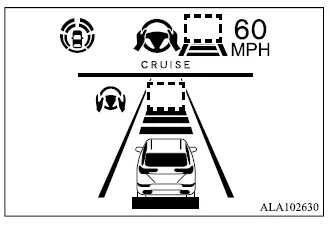
No vehicle detected ahead
The driver selects the desired cruising speed according to current road and traffic conditions. As long as no vehicle is detected in the lane ahead, the ACC system maintains the selected speed in a manner similar to conventional cruise control. The currently selected vehicle speed is shown on the ACC display.
*: The appearance and design of the system set display may vary depending on the Mitsubishi Outlander model.
System set display - vehicle ahead*
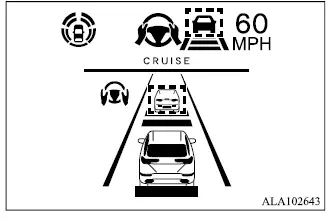
Vehicle detected ahead
When a vehicle is detected in the same lane ahead, the ACC system can reduce the speed of the Mitsubishi Outlander by controlling the throttle and applying the brakes as necessary to match a slower-moving vehicle. The system then continues adjusting vehicle speed according to the speed of the detected vehicle ahead, helping maintain the following distance selected by the driver.
NOTE
- The vehicle's stop lights illuminate whenever braking is automatically applied by the ACC system.
- When the ACC system applies the brakes, operating noise may be heard. This is a normal characteristic of system operation and does not indicate a malfunction.
When a vehicle ahead is detected, the vehicle ahead detection indicator and the speed control status indicator for distance control mode illuminate in green, confirming that ACC is actively controlling the following distance.
*: The appearance and design of the system set display may vary depending on the Mitsubishi Outlander model.
Vehicle ahead stops
If a detected vehicle ahead gradually slows to a stop, the Mitsubishi Outlander also decelerates to a standstill within the operating limits of the ACC system. Once your vehicle is stopped, the "(RES+) Follow Vehicle Ahead" message appears on the multi-information display.
Vehicle ahead accelerates
- If the Mitsubishi Outlander has been stopped for less than approximately 3 seconds and the vehicle ahead begins moving again, your vehicle will automatically start moving and continue following it.
- If your vehicle has remained at a standstill for more than approximately 3 seconds and the vehicle ahead begins to accelerate, push up the RES+ switch or lightly depress the accelerator pedal. The ACC system will then resume following the vehicle ahead.
- Always check the surroundings and confirm that it is safe before allowing the Mitsubishi Outlander to start moving again.
- For vehicles equipped with MI-PILOT Assist with Navi-link, and only while driving on a limited-access freeway identified as such by the navigation map data:
- The period during which the vehicle can remain stopped and still restart automatically is extended from approximately 3 seconds to approximately 30 seconds.
- If a vehicle cuts into or leaves the lane ahead, the Mitsubishi Outlander may not restart automatically when traffic begins moving. In this situation, push up the RES+ switch or lightly depress the accelerator pedal to begin following the vehicle directly ahead after confirming that it is safe to proceed.
Vehicle ahead not detected
When a vehicle is no longer detected ahead, the ACC system gradually accelerates the Mitsubishi Outlander toward the previously selected vehicle speed. Once the preset speed is reached, the system maintains that speed as long as operating conditions remain suitable.
When no vehicle is detected ahead, the vehicle ahead detection indicator and the speed control status indicator for maintain-speed control mode turn off.
The ACC system normally accelerates gradually back to the selected vehicle speed. If quicker acceleration is required, the driver may depress the accelerator pedal. If no vehicle is detected ahead while the Mitsubishi Outlander is traveling below approximately 15 MPH (25 km/h), the ACC system cancels automatically.
For vehicles equipped with MI-PILOT Assist with Navi-link, when driving on a limited-access freeway identified by the navigation map data, the ACC system will cancel and a warning chime will sound if the Mitsubishi Outlander remains at a standstill for more than approximately 3 seconds and no vehicle is detected ahead.
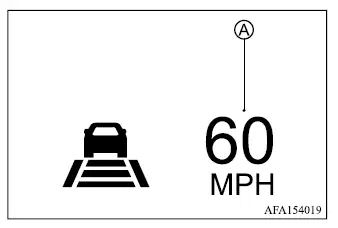
When passing another vehicle, the vehicle set speed indicator A flashes if the actual vehicle speed exceeds the selected ACC speed. The vehicle ahead detection indicator turns off when the area in front of the Mitsubishi Outlander becomes clear. After the accelerator pedal is released, the vehicle gradually returns to the previously selected speed. Even while a speed is stored in the ACC system, the accelerator pedal may be used whenever more rapid acceleration is necessary.
Cut-in detection
If another vehicle moves into your travel lane close to the Mitsubishi Outlander, the ACC system may alert the driver by flashing the vehicle ahead detection indicator. The driver must continue monitoring surrounding traffic and be prepared to adjust speed or following distance manually.
Approach warning
If the Mitsubishi Outlander rapidly closes the distance to a vehicle ahead because that vehicle decelerates suddenly, or because another vehicle cuts into the lane, the ACC system may warn the driver with a chime and a flashing system display. Apply the brake pedal as necessary to reduce speed and maintain a safe following distance if:
- The warning chime sounds.
- The vehicle ahead detection indicator and set distance indicator begin to blink.
- You determine that additional braking is necessary to maintain a safe distance from the vehicle ahead.
The approach warning chime may not sound in certain situations even when the distance between vehicles becomes relatively short. Examples include:
- When both vehicles are traveling at approximately the same speed and the following distance is not changing significantly.
- When the vehicle ahead is traveling faster than the Mitsubishi Outlander and the distance between the vehicles is increasing.
- When another vehicle cuts into the lane very close to your vehicle.
The warning chime will not sound under the following conditions:
- When the Mitsubishi Outlander approaches vehicles that are parked or moving slowly.
- When the accelerator pedal is depressed and the driver is overriding ACC operation.
NOTE
- The approach warning chime may sound and the ACC system display may flash if the radar sensor detects objects beside the vehicle or along the edge of the road. Such detections may also cause the ACC system to decelerate or accelerate the Mitsubishi Outlander. This can occur while driving on winding, narrow, or hilly roads, or when entering or exiting a curve. In these situations, the driver must manually control vehicle speed and maintain an appropriate following distance.
Radar sensor sensitivity can also be influenced by vehicle operation, including steering movements and the vehicle's position within the lane, as well as by surrounding traffic or the condition of the vehicle itself. For example, certain types of vehicle damage may affect sensor performance.
Acceleration when passing
When the ACC system is active above 44 MPH (70 km/h) and the Mitsubishi Outlander is following a slower vehicle traveling below the preset speed, activating the left turn signal can cause the system to begin accelerating to assist with initiating a pass on the left. During this operation, ACC may temporarily reduce the distance to the vehicle directly ahead. This function operates only when the left turn signal is used.
As the driver steers into the passing lane, the ACC system continues accelerating toward the selected vehicle speed if no vehicle is detected ahead. If another vehicle is detected in the passing lane, the Mitsubishi Outlander accelerates only up to the speed needed to follow that vehicle. If the driver does not move into the left lane, the temporary acceleration ends after a short period and the system returns to maintaining the selected following distance. The driver can stop this acceleration at any time by depressing the brake pedal or pressing the CANCEL switch on the steering wheel.
WARNING
- To reduce the risk of a collision that could result in serious injury or death, observe the following precautions when using this passing-assistance function:
- This function is activated only when the left turn signal is used and may briefly accelerate the Mitsubishi Outlander even if the driver does not actually begin changing lanes. This can also occur in situations that are not intended for passing, such as when signaling for a left-side exit.
- Before attempting to pass another vehicle, always confirm that the adjacent lane is clear and that the maneuver can be completed safely. Traffic conditions can change suddenly during a pass. The driver must steer, accelerate, or brake manually whenever necessary and must never rely solely on the system to complete the maneuver.
Speed Limit Assist - a feature of MI-PILOT Assist with Navi-link (if so equipped)
WARNING
- The Speed Limit Assist function has the limitations described below. Failure to operate the Mitsubishi Outlander with these limitations in mind could result in serious injury or death:
- The driver remains responsible for selecting an appropriate vehicle speed, obeying all applicable traffic laws and posted limits, and remaining aware of other road users.
- Speed Limit Assist may not operate correctly under all conditions, and the actual posted speed limit may not always be applied accurately to the selected vehicle speed. The driver must monitor and manually control vehicle speed whenever necessary.
- When the Traffic Sign Recognition [TSR] system is not operating correctly or has been switched off.
- When driving in countries or geographic areas that are not covered by the navigation system.
- When crossing national borders, where road information or applicable speed-limit data may change.
- When driving on an exit from a limited-access freeway identified in the navigation map data.
- When driving in an area with closely spaced parallel roads, such as a freeway running alongside a service road.
- When individual lanes on the same roadway have different posted speed limits.
- When traveling through road construction areas or active construction zones.
- When navigation system data is unavailable, incomplete, or not up to date.
When MI-PILOT Assist with Navi-link is active and the system detects a change in the applicable speed limit, the newly detected speed-limit sign is displayed. Depending on the selected Speed Limit Assist setting, the new limit can then be applied to the Mitsubishi Outlander set speed automatically or accepted manually by the driver.
The Speed Limit Assist function operates under the following conditions:
- When the detected speed-limit sign indicates 20 MPH (30 km/h) or higher.
- When "Spd. Limit Assist" is enabled in the settings menu of the multi-information display.
NOTE
- When AUTO mode is selected and the accelerator pedal is being operated, Speed Limit Assist will automatically adjust the vehicle set speed only if the newly detected speed limit is higher than the speed currently set by the driver.
- Speed Limit Assist will not operate in the following situations:
- When the system detects an increase in the posted speed limit but the Mitsubishi Outlander set speed is already higher than the newly detected limit.
- When the system detects a decrease in the posted speed limit but the vehicle set speed is already lower than the newly detected limit.
System display and indicators
Example
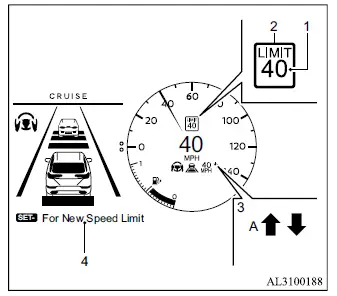
- Detected speed limit sign indicator
Displays the speed limit sign currently detected by the system. - Applied speed limit sign indicator (green
frame)
Shows that the detected speed limit can be applied to the current vehicle set speed. - Speed Limit Assist indicator
Indicates the selected system mode or current Speed Limit Assist operation.
" " : Manual mode is active and a newly detected higher speed limit is available to be applied.
" " : Manual mode is active and a newly detected lower speed limit is available to be applied.
"A" : Auto mode is active.
- Guidance message, which provides instructions for applying the newly detected speed limit to the vehicle set speed.
Operating the system
When the system detects a speed limit that differs from the currently recognized value, the newly detected speed limit is shown on the Mitsubishi Outlander display.
Depending on the selected Speed Limit Assist mode, the vehicle set speed can then be changed to match the indicated speed limit either automatically or manually.
When Manual mode is selected on settings menu (factory default setting):
- To accept the newly displayed speed limit, operate the RES+ switch when the new limit is higher, or the SET- switch when the new limit is lower.
- The Speed Limit Assist indicator (
 or
or
 ) turns off after approximately 10 seconds if the RES+ or SET- switch is not operated. The indicator can also be cleared immediately by operating the switch opposite to the direction shown by the Speed Limit Assist indicator.
The Speed Limit Assist function will not activate when no speed limit sign has been detected.
When Auto mode is selected on the settings menu:
- On a limited-access freeway identified in the navigation map data, the detected speed limit is automatically applied to the Mitsubishi Outlander set speed. If MI-PILOT Assist with Navi-link is switched on but is not currently set or active, detection of a new speed limit will also automatically update the vehicle set speed.
- Auto mode may not be available in certain regions or on roads that are not identified as limited-access freeways. When automatic operation is unavailable, Speed Limit Assist operates in the same manner as Manual mode.
NOTE
- Auto mode is not available in Hawaii or in U.S. island territories.
How to activate or deactivate the system
1. Push the
 button on the
steering
wheel until "Settings" appears in the
multi-information display, and then push the
scroll dial.
button on the
steering
wheel until "Settings" appears in the
multi-information display, and then push the
scroll dial.
2. Use the scroll dial to select "Driver Assistance".
Then push the scroll dial to open the menu.
3. Select "Spd. Limit Assist", and push the scroll dial to choose either "Auto" or "Manual" to enable the system in the desired operating mode.
To deactivate Speed Limit Assist, select "OFF".
NOTE
- The Mitsubishi Outlander retains the current Speed Limit Assist settings in the multi-information display even after the engine is switched off and restarted.
