
WARNING
- The Speed Adjust by Route function has the limitations described below. Failure to operate the Mitsubishi Outlander with these limitations in mind could result in serious injury or death:
- Speed Adjust by Route has limited capabilities and cannot operate correctly under every combination of driving, traffic, weather, and road conditions. The driver remains responsible for staying alert, driving safely, monitoring surrounding traffic, and maintaining full control of the vehicle at all times.
- The Speed Adjust by Route system does not bring the vehicle to a complete stop. The driver must apply the brakes manually whenever additional deceleration or stopping is required.
- The driver is responsible for selecting an appropriate speed, obeying all traffic regulations, and remaining aware of other road users.
- The Speed Adjust by Route function is not available in Hawaii or U.S. island territories.
- Speed Adjust by Route may not operate as expected under certain road or traffic conditions and may occasionally change vehicle speed unexpectedly. The driver must remain prepared to control the Mitsubishi Outlander speed manually.
- When navigation system data is outdated or unavailable.
- When the vehicle is not following the route recommended by the navigation system.
- While the navigation system is recalculating the route.
- When driving in countries or geographic areas that are not covered by the navigation system.
- When traveling on roads that are under construction or have been newly constructed.
- When driving near a road split, interchange, or junction.
- During adverse weather or poor road conditions that may affect system operation.
When MI-PILOT Assist with Navi-link is active on a limited-access freeway identified in the navigation map data, Speed Adjust by Route uses road information supplied by the navigation system to help adjust the Mitsubishi Outlander speed for upcoming curves, junctions, and exits. The system may not reduce speed sufficiently for every curve, junction, or exit, so the driver must remain prepared to apply additional braking whenever necessary.
After the vehicle passes through a curve or junction, the system can accelerate the Mitsubishi Outlander back toward the previously selected speed. When leaving a limited-access freeway, the driver must apply the brakes as necessary near the end of the exit because the system does not stop the vehicle automatically.
NOTE
- Speed Adjust by Route does not operate while the accelerator pedal is depressed.
- System operation may also vary depending on the selected following-distance setting and whether vehicles are detected ahead.
System display and indicators
Example
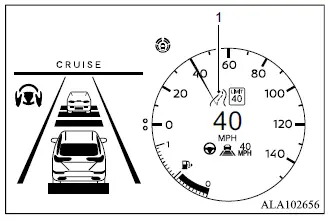
1. Road information indicator
Appears when Speed Adjust by Route is actively adjusting vehicle speed for an upcoming curve, junction, or freeway exit.
 Curves and junctions
 Exits
Exits
How to activate or deactivate the system
1. Push the
 button on the
steering
wheel until "Settings" appears in the
multi-information display, and then push the
scroll dial.
button on the
steering
wheel until "Settings" appears in the
multi-information display, and then push the
scroll dial.
2. Use the scroll dial to select "Driver Assistance".
Then push the scroll dial to open the selected menu.
3. Select "Speed Adjust by Route" and push the scroll dial to switch the system on or off.
NOTE
- The Mitsubishi Outlander retains the current Speed Adjust by Route setting in the multi-information display even after the engine is switched off and restarted.
