
WARNING
- Failure to follow the warnings and instructions for proper use of Lane Keep Assist [LKA] could result in serious injury or death.
- Lane Keep Assist [LKA] is not a substitute for proper driving techniques and cannot compensate for careless, inattentive, or distracted driving. The system may not always steer the Mitsubishi Outlander sufficiently to keep it within the lane, and it is not designed to prevent a loss of vehicle control. The driver remains responsible for staying alert, driving safely, keeping the vehicle within the travel lane, and maintaining control at all times.
- Lane Keep Assist [LKA] has operating limitations, so never rely exclusively on the system. LKA cannot function correctly under every combination of driving, traffic, weather, and road conditions. Always monitor vehicle behavior and be prepared to steer the Mitsubishi Outlander manually whenever necessary.
- Lane Keep Assist [LKA] is intended primarily for use on well-developed highways with gentle or moderate curves. To reduce the risk of an accident, do not use the system on local streets or other roads that are not suitable for highway-style lane assistance.
- Lane Keep Assist [LKA] provides steering assistance only to help maintain the vehicle near the center of the detected lane. It will not steer around objects in the roadway or automatically avoid another vehicle entering your lane.
- The driver is responsible for remaining alert, driving safely, maintaining proper lane position, and keeping full control of the Mitsubishi Outlander at all times. Never remove your hands from the steering wheel while driving.
Keep your hands on the steering wheel and remain prepared to provide steering input whenever required.
- Always drive carefully and attentively while using Lane Keep Assist [LKA].
Read and understand the Owner's Manual before operating Lane Keep Assist [LKA]. To reduce the risk of serious injury or death, never depend on the system to prevent an accident or to control the vehicle during an emergency.
Use Lane Keep Assist [LKA] only when road, traffic, weather, and driving conditions are appropriate for safe system operation.
Lane Keep Assist [LKA] operation
Lane Keep Assist [LKA] is designed to help the driver keep the Mitsubishi Outlander near the center of the travel lane when both the right and left lane markings are detected clearly. Lane Keep Assist [LKA] operates only in combination with the Adaptive Cruise Control [ACC] system.
Lane Keep Assist [LKA] can become active when all applicable operating conditions are satisfied:
- The ACC system is activated.
- Lane markings on both sides of the vehicle are clearly detected.
- A vehicle ahead is detected when the Mitsubishi Outlander is traveling below 37 MPH (60 km/h).
- The driver is holding the steering wheel.
- The vehicle is traveling near the center of the lane.
- The turn signals are not being operated.
- The windshield wipers are not operating in the high-speed position. Lane Keep Assist [LKA] is disabled after the wipers have operated at high speed for approximately 10 seconds.
Lane Keep Assist [LKA] display and indicators
Example
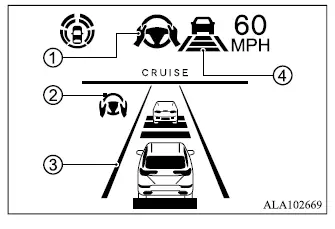
- Lane Keep Assist [LKA] status indicator/
warning 1
Shows the current Lane Keep Assist [LKA] operating condition or warning status according to the color of the indicator- Lane Keep Assist [LKA] status indicator (gray): Lane Keep Assist [LKA] is in standby
- Lane Keep Assist [LKA] status indicator (green): Lane Keep Assist [LKA] is actively providing steering assistance
- Lane Keep Assist [LKA] status indicator (orange): A Lane Keep Assist [LKA] malfunction has been detected
- Lane Keep Assist [LKA] indicator 2
Indicates the current Lane Keep Assist [LKA] status according to the indicator color- Lane Keep Assist [LKA] indicator (gray): Lane Keep Assist [LKA] is in standby
- Lane Keep Assist [LKA] indicator (green): Lane Keep Assist [LKA] is active
- Lane marker indicator 3
Shows whether the system currently detects the lane markings around the Mitsubishi Outlander- Lane marker indicator (gray): Lane markers are not detected
- Lane marker indicator (green): Lane markers are detected
- Lane marker indicator (orange): The system has detected a lane departure
- Lane marker indicator/speed control
status indicator/set distance indicator 4
Shows Lane Keep Assist [LKA] status through the color of the lane marker indicator while also presenting related speed-control and following-distance information.- Lane marker indicator (gray): Lane Keep Assist [LKA] is in standby
- Lane marker indicator (green): Lane Keep Assist [LKA] is actively operating
When Lane Keep Assist [LKA] is actively operating, the Lane Keep Assist [LKA] status indicator 1, the Lane Keep Assist [LKA] indicator 2, and lane marker indicators 3 and 4 on the multi-information display illuminate in green. A chime sounds when Lane Keep Assist [LKA] first becomes active to confirm that steering assistance has started.
When Lane Keep Assist [LKA] deactivates, the Lane Keep Assist [LKA] status indicator 1, Lane Keep Assist [LKA] indicator 2, and lane marker indicators 3 and 4 change to gray on the multi-information display. A chime sounds twice to indicate that active lane-centering assistance has ended.
Lane Departure Prevention [LDP]
While Lane Keep Assist [LKA] is active, a sharp curve, strong crosswind, or other condition may exceed the steering assistance capability of the system and cause the Mitsubishi Outlander to approach the left or right edge of the travel lane. If this occurs, the Lane Departure Prevention [LDP] system flashes the LDP indicator in the multi-information display and provides steering wheel vibration to alert the driver. A warning chime also sounds with four rapid beeps. The LDP system then applies steering assistance briefly to help guide the vehicle back toward the center of the lane. This intervention is provided in addition to Lane Keep Assist [LKA] operation, and these warnings cannot be disabled.
Hands on detection
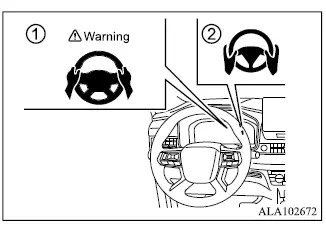
When Lane Keep Assist [LKA] is active, the system monitors the driver's steering wheel input to confirm continued driver involvement.
If the steering wheel is not operated for a period of time, or if the driver removes their hands from the steering wheel, warning 1 appears in the multi-information display and the hands OFF warning light 2 illuminates.
If the driver does not provide steering input after the warning appears and the warning light illuminates, an audible alert sounds and both the warning message and warning light begin flashing. If the driver still does not respond, the system briefly applies the brakes to request that the driver immediately resume control of the Mitsubishi Outlander.
If the driver continues not to respond, the system activates the hazard warning flashers and gradually slows the vehicle to a complete stop.
The driver can interrupt this automatic deceleration at any time by steering, applying the brake pedal, pressing the accelerator pedal, or operating the MI-PILOT Assist switch.
WARNING
- Lane Keep Assist [LKA] is not a hands-free driving system. Always keep your hands on the steering wheel and remain ready to control the Mitsubishi Outlander. Failure to maintain proper control could result in a collision causing serious injury or death.
NOTE
- If the driver only lightly touches the steering wheel instead of holding it firmly, the steering torque sensor may not recognize that the driver's hands are on the wheel. This can trigger a sequence of hands-on warnings. The warnings will turn off after the driver firmly grips and operates the steering wheel again.
Lane Keep Assist [LKA] limitations
WARNING
- Under the following conditions, the front camera may fail to detect lane markings correctly or may incorrectly interpret other road features as lane markings, causing Lane Keep Assist [LKA] to operate improperly:
- When driving on roads with several parallel lane markings, faded or poorly painted markings, non-standard markings, or markings covered by water, dirt, snow, or similar material.
- When driving on roads where lane markings are interrupted or discontinued.
- When traveling through sections where the lane width becomes wider or narrower.
- When road construction creates multiple lanes, temporary markings, or unclear lane boundaries.
- When strongly contrasting road features such as shadows, snow, standing water, wheel ruts, pavement seams, or markings left after road repairs resemble lane lines and may be interpreted by Lane Keep Assist [LKA] as actual lane markings.
- When the travel lane merges with another lane or separates into multiple lanes.
- Do not use Lane Keep Assist [LKA] under the following conditions because the camera may not detect lane markings correctly. Improper system operation could contribute to loss of vehicle control and an accident.
- During adverse weather conditions such as rain, fog, snow, or dust.
- When rain, snow, sand, or other material is thrown onto the vehicle by the wheels of surrounding traffic.
- When dirt, oil, ice, snow, water, or another obstruction adheres to the camera area.
- When the camera lens is fogged.
- When strong light, such as direct sunlight or high beams from an oncoming vehicle, shines into the camera.
- When headlight performance is reduced because the lenses are dirty, or when the headlights are not illuminated while driving in tunnels or darkness.
- When there is a sudden change in brightness, such as when the Mitsubishi Outlander enters or exits a tunnel or passes beneath a bridge.
- When driving where lanes merge or separate, or where temporary lane markings are used because of road construction.
- When a lane is closed because of road repairs or construction.
- When driving on rough or uneven road surfaces, including unpaved dirt roads.
- When driving through sharp curves or along winding roads.
- Do not use Lane Keep Assist [LKA] under the following conditions because reliable lane detection may not be available and the system may not operate as intended. Loss of vehicle control could result in an accident.
- During poor weather such as rain, fog, snow, or dusty conditions.
- When spray, snow, sand, or other material from surrounding vehicles obstructs the camera's view.
- When dirt, oil, ice, snow, water, or other material is present on or around the camera unit.
- When the camera lens becomes fogged.
- When strong sunlight or high beams from oncoming traffic shine directly into the camera.
- When headlight output is reduced by dirty lenses or the headlights are not being used in dark areas or tunnels.
- When surrounding brightness changes suddenly, such as when entering or leaving a tunnel or passing under a bridge.
- When lane boundaries merge, divide, or are temporarily altered because of construction.
- When a lane is closed for road repairs.
- When driving over rough or uneven surfaces, including unpaved roads.
- When driving on sharp curves or winding roads.
- When driving on roads with repeated uphill and downhill sections.
- Do not use Lane Keep Assist [LKA] under the following vehicle conditions because the system may not operate correctly:
- When one or more tires are not in normal condition, including excessive wear, abnormal tire pressure, installation of a spare tire, use of tire chains, or non-standard wheels.
- When the Mitsubishi Outlander is equipped with non-original brake or suspension components that may alter normal vehicle behavior.
- When an object, sticker, accessory, or cargo obstructs the camera's field of view.
- When excessively heavy baggage or cargo is loaded in the rear seat or luggage compartment.
- When the vehicle's permitted load capacity is exceeded.
- When towing a trailer or another vehicle.
- Excessive noise inside or outside the vehicle may interfere with the warning chime and make the audible alert difficult or impossible to hear.
- For MI-PILOT Assist and Lane Keep Assist [LKA] to operate correctly, the windshield area in front of the camera must remain clean and provide a clear view of the road. Replace worn windshield wiper blades and use blades of the correct size so that this area can be cleaned effectively. Use MITSUBISHI MOTORS genuine wiper blades, or equivalent blades specifically designed for the Mitsubishi Outlander model and model year. It is recommended that an authorized MITSUBISHI MOTORS dealer provide the correct replacement parts.
Lane Keep Assist [LKA] temporary standby
Automatic standby due to driving operation: A warning chime sounds and Lane Keep Assist [LKA] temporarily enters standby mode when current driving conditions no longer allow reliable steering assistance. Lane Keep Assist [LKA] will restart automatically once the required operating conditions are satisfied again. Automatic standby: In the following situations, a chime sounds and Lane Keep Assist [LKA] temporarily switches to standby. The system will automatically resume operation when the necessary conditions for LKA assistance are restored.
- When lane markings on both the left and right sides of the Mitsubishi Outlander are no longer detected clearly.
- When no vehicle is detected ahead while the vehicle is traveling below approximately 37 MPH (60 km/h).
NOTE
- On Mitsubishi Outlander models equipped with MI-PILOT Assist with Navi-link, while traveling on a limited-access freeway identified by the navigation map data, Lane Keep Assist [LKA] may continue operating when clearly visible lane markings are detected on both sides, even if vehicle speed is below approximately 37 MPH (60 km/h) and no vehicle is detected ahead.
Lane Keep Assist [LKA] cancel
Under any of the following conditions, Lane Keep Assist [LKA] is canceled and both the Lane Keep Assist [LKA] status indicator and Lane Keep Assist [LKA] indicator turn off:
- When unusual, conflicting, or unclear lane markings appear in the travel lane, or when the system cannot reliably detect lane boundaries for a period of time. Examples include snow ruts, reflected light on a wet road, or several overlapping or indistinct lane markings that may interfere with camera recognition.
- When the windshield wipers operate continuously at high speed. Lane Keep Assist [LKA] is disabled after high-speed wiper operation continues for more than approximately 10 seconds.
Action to take: Turn the ACC system off using the CANCEL switch. After the conditions described above are no longer present, turn the ACC system back on and confirm that normal operation has been restored.
Lane Keep Assist [LKA] malfunction
If Lane Keep Assist [LKA] detects a malfunction, the system switches off automatically and the Lane Keep Assist [LKA] status warning illuminates in orange. Depending on the circumstances, a warning chime may also sound.
Action to take: Stop the Mitsubishi Outlander in a safe location, push the park button to select P (Park), and turn off the engine. Restart the engine, resume driving when it is safe to do so, and set the ACC system again. If the orange Lane Keep Assist [LKA] warning remains illuminated, the LKA system may have a malfunction.
The Mitsubishi Outlander can still be driven normally; however, Lane Keep Assist [LKA] should be inspected before relying on the system again.
It is recommended that the vehicle be checked by an authorized Mitsubishi Motors dealer.
Lane Keep Assist [LKA] maintenance
The camera used by Lane Keep Assist [LKA] is located above the inside rear-view mirror and monitors the road ahead through the windshield.
To help maintain proper Lane Keep Assist [LKA] operation and reduce the possibility of a system malfunction, observe the following precautions:
- Always keep the windshield clean, particularly in the area in front of the camera.
- Do not attach stickers, including transparent materials, or install accessories near the camera unit where they could obstruct or interfere with its field of view.
- Do not place reflective materials, such as white paper or a mirror, on the instrument panel. Reflected sunlight may interfere with the camera and reduce its ability to detect lane markings correctly.
- Do not strike, impact, or otherwise damage the area surrounding the camera unit. Do not touch the camera lens or remove the screw located on the camera unit.
If the camera unit is damaged as a result of an accident or other impact, it is recommended that the Mitsubishi Outlander be inspected by an authorized Mitsubishi Motors dealer.
