
WARNING
- The ACC system has the operating limitations described below. Failure to operate the Mitsubishi Outlander with these limitations in mind could result in serious injury or death:
- The ACC system is intended primarily for highway and freeway driving. Use of ACC in normal city or urban traffic is not recommended.
- The ACC system does not automatically compensate for every road condition. It should be used only when traffic is flowing smoothly and vehicle speeds are relatively stable.
Do not use ACC on roads with sharp curves, on icy or otherwise slippery surfaces, during heavy rain, or in fog.
- The vehicle-to-vehicle distance control function has performance limitations, so never rely exclusively on the ACC system. It cannot compensate for careless, distracted, inattentive, or absent-minded driving, and it cannot overcome poor visibility caused by rain, fog, or other adverse weather conditions.
Apply the brake pedal whenever necessary to reduce the Mitsubishi Outlander speed, taking into account the distance to the vehicle ahead and surrounding traffic conditions, so that a safe following distance is maintained.
- When the ACC system automatically brings the vehicle to a stop, the Mitsubishi Outlander may begin moving again automatically if it has been stopped for less than approximately 3 seconds. Remain prepared to apply the brakes and stop the vehicle whenever necessary.
- For vehicles equipped with MI-PILOT Assist with Navi-link, and only while driving on a limited-access freeway identified as such by the navigation map data:
- The period during which the vehicle can remain stopped and still restart automatically is extended from approximately 3 seconds to approximately 30 seconds.
- If a vehicle cuts into or leaves the lane ahead, the Mitsubishi Outlander may not restart automatically when traffic begins moving. In this situation, push up the RES+ switch or lightly depress the accelerator pedal to resume following the vehicle directly ahead after confirming that it is safe to proceed.
- Always check the surroundings and confirm that the path is clear before allowing the vehicle to restart or move forward.
- Always monitor vehicle operation and remain ready to manually control the following distance.
Under certain road, traffic, weather, or driving conditions, the ACC system may not be able to maintain either the selected following distance or the preset vehicle speed.
- The ACC system is not designed to reliably detect the following vehicles, road users, or objects:
- Stationary or slow-moving vehicles when the Mitsubishi Outlander is approaching them.
- Pedestrians or objects located in the roadway.
- Oncoming vehicles traveling toward your vehicle in the same lane.
- Motorcycles traveling offset from the center of the travel lane.
- The ACC system may fail to detect a vehicle ahead correctly under certain road, weather, traffic, or driving conditions. To reduce the risk of an accident, do not use ACC under the following conditions:
- On roads with heavy or high-speed traffic, or on roads with sharp curves.
- On slippery road surfaces, including roads covered with ice, snow, or similar material.
- On rough or uneven surfaces, such as unpaved or irregular dirt roads.
- On steep downhill roads, where the vehicle may exceed the selected ACC speed and repeated braking could cause the brakes to overheat.
- On roads with repeated uphill and downhill sections.
- During adverse weather conditions such as rain, fog, or snow.
- When sensor detection capability is reduced by rain, snow, fog, dust storms, sandstorms, road spray from other vehicles, or similar conditions.
- When dirt, ice, snow, or other material adheres to or obstructs the radar sensor area.
- When traffic requires frequent acceleration and deceleration, making it difficult to maintain a stable and appropriate following distance.
- When a vehicle with an unusual or complex shape, such as a car-carrier trailer or flatbed truck or trailer, is positioned near the vehicle ahead.
- When interference from other radar sources affects sensor operation.
- When excessively heavy baggage or cargo is loaded in the rear seat or cargo area of the Mitsubishi Outlander.
- When towing a trailer or another vehicle.
- Under some road or traffic conditions, a vehicle or object may unexpectedly enter the sensor detection zone and cause the ACC system to apply the brakes automatically. Always remain alert and avoid using ACC in any situation where its use is not recommended in this warning section.
- The ACC system also uses a front camera.
The following are examples of conditions in which the front camera may not correctly detect a vehicle ahead, or detection may be delayed:
- Poor visibility caused by conditions such as rain, snow, fog, dust storms, sandstorms, or road spray from other vehicles.
- When the windshield area in front of the camera is fogged or covered with dirt, water droplets, ice, snow, or other material that obstructs the camera's view.
- When strong light, such as direct sunlight or high beams from an oncoming vehicle, enters the front camera and interferes with detection.
- When there is a sudden change in brightness, such as when the Mitsubishi Outlander enters or exits a tunnel or shaded area, or when lightning causes an abrupt change in surrounding light.
The ACC system is designed to automatically monitor radar sensor operation within the functional limitations of the system.
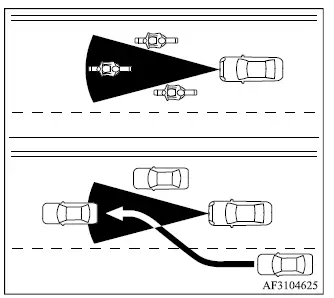
The radar sensor has a limited detection zone and cannot monitor every position in front of the Mitsubishi Outlander.
A vehicle traveling ahead must remain within this detection zone for the ACC system to recognize it and help maintain the following distance selected by the driver. A preceding vehicle may temporarily move outside the detection area because of its position within the same travel lane. Motorcycles may be difficult to detect if they are traveling offset from the centerline of the lane. Similarly, a vehicle entering your lane may not be detected until it has moved sufficiently into the radar sensor's detection zone.
If this occurs, the ACC system may flash the system indicator and sound a warning chime. The driver must be prepared to manually adjust the speed of the Mitsubishi Outlander and maintain a safe distance from the vehicle ahead.
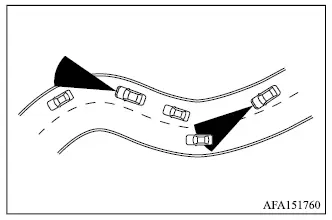
When driving on certain roads, including winding, hilly, curved, or narrow roads, or through road-construction areas, the radar sensor may detect a vehicle traveling in another lane or may temporarily lose detection of the vehicle directly ahead. This can cause the ACC system to unexpectedly decelerate or accelerate the Mitsubishi Outlander.
Vehicle detection may also be influenced by driving inputs, including steering maneuvers and the vehicle's position within the travel lane, as well as by the condition of the vehicle itself.
Under these circumstances, the ACC system may unexpectedly flash the system indicator and sound the warning chime. The driver must then manually control vehicle speed and following distance to remain safely separated from traffic ahead.
ACC system temporarily unavailable
The following conditions may cause the ACC system to become temporarily unavailable.
Depending on the circumstances, ACC operation may be affected without immediately canceling, and the system may be unable to maintain the following distance selected by the driver. The Mitsubishi Outlander driver must remain prepared to take control whenever system performance is reduced.
Condition A
Under any of the following conditions, the ACC system is automatically canceled. A warning chime sounds, and the system cannot be set again until the condition preventing normal operation has been resolved:
- When any door is open.
- When the driver's seat belt is unfastened.
- When no vehicle is detected ahead and the Mitsubishi Outlander is traveling below 15 MPH (25 km/h).
For vehicles equipped with MI-PILOT Assist with Navi-link and traveling on a limited-access freeway identified by the navigation map data, the ACC system also cancels and a warning chime sounds if the vehicle remains at a standstill for more than approximately 3 seconds while no vehicle is detected ahead.
- When the Mitsubishi Outlander has been held at a stop by the ACC system for approximately 3 minutes or longer.
- When the shift lever is moved out of the D (Drive) position or into manual shift mode.
- When the electric parking brake is applied.
- When the ASC system is switched off.
- When the FCM system applies stronger braking.
- When ASC, including the traction control system, is operating.
- When SNOW mode, GRAVEL mode, or MUD mode on AWC models is selected.
- When one or more wheels are slipping.
- When front radar detection is impaired because dirt, debris, or another obstruction is blocking the radar sensor.
- When the radar signal is temporarily interrupted.
Action to take: When the conditions listed above are no longer present, switch the system off using the MI-PILOT Assist switch. Then turn MI-PILOT Assist back on before attempting to use the ACC system again.
NOTE
- If the ACC system is canceled while the Mitsubishi Outlander is at a standstill under any of the following conditions, the electric parking brake is applied automatically:
- When any door is open.
- When the driver's seat belt is unfastened.
- When the vehicle has been held at a stop by the ACC system for approximately 3 minutes or longer.
- When the shift lever is moved out of the D (Drive) position or into manual shift mode.
- When the ASC system is switched off.
- When front radar detection is impaired because dirt, debris, or another obstruction is blocking the radar sensor.
- When the radar signal is temporarily interrupted.
Condition B
During adverse weather conditions such as rain, fog, or snow, the front radar sensor may become temporarily blocked or unable to detect surrounding traffic correctly. If this occurs, the ACC system is canceled automatically, a warning chime sounds, and the "Forward Driving Aids Temporarily Disabled Front Sensor Blocked" message appears in the multi-information display.
Action to take: When the weather or other condition interfering with the radar sensor has cleared, the warning message should disappear from the multi-information display and normal ACC operation should become available again. If the warning continues to appear after conditions improve, have the system inspected by an authorized Mitsubishi Motors dealer.
This inspection is recommended before relying on the ACC system again.
Condition C
If the radar sensor at the front of the Mitsubishi Outlander becomes covered with dirt or otherwise obstructed, the ACC system is automatically canceled to prevent unreliable operation.
A warning chime sounds and the "Forward Driving Aids Temporarily Disabled Front Sensor Blocked" message appears in the multi-information display.
Action to take: If this warning appears, stop the vehicle in a safe location, push the park button to select P (Park), and turn off the engine. If radar operation has been interrupted by contamination or another obstruction, clean the sensor area and restart the engine. If the warning message continues to appear after the sensor area has been checked and cleaned, have the system inspected.
It is recommended that the Mitsubishi Outlander be serviced by an authorized Mitsubishi Motors dealer.
Condition D
When driving in areas with limited roadside structures or reference objects, such as long bridges, deserts, snow-covered fields, or roads running alongside extended walls, the system may temporarily have difficulty evaluating its surroundings. Under these conditions, the "Forward Driving Aids Temporarily Disabled Front Sensor Blocked" message may appear.
Action to take: After the driving conditions described above are no longer present, turn the system back on and confirm that normal operation has been restored.
ACC system malfunction
If the ACC system detects a malfunction, it switches off automatically, a warning chime sounds, and the speed control status warning indicator illuminates in orange.
Action to take: If the warning indicator illuminates, stop the Mitsubishi Outlander in a safe location. Turn off the engine, restart it, and then attempt to set the ACC system again. If ACC cannot be set or the warning remains illuminated after the engine has been restarted, the system may have a malfunction.
Normal driving can still be continued; however, the ACC system should be inspected before further use. It is recommended that the vehicle be checked by an authorized Mitsubishi Motors dealer.
NOTE
- If the ACC system is temporarily unavailable, conventional cruise control mode may still remain available for use.
ACC sensor maintenance
The radar sensor is located at the front of the vehicle and is used by the ACC system to monitor traffic ahead.
To help maintain proper ACC operation on the Mitsubishi Outlander, observe the following precautions:
- Keep the radar sensor area clean and free from dirt, snow, ice, or other material that could interfere with detection.
- Do not strike, impact, or otherwise damage the area surrounding the sensor.
- Do not attach stickers, including transparent materials, or install accessories near the sensor. Such items may interfere with radar operation and could cause a system failure or malfunction.
- Do not install metallic objects, such as a brush guard or similar accessory, near the radar sensor area because they may interfere with sensor operation.
- Do not modify, remove, or repaint the front bumper in a way that could affect the radar sensor or its detection area.
Before modifying, customizing, repairing, or restoring the front bumper, it is recommended that you consult an authorized MITSUBISHI MOTORS dealer to help ensure that the work does not interfere with the operation of the vehicle's driver-assistance sensors.
The camera sensor is installed above the inside mirror and monitors the road ahead through the windshield.
To help maintain proper operation of the Mitsubishi Outlander driver-assistance systems and reduce the risk of a system malfunction, observe the following precautions:
- Always keep the windshield clean, especially in the area in front of the camera sensor.
- Do not attach stickers, including transparent materials, or install accessories near the camera unit where they could interfere with its field of view.
- Do not place reflective materials, such as white paper or a mirror, on the instrument panel. Reflected sunlight may interfere with the camera unit and reduce its ability to detect lane markings correctly.
- Do not strike, impact, or otherwise damage the area surrounding the camera unit. Do not touch the camera lens or remove the screw located on the camera unit.
If the camera unit is damaged as a result of an accident or other impact, it is recommended that the Mitsubishi Outlander be inspected by an authorized MITSUBISHI MOTORS dealer.
Radio frequency statement
For USA
Type approval number:
FCC ID: NF3-F5CP32
This device complies with Part 15 of the FCC Rules.
Operation is subject to the following two conditions:
1. This device may not cause harmful interference; and
2. This device must accept any interference received, including interference that may cause undesired operation.
CAUTION
- Changes or modifications to this equipment that are not expressly approved by Robert Bosch GmbH may void the FCC authorization to operate the equipment.
This equipment has been tested and found to comply with the limits established for a Class A digital device pursuant to Part 15 of the FCC Rules.
These limits are intended to provide reasonable protection against harmful interference when the equipment is operated in a commercial environment. This equipment generates, uses, and can radiate radio frequency energy. If it is not installed and operated in accordance with the instruction manual, it may cause harmful interference to radio communications.
Operation of this equipment in a residential environment is likely to cause harmful interference. If such interference occurs, the user may be required to correct it at their own expense.
Radio frequency radiation exposure information: This equipment complies with FCC radiation exposure limits established for an uncontrolled environment. The equipment should be installed and operated with a minimum separation distance of 20 cm between the radiator and the user's body.
This transmitter must not be co-located with, or operated in conjunction with, any other antenna or transmitter.
For Canada
Type approval number:
IC: 3887A-F5CP32
Legal warning text for RF equipment:
This device contains licence-exempt transmitter(s)/receiver(s) that comply with Innovation, Science and Economic Development Canada's applicable licence-exempt RSS standards. Operation is subject to the following two conditions: (1)
This device may not cause interference. (2)
This device must accept any interference received, including interference that may cause undesired operation of the device.
L'émetteur/récepteur exempt de licence contenu dans le présent appareil est conforme aux CNR d'Innovation, Sciences et Développement économique Canada applicables aux appareils radio exempts de licence.
L'exploitation est autorisée aux deux conditions suivantes : (1) L'appareil ne doit pas produire de brouillage; (2) L'appareil doit accepter tout brouillage radioélectrique subi, même si le brouillage est susceptible d'en compromettre le fonctionnement.
