
The MI-PILOT Assist system combines the following two primary driver-assistance functions:
1. Adaptive Cruise Control [ACC]
The ACC system can operate in one of two cruise control modes:
- Conventional (fixed speed) cruise control mode: This mode allows the Mitsubishi Outlander to cruise at a preset vehicle speed without vehicle-to-vehicle distance control.
NOTE
- Lane Keep Assist [LKA] is not available while conventional (fixed speed) cruise control mode is selected.
- Vehicle-to-vehicle distance control mode:
The ACC system helps maintain a following distance selected by the driver from the vehicle traveling ahead. It operates within a vehicle speed range of 0 to 90 MPH (0 to 144 km/h), up to the preset vehicle speed.
The driver can select a set speed between 20 and 90 MPH (30 to 144 km/h). If the vehicle ahead slows to a stop, the Mitsubishi Outlander gradually decelerates to a standstill within the operating limits of the ACC system. Once stopped, the system continues applying braking force to help keep the vehicle stationary.
- If the Mitsubishi Outlander has been stopped for less than approximately 3 seconds and the vehicle ahead begins moving again, the vehicle will automatically start moving and continue following it.
- If the vehicle has remained stationary for more than approximately 3 seconds and the vehicle ahead begins to accelerate, push up the RES+ switch or lightly depress the accelerator pedal. The ACC system will then resume following the vehicle ahead.
- Always check the area around the Mitsubishi Outlander and confirm that it is safe before allowing the vehicle to restart or move forward.
- For vehicles equipped with MI-PILOT Assist with Navi-link, and only while driving on a limited-access freeway identified as such by the navigation map data:
- The period during which the vehicle can remain stopped and still restart automatically is extended from approximately 3 seconds to approximately 30 seconds.
- If a vehicle cuts into or leaves the lane ahead while your vehicle is stopped, the Mitsubishi Outlander may not restart automatically when traffic begins moving. In this situation, push up the RES+ switch or lightly depress the accelerator pedal to follow the vehicle directly ahead once you have confirmed that it is safe to proceed.
- When no vehicle is detected within the following distance selected by the driver, the ACC system maintains the speed set by the driver. Vehicle speed must be above 20 MPH (30 km/h) to use this function.
NOTE
- Even if the Forward Collision Mitigation System [FCM] has been turned off by the driver through the "Settings" menu in the multi-information display, FCM is automatically enabled when the ACC system is used.
2. Lane Keep Assist [LKA]
The Lane Keep Assist [LKA] function controls the steering system to help keep the Mitsubishi Outlander positioned within the detected traveling lane.
When no vehicle is detected ahead, Lane Keep Assist [LKA] is not available at vehicle speeds below 37 MPH (60 km/h).
MI-PILOT Assist switches
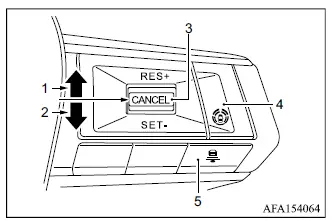
- RES+ switch:
Resumes the previously set vehicle speed or increases the selected speed incrementally - SET- switch:
Sets the desired cruising speed or reduces the selected speed incrementally - CANCEL switch:
Temporarily deactivates MI-PILOT Assist operation - MI-PILOT Assist switch:
Turns the MI-PILOT Assist system on or off - DISTANCE switch:
Selects the preferred following-distance setting:
- Long
- Middle
- Short
NOTE
- For Mitsubishi Outlander models equipped with MI-PILOT Assist with Navi-link: when Manual mode is selected in the "Spd. Limit Assist" menu of the multi-information display, operating the RES+ or SET- switch can apply the displayed speed-limit sign value to the currently set vehicle speed.
