
Example
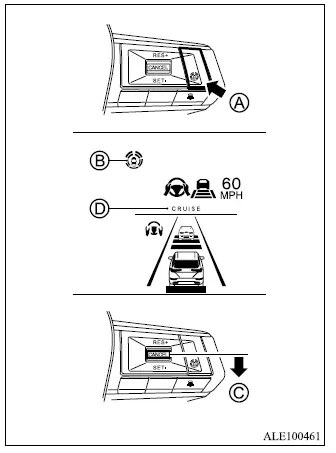
1. Push the MI-PILOT Assist switch A.
This activates the MI-PILOT Assist system and places it in standby for operation.
- The MI-PILOT Assist status indicator B illuminates in white to show that the system is switched on.
- A status screen appears temporarily, showing the current condition and availability of the Driving Aid functions.
Example (all enabled)
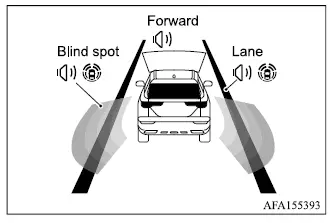
When the Driving Aids are enabled, the display indicates which warning and intervention functions are currently active.
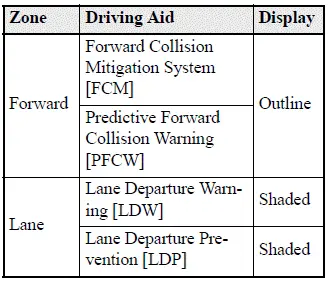
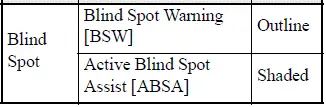
- When any of the "Warning" systems are enabled, the "
 " mark is shown in each corresponding zone.
 - When any of the "Intervention" systems are enabled, the "
 " mark is shown in each corresponding zone.
 - When no system is enabled for a particular zone, "OFF" is displayed in that zone.
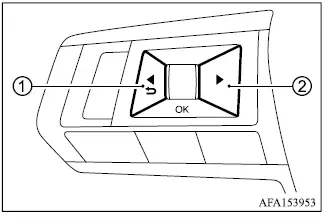
To change the status of the Driving Aid functions, use controls 1 or 2 to navigate through the settings screen and select the desired options.
2. Accelerate or decelerate the Mitsubishi Outlander to the desired speed, and then push down the SET- switch C.
The MI-PILOT Assist system begins maintaining the selected vehicle speed automatically. The MI-PILOT Assist activation indicator D and MI-PILOT Assist status indicator B illuminate in green to confirm active operation. If a vehicle ahead is detected while traveling at 20 MPH (30 km/h) or below and the SET- switch is pushed down, the system sets the vehicle speed to 20 MPH (30 km/h).
NOTE
- When the LDP and ABSA systems are enabled through the settings menu in the multi-information display, switching on MI-PILOT Assist also activates the LDP and ABSA systems. If LDP has been disabled in the settings menu, it will automatically turn on whenever the Lane Keep Assist [LKA] system becomes active.
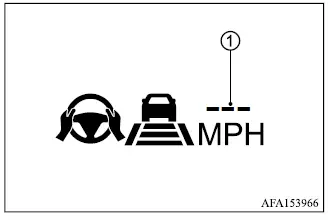
If the SET- switch is pushed down under any of the following conditions, MI-PILOT Assist cannot be set and the vehicle set speed indicator 1 flashes for approximately 2 seconds.
- When the Mitsubishi Outlander is traveling below 20 MPH (30 km/h) and no vehicle is detected ahead.
- When the shift lever is moved out of the D (Drive) position or into manual shift mode.
- When the parking brake is applied.
- When the driver is operating the brakes.
- When the ASC system is switched off.
- When ASC, including the traction control system, is actively operating.
- When SNOW mode, GRAVEL mode, or MUD mode on AWC models is selected.
- When one or more wheels are slipping.
- When any door is open.
- When the driver's seat belt is not fastened.
How to change the set vehicle speed
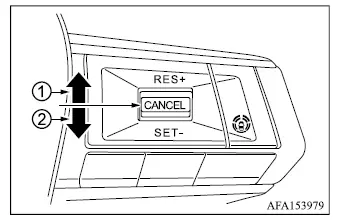
The vehicle speed stored by the MI-PILOT Assist system can be adjusted while the system is operating.
To change to a faster cruising speed:
- Push up and hold the RES+ switch 1.
The selected vehicle speed increases in increments of 5 MPH (5 km/h) while the switch is held.
- Push up and then quickly release the RES+ switch 1. Each operation increases the set vehicle speed by 1 MPH (1 km/h).
To change to a slower cruising speed:
- Push down and hold the SET- switch 2.
The selected vehicle speed decreases in increments of 5 MPH (5 km/h) while the switch is held.
- Push down and then quickly release the SET- switch 2. Each operation decreases the set vehicle speed by 1 MPH (1 km/h).
How to momentarily accelerate or decelerate
- Depress the accelerator pedal whenever temporary acceleration is required. After the pedal is released, the Mitsubishi Outlander will return toward the previously selected vehicle speed.
- Depress the brake pedal when deceleration is necessary. This cancels control by the MI-PILOT Assist system. To resume the previously stored vehicle speed, push up the RES+ switch after conditions are suitable.
WARNING
- When the accelerator pedal is depressed while the Mitsubishi Outlander is approaching a vehicle ahead, the ACC system will not automatically apply the brakes and will not provide the normal warning chime or display alert. The driver must manually control vehicle speed and maintain a safe following distance. Failure to respond appropriately could result in serious injury or death.
NOTE
- When the vehicle is accelerated using the accelerator pedal, or when the set speed is reduced with the SET- switch while actual vehicle speed remains above the selected speed, the set vehicle speed indicator will blink.
How to change the set distance to the vehicle ahead
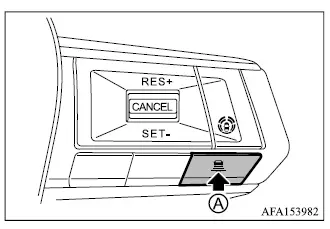
The following distance from the vehicle ahead can be changed at any time while MI-PILOT Assist is in use.
Each time the DISTANCE switch is pushed, the selected setting changes in sequence from "long" to "middle", then "short", and back to "long".
Example
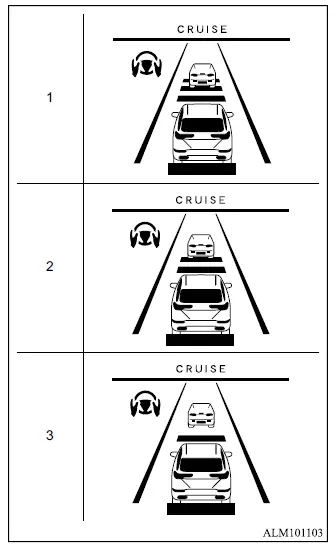
Distance - approximate distance at 60 MPH (100 km/h)
- Long - 200 ft (60 m)
- Middle - 150 ft (45 m)
- Short - 90 ft (30 m)
- The actual following distance changes automatically according to vehicle speed. As the Mitsubishi Outlander travels faster, the distance corresponding to the selected setting becomes longer.
- The selected distance setting is retained even after the engine is switched off and restarted.
How to enable/disable the Lane Keep Assist [LKA]
Use the following procedure to enable or disable the Lane Keep Assist [LKA] function through the multi-information display.
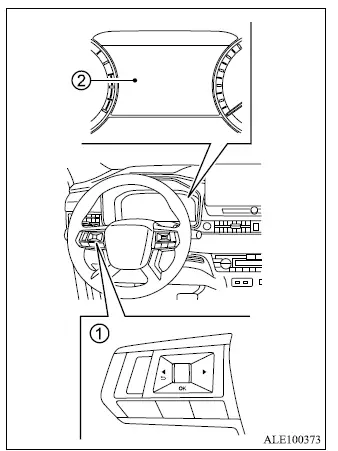
- Steering wheel remote control switches (left side)
- Multi-information display
1. Push the
 button on the steering
wheel 1 until "Settings" appears in the
multi-information display 2, and then
push the scroll dial.
button on the steering
wheel 1 until "Settings" appears in the
multi-information display 2, and then
push the scroll dial.
2. Use the scroll dial to select "Driver Assistance." Then push the scroll dial to open the menu.
3. Select "Steering Assist" and push the scroll dial to switch Lane Keep Assist [LKA] on or off.
NOTE
- When the Cruise screen is currently shown in the multi-information display, push the scroll dial on the steering wheel to open the "Driver Assistance" settings display directly.
- When Lane Keep Assist is enabled or disabled through the multi-information display, the Mitsubishi Outlander retains the selected setting even after the engine is restarted.
