
CAUTION
- Do not place blankets, cushions, seat covers, or other materials on the seat that could restrict airflow through the ventilation system. Do not use a seat cover that may block the ventilated areas of the seat.
- Do not place hard or heavy objects on the seat, and do not pierce the seat surface with pins, needles, or similar sharp objects.
Doing so may damage the internal ventilation components or interfere with proper airflow.
- If liquid is spilled on a ventilated front seat, remove it immediately with a dry cloth.
- When cleaning the seat, do not use gasoline, paint thinner, or similar solvents that could damage the seat materials or ventilation system.
- If a malfunction is detected or a ventilated front seat does not operate correctly, turn the switch off and have the system inspected. It is recommended that you visit an authorized Mitsubishi Motors dealer for this service.
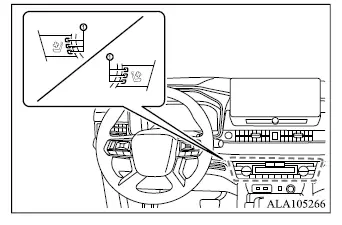
The Mitsubishi Outlander front seats are ventilated by built-in fans that circulate air through the seat surfaces. The ventilation switches are located on the instrument panel, and the driver and front passenger seat ventilation functions can be operated independently.
Operation with switch
1. Start the engine.
2. Push the ventilated front seat switch repeatedly to select the desired ventilation level.
- For high ventilation, push the switch once.
- For medium ventilation, push the switch twice.
- For low ventilation, push the switch three times.
- Indicator light 1 on the switch illuminates according to the selected ventilation level while the system is operating.
3. To turn the seat ventilation off, continue pushing the ventilated front seat switch until the indicator light turns off.
