
WARNING
- Failure to follow the warnings and instructions for proper use of the DAA system could result in serious injury or death.
- The DAA system is designed only to warn the driver when it detects signs of reduced attention or possible drowsiness. It does not steer the Mitsubishi Outlander and cannot prevent a loss of vehicle control.
- The DAA system cannot detect every instance of driver inattention, fatigue, or drowsiness and may not provide an alert in all situations.
- The driver remains responsible for:
- remaining alert and attentive while driving.
- driving the Mitsubishi Outlander safely and appropriately for current conditions.
- keeping the vehicle properly positioned within the traveling lane.
- maintaining full control of the vehicle at all times.
- avoiding driving when tired, fatigued, or drowsy.
- avoiding distractions such as texting or other activities that take attention away from driving.
The Driver Attention Alert [DAA] system is designed to help alert the driver when it detects driving behavior that may indicate reduced attention or fatigue.
The system monitors driving style and steering behavior over time and compares current vehicle movements with the driver's established pattern. If the DAA system determines that driver attention appears to be decreasing over a period of time, it provides audible and visual warnings suggesting that the driver consider taking a break.
DAA system operation
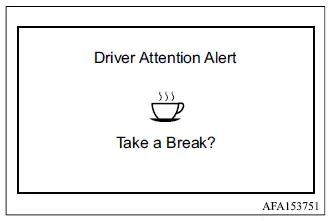
If the system detects signs of driver fatigue or decreasing attention, the "Take a break?" message appears in the multi-information display and a warning chime sounds when the Mitsubishi Outlander is traveling at speeds above 37 MPH (60 km/h).
The DAA system continues monitoring driver behavior throughout the trip and may provide more than one warning if signs of reduced attention are detected again.
The system resets its learned driving pattern and begins reassessing steering behavior and driving style when the ignition switch is cycled from the ON position to OFF and then returned to ON.
How to enable/disable the DAA system
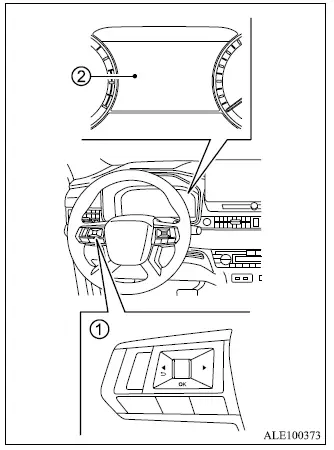
- Steering wheel remote control switches (left side)
- Multi-information display
Use the following procedure to enable or disable the DAA system. The exact menu sequence depends on the type of instrument display installed in the vehicle.
Model with Combination meter cluster / Multi-information display (Type 1):
1. Press the
 button until
"Settings"
appears in multi-information display
2. Use the scroll dial to select "Driver
Assistance." Then push the scroll dial.
button until
"Settings"
appears in multi-information display
2. Use the scroll dial to select "Driver
Assistance." Then push the scroll dial.
2. Select "Driver Attention Alert" and push the scroll dial to switch the DAA system on or off.
Model with full digital driver display (Type 2):
1. Press the
 button until
"Settings"
appears in multi-information display
2. Use the scroll dial to select "Driver
Assistance." Then push the scroll dial.
button until
"Settings"
appears in multi-information display
2. Use the scroll dial to select "Driver
Assistance." Then push the scroll dial.
2. Select "Driver Monitor" and push the scroll dial to open the related settings.
3. Select "Driver Attention Alert" and push the scroll dial to turn the system on or off.
NOTE
- The DAA system is automatically turned on whenever the Mitsubishi Outlander engine is restarted.
DAA system limitations
WARNING
- The following limitations apply to the DAA system. Failure to operate the Mitsubishi Outlander with these limitations in mind could result in serious injury or death.
- The DAA system may not operate correctly or may fail to provide an alert under the following conditions:
- When road conditions are poor, including uneven pavement, potholes, or other irregular road surfaces that affect normal steering behavior.
- When strong crosswinds cause frequent steering corrections.
- When the driver uses a sporty driving style involving higher cornering speeds or stronger acceleration.
- When the vehicle frequently changes lanes or vehicle speed varies repeatedly.
- The DAA system will not provide a driver attention warning under the following conditions:
- When vehicle speed is below 37 MPH (60 km/h).
- During brief or short-duration lapses in driver attention.
- During sudden, momentary distractions, such as when the driver drops an object.
System malfunction
If the DAA system detects a malfunction, the "Driver Attention Alert Malfunction" warning message appears in the multi-information display and the Driver Attention Alert function is automatically disabled.
Action to take Stop the Mitsubishi Outlander in a safe location, select P (Park), and turn off the engine. Restart the engine and check whether the warning message disappears. If the "Driver Attention Alert Malfunction" message continues to appear, have the DAA system inspected. It is recommended that you visit an authorized Mitsubishi Motors dealer for this service.
