
Hill Descent Control [HDC] is designed to help the Mitsubishi Outlander maintain a steady, controlled speed while descending steep grades or rough roads where engine braking alone may not provide sufficient deceleration.
WARNING
- Never rely solely on Hill Descent Control [HDC] to regulate vehicle speed on steep downhill grades. Always drive carefully while using HDC and apply the brake pedal whenever additional deceleration is required. Use particular caution on frozen, muddy, loose, or extremely steep downhill surfaces. Failure to maintain appropriate speed and control could result in loss of vehicle control, serious injury, or death.
- Hill Descent Control [HDC] may not be able to maintain the desired low speed under every vehicle load, slope, or road surface condition. On slippery surfaces such as muddy, icy, or unpaved roads, available traction may be insufficient for the system to hold a constant low speed.
Always remain prepared to depress the brake pedal and manually control the speed of the Mitsubishi Outlander. Failure to do so could result in a collision or serious personal injury.
CAUTION
- If a malfunction occurs in the Hill Descent Control [HDC] system, the ASC warning light illuminates. If the ASC warning light comes on, have the Mitsubishi Outlander inspected by an authorized MITSUBISHI MOTORS dealer.
When the warning light illuminates, a corresponding warning message may also appear in the multi-information display.
To operate
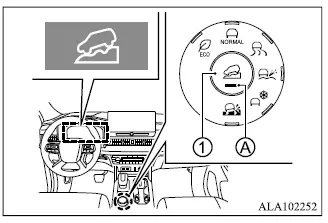
- Bring the Mitsubishi Outlander to a complete stop.
- Press Hill Descent Control switch 1.
- Confirm that Hill Descent Control indicator A illuminates and that the Hill Descent Control system ON indicator light also illuminates.
When the Hill Descent Control system ON indicator light is illuminated, HDC is switched ON and placed in standby mode. If the Hill Descent Control system ON indicator light is blinking, the system has not yet engaged.
NOTE
- The indicator should illuminate when the operation mode is placed in ON and should turn off after several seconds.
- Hill Descent Control cannot be placed in ON (Standby) mode under the following conditions:
- Brake system: brake temperature is too high
- ASC warning light is illuminated or flashing
Hill Descent Control brake regulation operates when all of the following conditions are satisfied:
- The transmission is in D (Drive) or R (Reverse).
- Vehicle speed is 15 MPH (25 km/h) or less.
- Neither the accelerator pedal nor the brake pedal is being operated.
When HDC is actively controlling vehicle speed, the Hill Descent Control indicator illuminates and both the brake lights and high-mounted stop light illuminate.
The controlled vehicle speed can be adjusted by operating either the accelerator pedal or the brake pedal.
After the driver releases the pedal, Hill Descent Control resumes brake control and attempts to maintain the vehicle speed that was present when the pedal was released.
To deactivate
1. Press the Hill Descent Control switch.
Hill Descent Control braking assistance will then be released gradually rather than ending abruptly.
2. Confirm that Hill Descent Control indicator A and the Hill Descent Control system ON indicator light are both OFF.
NOTE
- Hill Descent Control automatically switches off and the Hill Descent Control indicator turns off without requiring the driver to press the HDC switch under the following conditions:
- ASC warning light: ON
- Brake system: brake temperature is too high
