
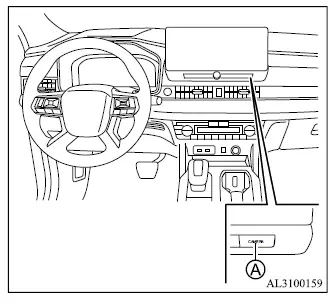
- CAMERA button
WARNING
- Failure to follow the warnings and instructions for proper use of the Moving Object Detection system could result in serious injury or death.
- The MOD system is a driver-assistance feature and is not a substitute for careful vehicle operation. It is not designed to prevent contact with objects around the Mitsubishi Outlander. Before maneuvering, always check the door mirrors and rearview mirror and look directly around the vehicle to confirm that the surrounding area is clear.
- The system is deactivated when vehicle speed exceeds approximately 6 MPH (10 km/h) and becomes available again at lower speeds.
- The MOD system is designed to detect moving objects and does not detect surrounding stationary objects.
The Moving Object Detection system can alert the driver to moving objects near the Mitsubishi Outlander when exiting a garage, maneuvering through a parking area, or performing similar low-speed driving operations.
The MOD system uses image-processing technology to analyze the camera image shown on the display and identify movement within the monitored area.
MOD system operation
The MOD system activates automatically under the following conditions:
- When the shift lever is moved to the R (Reverse) position.
- When the CAMERA button is pressed to activate the Multi Around Monitor system on the display.
- When vehicle speed decreases below approximately 6 MPH (10 km/h).
The MOD system operates under the following conditions while an applicable camera view is displayed:
- When the shift lever is in the P (Park) or N (Neutral) position and the vehicle is stopped, the MOD system detects moving objects within the bird's-eye view.
The MOD system does not operate if either door is open. If the door mirrors are folded, Moving Object Detection may not function correctly.
- When the shift lever is in the D (Drive) position and vehicle speed is below approximately 6 MPH (10 km/h), the MOD system detects moving objects in the front camera view.
- When the shift lever is in the R (Reverse) position and vehicle speed is below approximately 6 MPH (10 km/h), the MOD system detects moving objects in the rear camera view. The MOD system does not operate while the liftgate is open.
The MOD system does not detect moving objects while the front-side view is displayed. The MOD icon is therefore not shown on the screen in this view.
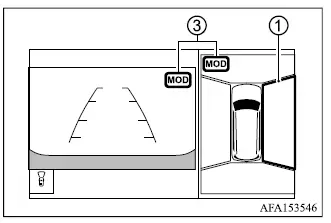
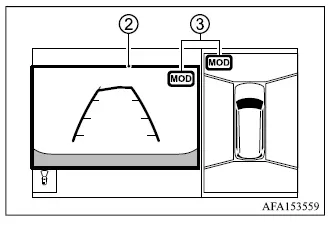
When the MOD system detects a moving object near the vehicle, a yellow frame appears around the camera view in which the movement was detected and a chime sounds once. As long as the system continues to detect the moving object, the yellow frame remains displayed to help draw the driver's attention to that area.
NOTE
- While the Rear Cross Traffic Alert (RCTA) chime is sounding, the MOD system does not produce its own warning chime.
Front and bird's-eye views
Rear and bird's-eye views
Rear and front-side views
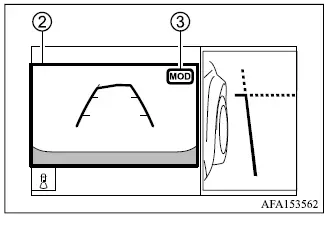
Front-wide view / rear-wide view
In the bird's-eye view, yellow frame 1 appears around the individual camera image—front, rear, right, or left—corresponding to the area where the Moving Object Detection system has identified a moving object.
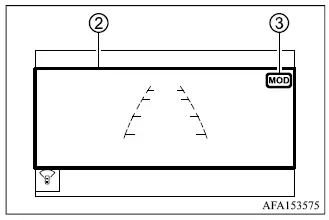
In the front-view and rear-view modes, yellow frame 2 is displayed within the applicable camera view when movement is detected near the Mitsubishi Outlander.
Green MOD icon 3 indicates a view in which the MOD system is currently active and available to detect moving objects. Gray MOD icon 3 indicates a view in which the system is not currently operating.
When the MOD system is switched off, MOD icon 3 is not displayed.
Turning MOD on and off
The Moving Object Detection system can be enabled or disabled through the multi-information display settings of the Mitsubishi Outlander.
MOD system limitations
WARNING
- The following are limitations of the MOD system. Failure to operate the vehicle with these limitations in mind could result in serious injury or death.
- Excessive surrounding noise, including high audio system volume or noise entering through an open vehicle window, may make the MOD warning chime difficult or impossible to hear.
- MOD system performance can be reduced by environmental conditions and characteristics of surrounding objects, including the following situations:
- When there is little contrast between a moving object and its background.
- When a flashing or blinking light source is present.
- When strong light, such as direct sunlight or headlights from another vehicle, enters the camera view.
- When a camera is not in its normal operating position, such as when a door mirror is folded.
- When dirt, water droplets, or snow are present on a camera lens.
- When the position of a moving object within the displayed image does not noticeably change.
- The MOD system may interpret certain visual changes as moving objects, including flowing water droplets on a camera lens, white exhaust smoke from the muffler, moving shadows, or similar conditions.
- The MOD system may not operate correctly depending on the speed, direction of travel, distance, or shape of the moving object.
- If the Mitsubishi Outlander is damaged in an area where a camera is installed and the camera becomes misaligned, bent, or displaced, the detection area may change and the MOD system may no longer identify moving objects correctly.
- When the ambient temperature is extremely high or extremely low, objects may not appear clearly on the display. This condition does not necessarily indicate a malfunction.
NOTE
- The green MOD icon changes to orange when one of the following conditions occurs.
- The MOD system has detected a malfunction.
- The temperature of a system component becomes excessively high. In this condition, the icon will blink.
- The rearview camera detects that its view is obstructed. In this condition, the icon will blink.
If the MOD icon continues to illuminate in orange, have the Moving Object Detection system inspected. It is recommended that the Mitsubishi Outlander be checked by an authorized Mitsubishi Motors dealer.
System maintenance
CAUTION
- Do not use alcohol, benzine, thinner, or similar strong solvents to clean the cameras, as these products may discolor or damage the camera surfaces.
- Do not scratch, strike, or otherwise damage a camera, as damage can adversely affect both MOD system operation and the image shown on the monitor.
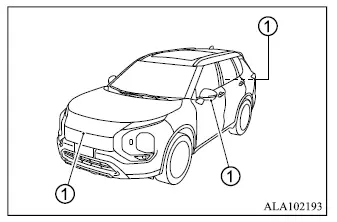
If dirt, rainwater, or snow accumulates on any camera 1, the Mitsubishi Outlander MOD system may not operate correctly or may have difficulty detecting moving objects. Clean the affected camera with a soft cloth dampened with a diluted mild cleaning agent, then wipe it carefully with a clean, dry cloth.
