
WARNING
- Do not operate the push-button ignition switch while driving except in an emergency. The engine will stop if the ignition switch is pushed 3 consecutive times or if it is pushed and held for more than 2 seconds. If the engine stops while the Mitsubishi Outlander is moving, vehicle control may be affected and a crash resulting in serious injury could occur.
Before operating the push-button ignition switch, make sure the park button has been pushed and the transmission is in the P (Park) position.
Operating range for engine start function
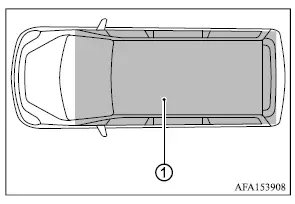
The transmitter can be used to start the engine only when it is located within the specified operating range.
If the transmitter battery is nearly discharged, or if strong radio signals are present near the vehicle, the effective operating range may become smaller and the transmitter may not function normally.
If the transmitter is within the operating range, the push-button ignition switch may be operated to start the engine even by a person who is not carrying the transmitter.
- If the transmitter is placed on the instrument panel, inside the glove box, or in a door storage pocket, it may not be detected correctly.
- If the transmitter is positioned close to a door or window from outside the vehicle, it may still be detected and operate.
Push-button ignition switch operation
CAUTION
- Do not leave the Mitsubishi Outlander for an extended period with the ignition switch in the ON position while the engine is not running, as this can discharge the vehicle battery.
- Whenever possible, operate electrical accessories with the engine running to reduce the risk of battery discharge.
If accessories must be used while the engine is stopped, avoid operating them for long periods and do not use several high-demand electrical accessories at the same time.
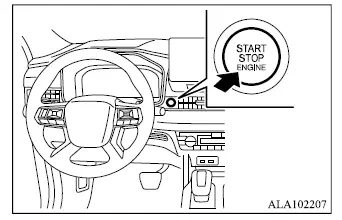
When the ignition switch is pushed without depressing the brake pedal, the ignition switch will illuminate.
Push the center of the ignition switch:
- once to change the ignition position to ON.
- two times to change the ignition position to OFF.
When the ignition switch is in the OFF position, it will automatically return to the LOCK position when any door is opened or closed.
The ignition lock system is designed so that the ignition switch cannot be changed to OFF until the shift lever is moved to the P (Park) position.
If the ignition switch cannot be changed to the OFF position, use the following procedure:
1. Push the park button to shift the transmission to P (Park).
2. Push the ignition switch. The ignition switch position will change to ON.
3. Push the ignition switch again to change it to the OFF position.
The shift lever can be moved from the P (Park) position if the ignition switch is in the ON position and the brake pedal is depressed.
Push-button ignition switch positions
LOCK (Normal parking position)
The ignition switch can be locked only in this position.
With the ignition switched off, the ignition switch will lock when any door is opened or closed.
ON (Normal operating position)
In the ON position, the ignition system and electrical accessory circuits are powered even if the engine is not running.
The ON position includes a battery saver function. If the Mitsubishi Outlander is not running, the ignition switch will automatically change to the OFF position after a period of time when the following conditions are met:
- all doors are closed.
- the vehicle is in the P (Park) position.
OFF position
The engine is stopped when the ignition switch is in this position.
Auto ACC position
When the vehicle is in P (Park), the transmitter is with you, and the ignition is changed from ON to OFF, the radio can continue operating for a limited period or until the driver's door is opened. After that period, functions such as the radio, navigation system if equipped, and Bluetooth Hands-Free Phone System can be restarted by switching on the audio system as described in the separate Smartphone-link Display Audio [SDA] Owner's Manual, or by pushing the UNLOCK button on the transmitter. These functions can remain available for a total period of up to 30 minutes.
Emergency engine shut off
To stop the engine in an emergency while driving, or when the transmitter battery is discharged, perform either of the following actions:
- Rapidly push the push-button ignition switch 3 consecutive times within less than 1.5 seconds, or
- Push and hold the push-button ignition switch for more than 2 seconds.
After the engine has been shut off using this emergency procedure, open a door to return the system to its normal operating condition.
Transmitter battery discharge
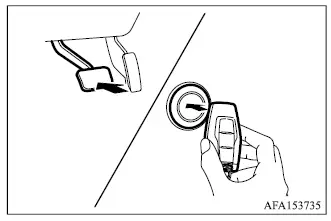
If the transmitter battery is discharged, or if environmental conditions interfere with normal transmitter operation, the Mitsubishi Outlander engine can be started using the following procedure:
1. Push the park button to shift the transmission to the P (Park) position.
2. Firmly depress and hold the brake pedal.
3. Touch the transmitter against the ignition switch as illustrated. A chime will sound.
4. Within 10 seconds after the chime sounds, push the ignition switch while continuing to depress the brake pedal. The engine will start.
After completing step 3, if the ignition switch is pushed without depressing the brake pedal, the ignition switch position will change to ON instead of starting the engine.
NOTE
- When the ignition switch is changed to ON or the engine is started using the procedure above, the "Key Battery Low" warning may appear in the multi-information display even though the transmitter is inside the vehicle. This is not a malfunction. To clear the warning, touch the ignition switch with the transmitter again.
- If the "Key Battery Low" warning appears in the multi-information display, replace the transmitter battery as soon as possible.
Before starting the engine
- Make sure the area around the Mitsubishi Outlander is clear of people, vehicles, and obstacles.
- Check fluid levels such as engine oil, coolant, brake fluid, and windshield washer fluid as frequently as practical, or at least whenever the vehicle is refueled.
- Make sure all windows and exterior lights are clean and provide unobstructed visibility.
- Visually inspect the tires for wear, damage, and general condition, and confirm that they are inflated to the proper pressure.
- Lock all doors.
- Adjust the driver's seat and position the head restraints correctly.
- Adjust the inside rearview mirror and door mirrors for a clear view around the vehicle.
- Fasten your seat belt and make sure all passengers do the same.
- Check that the warning lights operate correctly when the ignition switch is placed in the ON position.
