
Mitsubishi Outlander: Antenna
Roof antenna
To remove
Turn the pole (A) anticlockwise.
To install
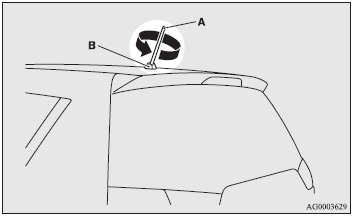
Screw the pole (A) clockwise into the base (B) until it is securely retained.
NOTE:
● Be sure to remove the roof antenna in the following cases:
• When going into an automatic car wash.
• When placing a car cover over the vehicle.
● Before driving into a structure that has a low ceiling, fold down the antenna to prevent it from hitting the ceiling.
READ NEXT:
 Digital clock
Automatic mode and manual mode is available for digital clock adjustment:
Select the automatic mode or the manual mode by performing the following operations:
1. Press the PWR switch (A) to turn
Hands-free Bluetooth® cellular phoneinterface system with voice recognition
The Hands-free Bluetooth® cellular phone interface system with voice recognition
uses a wireless communication technology known as Bluetooth® to allow you to make
hands-free calls in your vehicl
Sun visors
1- To eliminate front glare 2- To eliminate side glare.
Card holder
Cards can be slipped into the front (A) of the vanity mirror lid.
SEE MORE:
Doors
CAUTION:
● Make sure the doors are closed: driving with doors not completely closed is
dangerous.
● Never leave children in the vehicle unattended.
● Be careful not to lock the doors while the keys is inside the vehicle.
NOTE:
● When the driver’s door is open, neithe
Reduction Gear
DISASSEMBLY AND ASSEMBLY
Nut
Reduction gear bearing
Reduction gear bearing
Reduction gear sub-assembly
Adjusting shim
Required special tools:
MB990810: Side bearing puller
MB990947: Lower arm push arbor
MD999566: Crow
MB990984: Mount bushing lower roll insulator
arbor
MD998917: Bearin
© 2010-2026 Copyright www.mioutlander.com
