
WARNING
- The distance guide lines and vehicle width guide lines should be treated only as approximate references when the Mitsubishi Outlander is positioned on a level, paved surface. The apparent distance shown on the monitor may differ from the actual distance between the vehicle and surrounding objects.
- Use the displayed guide lines and bird's-eye view only as visual references. Their apparent position can be significantly affected by the number of occupants, fuel level, vehicle loading, vehicle position, road surface conditions, and road gradient.
- If tires of a different size are installed, the predictive course lines and bird's-eye view may no longer correspond accurately to the actual position and path of the vehicle.
- When driving uphill, objects shown on the monitor may appear farther away than they actually are. When driving downhill, objects may appear closer than their true distance from the Mitsubishi Outlander.
- Objects displayed in the rear camera view appear visually reversed compared with the view seen in the inside rearview mirror and door mirrors.
- Always use the mirrors and, when necessary, look directly around the vehicle to judge the actual position and distance of surrounding objects.
- On snow-covered, icy, or otherwise slippery roads, the actual path of the vehicle may differ from the predictive course lines displayed on the monitor.
- The displayed vehicle width guide lines and predictive course lines are wider than the actual vehicle width and travel path.
- The guide lines shown in the rear view may appear slightly shifted to the right because the rearview camera is not mounted exactly at the center of the rear of the vehicle.
Front and rear view
Front view
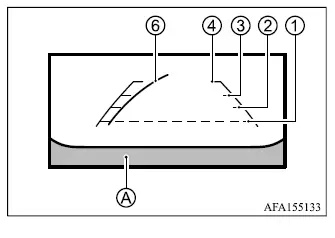
Rear view
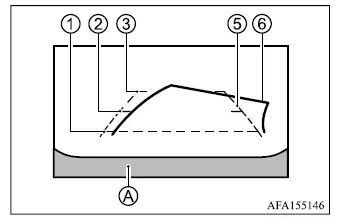
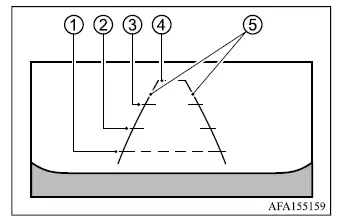
The monitor displays guide lines that indicate the approximate vehicle width and distance to surrounding objects, using vehicle body line A as the reference point.
Distance guide lines:
These lines indicate approximate distances from the Mitsubishi Outlander vehicle body.
- Red line 1: approximately 1.5 ft (0.5 m)
- Yellow line 2: approximately 3 ft (1 m)
- Green line 3: approximately 7 ft (2 m)
- Green line 4: approximately 10 ft (3 m)
Vehicle width guide lines 5:
These lines indicate the approximate width of the vehicle and help the driver judge available clearance while maneuvering.
Predictive course lines 6:
The predictive course lines indicate the approximate path the vehicle is expected to follow based on steering input. When the monitor is showing the rear view and the steering wheel is turned, predictive course lines appear on the display. Their shape and position change according to the steering angle. The lines are not displayed while the steering wheel remains in the straight-ahead position.
The front camera view is not displayed when vehicle speed exceeds 6 MPH (10 km/h).
NOTE
- When the monitor is displaying the front view and the steering wheel is turned approximately 90 degrees or less from the straight-ahead position, both the right and left predictive course lines 6 are shown. When the steering wheel is turned approximately 90 degrees or more, only the predictive course line on the side opposite the direction of the turn is displayed.
Bird's-eye view
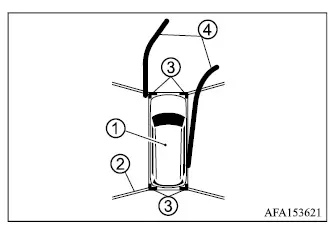
The bird's-eye view provides an overhead-style image of the Mitsubishi Outlander and its immediate surroundings, helping the driver confirm the vehicle's position and approximate path when maneuvering into a parking space.
Vehicle icon 1 indicates the position of the vehicle within the combined camera image. Keep in mind that the apparent distance between the vehicle and surrounding objects in the bird's-eye view may differ from the actual distance.
Areas that cannot be covered by the cameras are shown as black zones 2 when the vehicle is not equipped with a parking sensor system.
After the ignition switch is placed in the ON position, non-viewable areas 2 are highlighted in yellow for several seconds when the bird's-eye view is first displayed, drawing attention to portions of the surroundings that cannot be shown by the cameras.
Red markers 3, if so equipped, appear when the parking sensor system is turned off or when a parking sensor is unavailable at a corner of the vehicle. Predictive course lines 4 indicate the approximate path the Mitsubishi Outlander is expected to follow according to steering input.
WARNING
- Objects shown in the bird's-eye view may appear farther away than their actual distance from the vehicle.
- Tall or projecting objects, such as curbs or other vehicles, may appear misaligned or may not be displayed correctly where the individual camera images are joined together.
- Objects located above the cameras' field of view cannot be displayed by the bird's-eye view.
- The bird's-eye image may become misaligned if the position or angle of one of the cameras changes.
- Lines or markings on the ground may appear offset or may not look straight where the camera images meet. This apparent misalignment can become greater as the line extends farther away from the vehicle.
Front-side view
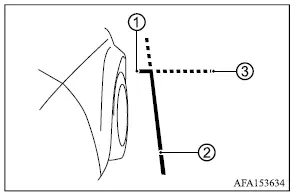
Guiding lines:
The front-side view displays guide lines that indicate the approximate width and front edge of the Mitsubishi Outlander, helping the driver judge clearance near the front corner of the vehicle.
Front-of-vehicle line 1 indicates the approximate position of the front end of the vehicle.
Side-of-vehicle line 2 indicates the approximate vehicle width, including the outside door mirrors.
The extensions 3 of front line 1 and side line 2 are shown as green dotted lines to provide an additional visual reference beyond the immediate vehicle outline.
Front-wide/rear-wide view
Front-wide view
Rear-wide view
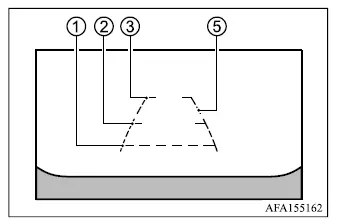
The front-wide and rear-wide views use the full display to show a broader area in front of or behind the Mitsubishi Outlander, making it easier to check blind corners on both the left and right sides. The front-wide and rear-wide views cover an approximately 180-degree area, while the standard front and rear views cover an approximately 150-degree area.
Predictive course lines are not displayed while the front-wide or rear-wide view is selected.
Distance guide lines 1 - 4:
These lines indicate approximate distances from the vehicle body.
- Red line 1: approx. 1.5 ft (0.5 m)
- Yellow line 2: approx. 3 ft (1 m)
- Green line 3: approx. 7 ft (2 m)
- Green line 4: approx. 10 ft (3 m)
Vehicle width guide lines 5 :
These lines indicate the approximate width of the Mitsubishi Outlander and should be used as a visual reference when judging available clearance.
