
WARNING
- If tires of a different size are installed, the predictive course lines may no longer correspond accurately to the actual path of the vehicle.
- On snow-covered, icy, or otherwise slippery roads, the actual path of the Mitsubishi Outlander may differ from the predictive course lines shown on the display.
- If the battery is disconnected or becomes discharged, the predictive course lines may be displayed incorrectly. If this occurs, perform the following procedures:
- With the engine running, turn the steering wheel fully from one lock position to the opposite lock position.
- Drive the vehicle on a straight road for more than 5 minutes.
- If the steering wheel is turned while the ignition switch is in the ON position, the predictive course lines may temporarily be displayed incorrectly.
1. Before beginning the parking maneuver, visually check the parking space and surrounding area to confirm that it is safe and clear of obstacles.
2. When the shift lever is moved to the R (Reverse) position, rear view A is displayed on the monitor.
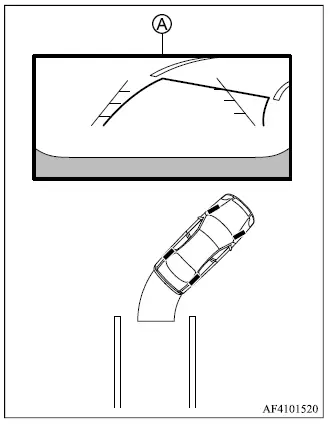
3. Reverse slowly while adjusting the steering wheel so that predictive course lines B move into parking space C.
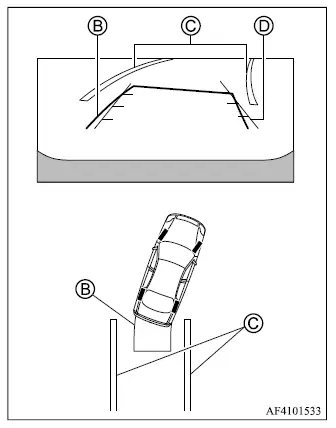
4. Continue steering carefully until vehicle width guide lines D are approximately parallel with parking space C, using the predictive course lines to judge the expected vehicle path.
5. When the Mitsubishi Outlander is fully positioned within the parking space, move the shift lever to P (Park) and apply the parking brake.
How to switch the display
With the ignition switch in the ON position, press the CAMERA button or move the shift lever to the R (Reverse) position to activate the Multi Around Monitor.
The Multi Around Monitor provides different split-screen views depending on the current shift lever position. Press the CAMERA button to cycle through the available camera views.
If the shift lever is in the R (Reverse) position, the available views are:
- Rear view/bird's-eye view split screen
- Rear view/front-side view split screen
- Rear view
If the shift lever is in a position other than R (Reverse), the available views are:
- Front view/bird's-eye view split screen
- Front view/front-side view split screen
- Front view
The display will leave the Multi Around Monitor screen under the following conditions:
- The shift lever is in D (Drive) and vehicle speed increases above approximately 6 MPH (10 km/h).
- Another display screen is selected.
