
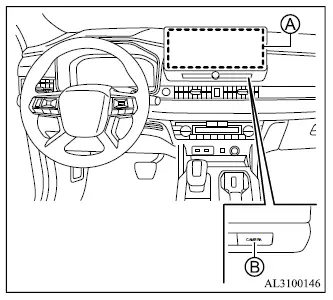
- Smartphone-link Display Audio [SDA]
- CAMERA button
WARNING
- Failure to follow the warnings and operating instructions for the Multi Around Monitor system could result in serious injury or death.
- The Multi Around Monitor is a driver-assistance feature and is not a substitute for careful vehicle operation. The system has areas that the cameras cannot display, and objects near the four corners of the Mitsubishi Outlander may not always appear in the bird's-eye, front, or rear views. Always check the area around the vehicle directly before moving and continue monitoring your surroundings during the maneuver. Operate the vehicle slowly.
- The driver remains responsible for safe vehicle operation at all times, including during parking, reversing, and other low-speed maneuvers.
CAUTION
- If a camera lens becomes dirty, the image may no longer be clear. When necessary, rinse the lens with clean water and gently wipe it with a clean, soft cloth.
- To help prevent damage to the cameras:
- Do not rub the camera cover excessively or polish it with an abrasive compound.
- Do not disassemble or modify the camera.
- Do not splash hot water directly onto the camera lens.
- Do not direct high-pressure water at the camera or its surrounding area.
- Make sure the liftgate is fully closed and securely latched before reversing.
The Multi Around Monitor system is designed to assist the driver during low-speed maneuvers such as parking in a conventional parking space or parallel parking.
The Smartphone-link Display Audio [SDA] screen can show several camera views of the Mitsubishi Outlander and its immediate surroundings, including combinations presented in a split-screen layout.
The available view combinations depend on the current operating conditions, so not every view can be selected or displayed at all times.
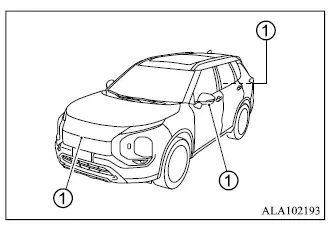
To create the different Multi Around Monitor views, the system uses cameras 1 positioned in the front grille, on the door mirrors, and above the rear license plate.
- Types of views of the Multi Around Monitor
- Available views
- Difference between predictive and actual distances
- How to park with predictive course lines
- Adjusting the screen
