
The guide lines shown on the display and their apparent positions on the ground are intended only as approximate references. When the Mitsubishi Outlander is positioned on an uphill or downhill slope, or when nearby objects project outward above ground level, their actual distance from the vehicle may differ from the distance suggested by the monitor and guide lines. If there is any uncertainty, turn and look directly behind the vehicle while reversing, or stop safely, park the vehicle, and get out to confirm the true position of surrounding objects.
Backing up on a steep uphill
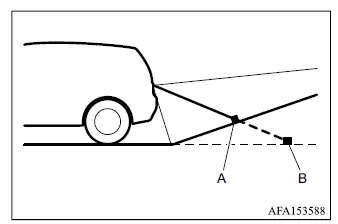
- Actual objects
- Objects shown on the screen
When the ground rises behind the vehicle, objects shown on the monitor may appear farther away than they actually are.
Backing up on a steep downhill
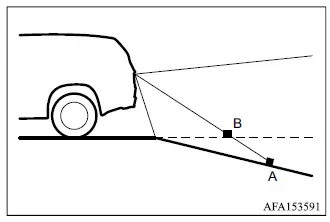
-
Actual objects
-
Objects shown on the screen
When the ground slopes downward behind the vehicle, objects displayed on the screen may appear closer to the Mitsubishi Outlander than they actually are.
Weighed down by weigh
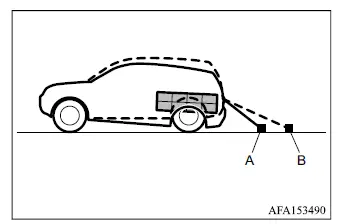
- Actual objects
- Objects shown on the screen
When the rear of the vehicle is lowered by the weight of passengers or luggage, objects shown on the monitor may appear farther away than their actual distance from the vehicle.
Backing up near a projecting object
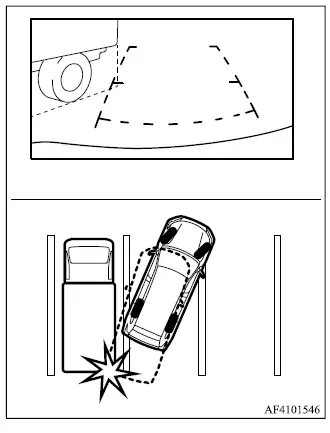
When reversing near a projecting object such as a truck body, the displayed reference lines may appear to indicate that the Mitsubishi Outlander will pass clear of the object. In reality, the projecting portion may still extend into the vehicle's path. Always judge the complete shape and position of nearby obstacles rather than relying only on the guide lines.
Backing up behind a projecting object
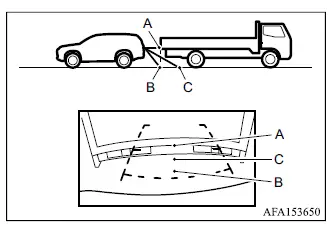
When an object behind the vehicle has an upper section projecting toward the vehicle, the monitor can create a misleading impression of distance. The reference lines may make point A appear farthest away and point B appear closest to the vehicle. In reality, points A and B are approximately the same distance from the Mitsubishi Outlander, while point C is farther away than both A and B.
