
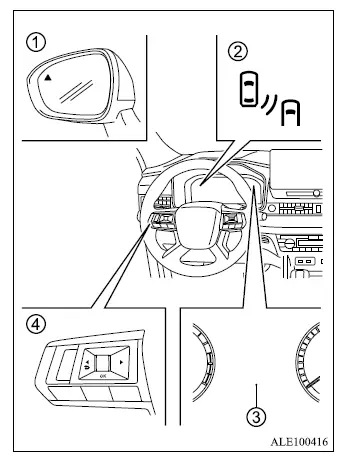
Mitsubishi Outlander BSW and Lane Change Assist indicators, mirror warning light and steering wheel controls

  1. Side indicator light
  2. BSW/LCA indicator (on the multi-information display)
  3. Multi-information display
  4. Steering wheel remote control switches (left side)
  • The BSW/LCA system uses radar sensors installed near the rear bumper to detect vehicles traveling beside the Mitsubishi Outlander in an adjacent lane.
  • The system operates at vehicle speeds above approximately 6 MPH (10 km/h).
  • If the radar sensors detect a vehicle within the monitored detection zone, side indicator light 1 in the door mirror on the corresponding side will illuminate.
  • When a vehicle is detected in the adjacent lane and the turn signal is activated toward that side, a warning buzzer sounds, BSW/LCA indicator 2 in multi-information display 3 flashes, and side indicator light 1 in the door mirror also flashes. If the radar sensor detects a vehicle approaching from behind in the neighboring lane, the Lane Change Assist [LCA] function warns the driver in the same manner.

NOTE

  • The side indicator lights illuminate for several seconds when the ignition switch is placed in the ON position.
  • The brightness of the side indicator lights is adjusted automatically according to the surrounding ambient light level.
  • The current operating status of BSW/LCA can be checked on the "Driver assistance" screen in the multi-information display.

Detection zone
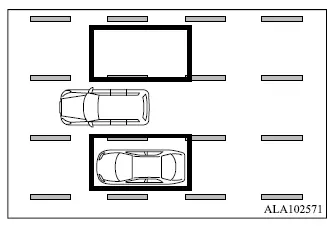
Mitsubishi Outlander BSW and LCA radar detection zones on the left and right sides of the vehicle

The rear radar sensors monitor detection zones on both the left and right sides of the Mitsubishi Outlander for vehicles traveling in adjacent lanes.

    READ NEXT:

     Active Blind Spot Assist [ABSA]

    Side indicator light ABSA ON indicator (on the multi-information display) ABSA indicator (on the multi-information display) Multi-information display MI-PILOT Assist switch Th

     BSW/LCA/ABSA driving situations

    CAUTION When changing lanes, always check the side and rearview mirrors and turn your head to look in the direction the Mitsubishi Outlander will move before beginning the maneuver. Never rely onl

     How to use the BSW/LCA/ABSA systems

    NOTE Pushing the MI-PILOT Assist switch turns the Lane Departure Prevention [LDP] and Active Blind Spot Assist [ABSA] systems on or off at the same time. The BSW/LCA functions are automatically

    SEE MORE:

     Electric power steering

    WARNING If the engine is not running or is switched off while driving, electric steering assistance will no longer operate. The Mitsubishi Outlander can still be steered, but considerably more effort will be required to turn the steering wheel. If the electric power steering warning light illu

     Adjusting the screen

    1. Push MENU button 1. 2. Touch the "Settings" key, then select the "Camera" key. 3. Touch the "Display Settings" key to open the available camera display adjustments. 4. Select the "Brightness", "Contrast", "Tint", "Color", or "Black Level" setting you want to change. 5. Adjust the se