
CAUTION
- When changing lanes, always check the side and rearview mirrors and turn your head to look in the direction the Mitsubishi Outlander will move before beginning the maneuver. Never rely only on the BSW system. For example, the radar sensors may not detect a vehicle approaching from behind at a speed significantly higher than your own vehicle speed.
NOTE
- ABSA will not operate if another vehicle enters the detection zone only after the Mitsubishi Outlander has already crossed the lane marker.
Illustration 1 - Approaching from behind
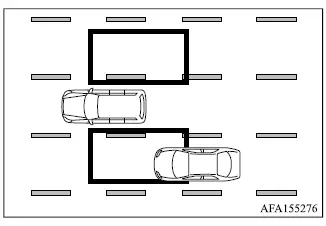
Illustration 1: The side indicator light illuminates when another vehicle approaches from behind and enters the radar detection zone in an adjacent lane.
Illustration 2 - Approaching from behind
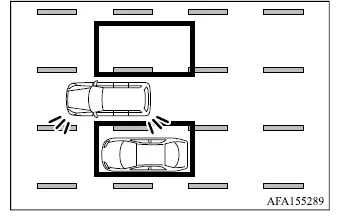
Illustration 2: If the driver activates the turn signal toward the side where another vehicle is already within the detection zone, the system sounds a warning buzzer and the corresponding side indicator light flashes.
Illustration 3 - Approaching from behind
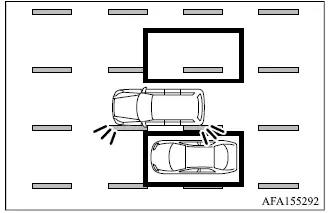
Illustration 3: If the Mitsubishi Outlander approaches a lane marker while another vehicle is within the detection zone, the system sounds a warning buzzer and the side indicator light flashes. At the same time, ABSA can apply steering control to help guide the vehicle back toward the center of its travel lane.
Illustration 4 - At starting the vehicle
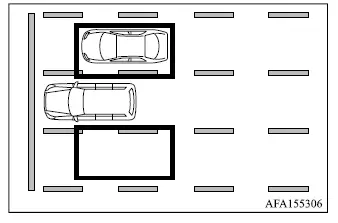
Illustration 4: When the Mitsubishi Outlander has been stopped, the system may be unable to detect a vehicle that has remained continuously within the detection zone before your vehicle begins moving.
Illustration 5 - Overtaking another vehicle
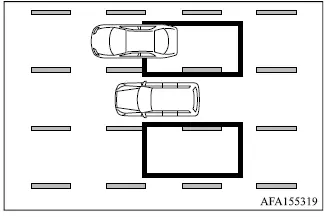
Illustration 5: When you overtake another vehicle and that vehicle remains within the detection zone for approximately 2 seconds, the side indicator light illuminates.
NOTE
- The radar sensors may not detect a slower-moving vehicle if the Mitsubishi Outlander passes it too quickly for the vehicle to remain within the detection zone long enough.
Illustration 6 - Overtaking another vehicle
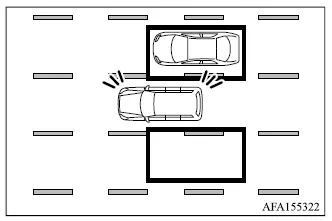
Illustration 6: If the driver activates the turn signal while the overtaken vehicle remains in the detection zone, the system sounds a warning buzzer and the side indicator light flashes.
Illustration 7 - Overtaking another vehicle
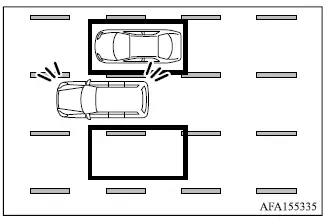
Illustration 7: If the Mitsubishi Outlander approaches a lane marker while the overtaken vehicle remains within the detection zone, the system sounds a warning buzzer and the side indicator light flashes. At the same time, the ABSA system can provide steering assistance to help return the vehicle toward the center of the lane.
Illustration 8 - Overtaken by another vehicles
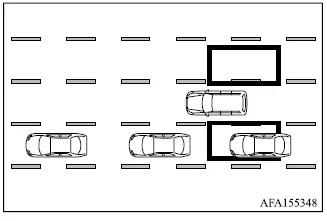
Illustration 8: If two or more vehicles overtake the Mitsubishi Outlander while traveling closely together in a line, the radar sensors may detect only the first vehicle in the sequence.
Illustration 9 - Entering from the side
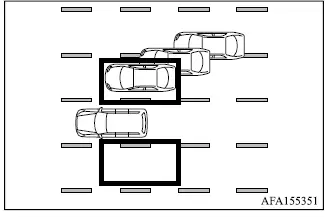
Illustration 9: When another vehicle moves laterally toward the Mitsubishi Outlander, such as during a lane change, the side indicator light illuminates once that vehicle enters the radar detection zone.
NOTE
- The radar sensors may not detect a vehicle entering the detection zone from the side if that vehicle is traveling at approximately the same speed as the Mitsubishi Outlander.
Illustration 10 - Entering from the side
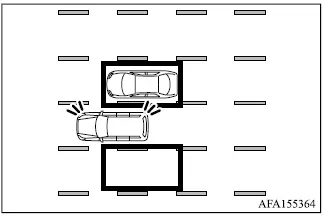
Illustration 10: If the driver activates the turn signal while another vehicle is within the detection zone, the system sounds a warning buzzer and the corresponding side indicator light flashes.
Illustration 11 - Entering from the side
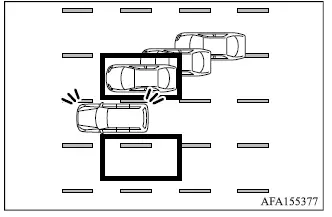
Illustration 11: If the Mitsubishi Outlander approaches a lane marker while another vehicle is within the detection zone, the system sounds a warning buzzer and the side indicator light flashes. At the same time, ABSA can apply steering control to help guide the vehicle back toward the center of its travel lane.
Illustration 12 - If your vehicle is on a lane marker
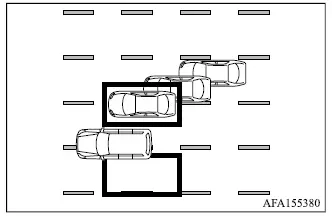
Illustration 12: The ABSA system will not provide steering assistance if the Mitsubishi Outlander is already positioned on a lane marker when another vehicle enters the detection zone. Under this condition, only the BSW/LCA warning functions operate.
