
WARNING
- Always keep the doors locked while the vehicle is being driven.
Together with proper seat belt use, locked doors provide an additional level of protection in a collision by helping reduce the possibility of occupants being thrown from the vehicle. Locked doors also help prevent children or other passengers from opening a door unintentionally and can provide additional protection against unauthorized entry.
- Whenever a door is closed, make sure it is fully latched and confirm that the door-ajar warning disappears from the information screen in the Mitsubishi Outlander multi-information display.
A door that is not completely closed could open while the vehicle is moving and create a serious accident hazard.
- Before opening any door, check the surrounding area carefully for approaching vehicles, bicycles, pedestrians, and other traffic.
- To reduce the risk of serious injury or death caused by unintended operation of the vehicle or its systems, including power-window entrapment or accidental door locking, never leave children, people who require assistance, or pets unattended inside the Mitsubishi Outlander. On warm days, temperatures inside a closed vehicle can rise rapidly to dangerous levels and may cause serious injury or death.
Locking with key
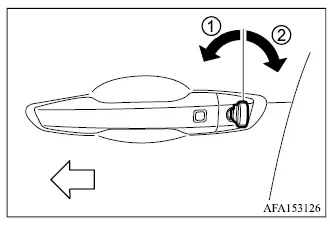
To lock the driver's door manually, insert the key into the driver's door key cylinder and turn it toward the front of the vehicle in direction 1.
To unlock the driver's door, turn the driver's door key cylinder toward the rear of the vehicle in direction 2.
To lock or unlock the remaining doors and the liftgate, use the Free-hand Advanced Security Transmitter [F.A.S.T.-key] function or the remote keyless entry function.
Locking with inside lock knob
When locking a door from inside without using the key, make sure the transmitter or key has not been left inside the vehicle before closing the door.
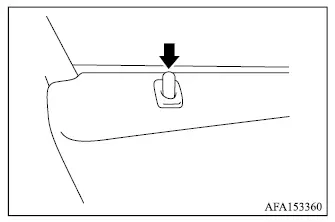
To lock a door from inside the vehicle, push the inside lock knob downward.
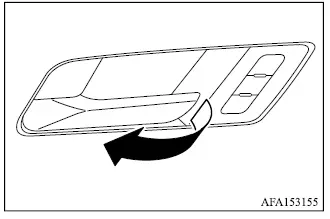
To unlock and open the driver's door from inside, pull the interior door handle. For the other doors, pull the handle once to unlock the door, then pull it a second time to open the door.
Locking with power door lock switch
Driver's armrest
Passenger's armrest
NOTE
- Repeatedly locking and unlocking the doors in rapid succession may activate the built-in protection circuit of the power door locking system and temporarily stop further operation. If this happens, wait approximately 1 minute before using the power door lock switch again.
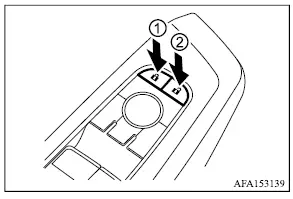
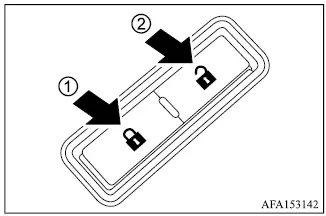
Operating the power door lock switch located on either the driver's door or the front passenger's door locks or unlocks all doors of the Mitsubishi Outlander at the same time.
To lock all doors, push power door lock switch 1 while the driver's door or front passenger's door is open, then close the door.
When using this method to lock the vehicle, always make sure the key or transmitter has not been left inside the Mitsubishi Outlander.
To unlock all doors, push door unlock switch 2.
Lockout protection
The lockout protection function is designed to help prevent the transmitter from being accidentally locked inside the vehicle.
If power door lock switch 1 on the driver's or front passenger's side is pushed while the transmitter remains inside the vehicle and any door is open, all doors will automatically unlock after the door is closed and a warning chime will sound.
Automatic door locks
- All doors automatically lock when vehicle speed reaches approximately 9 MPH (15 km/h).
- All doors can automatically unlock when the ignition switch is placed in the OFF position or when the shift lever is moved to the P (Park) position, depending on the selected vehicle setting.
NOTE
- The Automatic Door Unlock function can be customized through the "Vehicle Settings" menu in the multi-information display.
- The automatic door lock function can also be enabled or disabled. The default setting is "enabled". To change this setting, follow the procedure below.
1. Close all doors.
2. Place the ignition switch in the ON position.
3. Within 20 seconds, push and hold the power door lock switch for more than 5 seconds to change the setting.
Enabled: The hazard warning lights flash twice to confirm that automatic door locking is active.
Disabled: The hazard warning lights flash once to confirm that automatic door locking has been turned off.
Child safety rear door lock
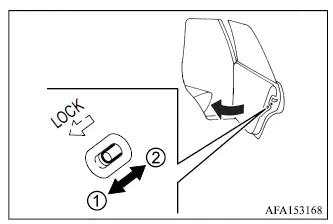
The child safety rear door locks help prevent the rear doors from being opened unintentionally from inside the vehicle, making them particularly useful when young children are riding in the rear seats.
When the child safety lock levers are moved to lock position 1, the corresponding rear doors cannot be opened using the inside door handles and can only be opened from outside the vehicle.
To restore normal rear door operation, move the child safety lock levers to unlock position 2.
