
WARNING
- Radio waves emitted by the transmitter may adversely affect certain electronic medical devices. Anyone who uses a pacemaker or other medical equipment should consult the equipment manufacturer about possible effects before using the remote keyless entry system.
- The transmitter emits radio-frequency signals whenever one of its buttons is pressed. The FAA advises that radio waves may interfere with aircraft navigation or communication systems. Do not operate the transmitter while aboard an aircraft, and make sure its buttons cannot be pressed accidentally while the transmitter is stored during a flight.
CAUTION
- Do not allow the transmitter, which contains electronic components, to come into contact with fresh water or salt water. Moisture exposure can interfere with proper operation of the remote keyless entry system.
- Do not drop the transmitter or subject it to strong impact.
- Do not strike the transmitter sharply against another object.
- Do not alter, modify, or disassemble the transmitter.
- Moisture can damage the transmitter. If it becomes wet, wipe it immediately and dry it thoroughly.
- When the outside temperature falls below 14ºF (−10ºC), the transmitter battery may not operate normally.
- Do not leave the transmitter for an extended period in an area where the temperature exceeds 140ºF (60ºC).
- Do not attach the transmitter to a key holder containing a magnet.
- Do not place the transmitter close to equipment that produces a magnetic or electromagnetic field, such as a television, audio equipment, personal computer, or cellular phone.
NOTE
- On Mitsubishi Outlander models equipped with the door mirror folding switch, the outside mirrors automatically fold or extend when all doors and the liftgate are locked or unlocked using the remote keyless entry function.
This automatic mirror-folding function can be deactivated. Contact an authorized Mitsubishi Motors dealer for additional information.
The remote keyless entry system allows the driver to lock or unlock all doors using the buttons on the transmitter. Under suitable conditions, the system can normally be operated from approximately 40 ft (12 m) away from the Mitsubishi Outlander. Actual operating range may vary depending on surrounding conditions, nearby structures, interference, and other environmental factors.
The remote keyless entry function will not operate under the following conditions:
- When the transmitter is outside its effective operating range.
- When the transmitter battery is discharged or too weak to send a usable signal.
The remote keyless entry transmitter can also be used to operate the vehicle's alarm function.
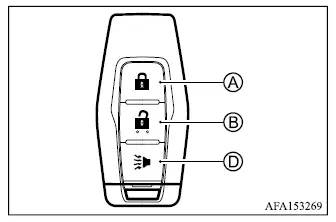
Type A
Type B
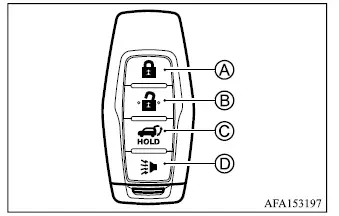
- LOCK button

- UNLOCK button

- Power remote liftgate button

- PANIC button

When the doors or liftgate are locked or unlocked with the transmitter, the hazard warning lights flash and the horn or outside chime sounds to confirm the requested operation.
Locking doors
1. Place the ignition switch in the OFF position.
2. Carry the transmitter with you.*
3. Make sure all doors are completely closed.
4. Push the LOCK
 button A on the transmitter.
5. All doors and the liftgate will lock.
6. The hazard warning lights flash once and the horn chirps once to confirm that the vehicle has been locked.
*: The doors cannot be locked using the transmitter while the ignition switch is in the ON position.
After locking the Mitsubishi Outlander, operate the exterior door handles to confirm that the doors have been secured properly.
Unlocking doors
1. Push the UNLOCK
 button B on the transmitter once.
2. The hazard warning lights flash twice and the driver's door unlocks.
3. Push the UNLOCK
 button again within 2 seconds.
4. The hazard warning lights flash twice again, and all doors together with the liftgate unlock.
After the UNLOCK
 button is pressed while the vehicle is locked, all doors will automatically lock again after approximately 30 seconds unless one of the following operations is performed:
- Any door, including the liftgate, is opened.
- The ignition switch is pushed.
During this 30-second period, if the UNLOCK
 button is pressed again, the automatic relocking timer starts over and the doors will lock automatically after another 30 seconds if none of the listed operations is performed.
Opening/closing liftgate (if so equipped)
1. Push and hold the power remote liftgate button
 C
for more than 1 second.
C
for more than 1 second.
2. The power liftgate will begin opening automatically.
The outside chime sounds 3 times to indicate operation of the power liftgate.
To close the liftgate remotely, push and hold the power remote liftgate button
 for more than 1 second.
The liftgate will close automatically, and the outside chime will sound 3 times.
If the button
 is pushed while the liftgate is opening or closing, the liftgate will reverse its direction of movement.
Using panic alarm
If you are near the Mitsubishi Outlander and feel threatened or need to attract attention, the transmitter's panic function can activate the vehicle alarm as follows:
1. Push and hold PANIC
 button D on the transmitter for more than 1 second.
2. The theft warning alarm activates and the headlights remain illuminated for approximately 30 seconds.
3. The panic alarm stops when any of the following occurs:
- The alarm has operated for approximately 30 seconds, or
- Any button on the transmitter is pushed. The PANIC button must be held for more than 1 second.
- The ignition switch is placed in the ON position.
Transmitter button operation light
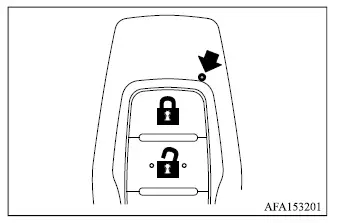
The transmitter indicator light flashes whenever a button is pushed. Illumination of this light only confirms that the transmitter has attempted to send a radio signal; it does not by itself confirm that the Mitsubishi Outlander received or completed the requested command. Check visually or listen for the vehicle's confirmation signals to verify that the intended operation occurred. If the transmitter light does not flash when a button is pressed, the battery may be too weak to communicate reliably with the vehicle and may need to be replaced.
Setting hazard indicator and horn mode (Remote keyless)
When delivered, the Mitsubishi Outlander remote keyless entry system is initially configured to use both the hazard warning lights and horn as confirmation signals.
In hazard indicator and horn mode, pushing the LOCK
 button A causes the hazard warning lights to flash once and the horn to chirp once. When the UNLOCK
 button B is pushed, the hazard warning lights flash twice.
If audible horn confirmation is not desired, the remote keyless entry system can be switched to hazard indicator mode.
In hazard indicator mode, pressing the LOCK
 button causes the hazard warning lights to flash once without a horn chirp. Pressing the UNLOCK
 button causes the hazard warning lights to flash twice.
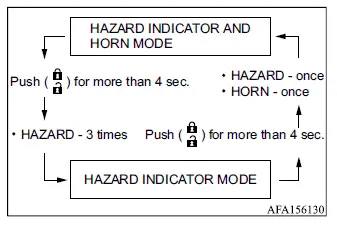
Hazard indicator and horn mode

Hazard indicator mode

Switching procedure
To change between hazard indicator and horn confirmation mode and hazard-only mode, simultaneously push and hold LOCK
 A and
UNLOCK
A and
UNLOCK
 B on the transmitter for more than 4 seconds.
- When hazard indicator mode is selected, the hazard warning lights flash 3 times to confirm the setting.
- When hazard indicator and horn mode is selected, the hazard warning lights flash once and the horn chirps once.
The horn confirmation function can also be switched on or off through the applicable settings in the multi-information display.
