
WARNING
- If tires of a different size are installed, the predictive course lines may no longer correspond accurately to the actual path of the Mitsubishi Outlander.
- On snow-covered, icy, or otherwise slippery roads, the actual path of the vehicle may differ from the predictive course lines shown on the display.
- If the battery has been disconnected or becomes discharged, the predictive course lines may be displayed incorrectly. If this occurs, perform the following procedures:
- With the engine running, turn the steering wheel fully from one lock position to the opposite lock position.
- Drive the vehicle in a straight line for more than 5 minutes.
- If the steering wheel is turned while the ignition switch is in the ON position, the predictive course lines may temporarily be displayed incorrectly.
1. Before beginning the parking maneuver, visually check the entire parking area and confirm that there is sufficient space to park the vehicle safely.
2. When the shift lever is moved to the R (Reverse) position, rearview image A appears on the display.
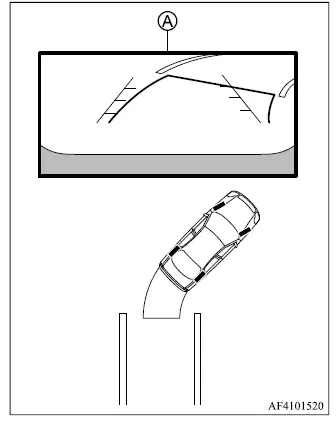
3. Reverse slowly while adjusting the steering wheel so that predictive course lines B move into parking space C.
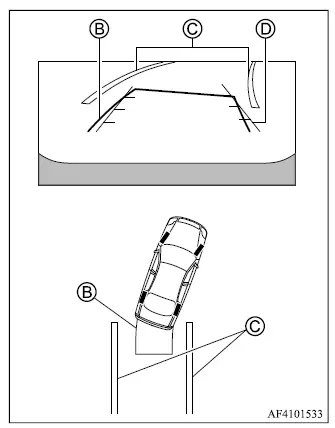
4. Continue steering carefully until vehicle width guide lines D are approximately parallel with parking space C, using the predictive course lines as a reference for the expected vehicle path.
5. Once the Mitsubishi Outlander is completely positioned within the parking space, move the shift lever to P (Park) and apply the parking brake.
Adjusting the screen
1. Push MENU button 1.
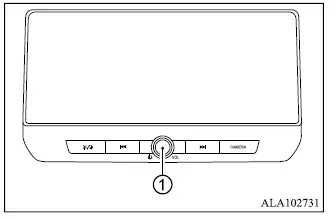
2. Touch the "Settings" key, then select the "Camera" key.
3. Touch the "Display Settings" key.
4. Select the "Brightness", "Contrast", "Tint", "Color", or "Black Level" setting that you want to adjust.
5. Adjust the selected setting by touching the "+" or "-" key on the touch screen display.
NOTE
- Do not change Rearview camera display settings while the vehicle is moving. Stop the vehicle in a safe location and make sure the parking brake is firmly applied before making adjustments.
How to turn ON and OFF predictive course lines
When the shift lever is in the P (Park) position, the predictive course lines can be switched ON or OFF using the following procedure.
1. Push the MENU button. 2. Touch the "Settings" key, then touch the "Camera" key.
3. Touch the "Predictive Course Lines" key to turn the function ON or OFF.
The predictive course lines can also be switched ON or OFF by pushing the CAMERA button while the shift lever is in the R (Reverse) position.
